Trường Số · Product Requirements · 09/2026

PRD 17 · Mobile applications

One codebase for the Trường Số mobile experience with four role-specific shells (manager, teacher, consultant, parent and student), shipped as an installable PWA in P1 and wrapped as native iOS/Android apps in P2. This document specifies the offline data scope, sync conflict rules, push notifications with deep links, biometric re-authentication, the device registry and performance budgets on 3G.

Key facts, origin and limits
Status
Draft v1
Owning module
Nền tảng
Backend
EXISTING me, today-plan, notifications, parent reports, feature-configs · EXTEND notifications, school-config · NEW devices, push, offline sync
Phase
P1 (PWA for teachers and managers; parent portal on mobile) / P2 (native iOS/Android apps, store push notifications)
Depends on
04 Attendance, 07 Parents, 09 Reports, 12 Non-functional, 16 Tasks

Drafted by an AI assistant in a single session on 16/09/2026, extending the PRD set under the original request quoted verbatim on the hub page. A proposal for team discussion, not a decision of the product team.

Sources

  • Public competitor research (PSE ONE, pse4.one), the center-crm-frontend codebase and the staging /v3 OpenAPI specification (182 paths), as of 10/09/2026.
  • The existing / extend / new tags on this page come from a comparison with the staging /v3 specification at that date.
  • A second scan of PSE ONE's public sources on 16/09/2026 (features page, pricing, user-guide articles).
  • Competitor reference: PSE ONE (pse4.one, public scan on 16/09/2026) markets its mobile app as the main differentiator, running on desktop, laptop, tablet, Android and iOS, with three separate apps for parents (schedule, attendance, results, tuition), students (notifications, learning materials, course reviews) and teachers (teaching schedule, attendance, assessments, incident reports), plus a monitoring app for the owner.

Limits

  • Verification pending in-app survey, because automated login to the reference product was not authorised in the drafting session:
    • Whether the competitor's mobile app is native on the stores or a wrapped web app; whether it works offline and what is cached.
    • Whether the parent, student and teacher apps are three store listings or one app with role selection after login.
    • What "thông báo và nhắc nhở thông minh" covers, which channels it uses (push, Zalo, SMS) and whether users can mute types.
    • Which real-time numbers the owner monitoring app shows and whether they are split by branch.
    • Whether the competitor limits signed-in devices, has a device-management screen or biometric authentication.
    • Which fields the teacher "báo cáo sự cố" contains and who receives it.
Proposed design

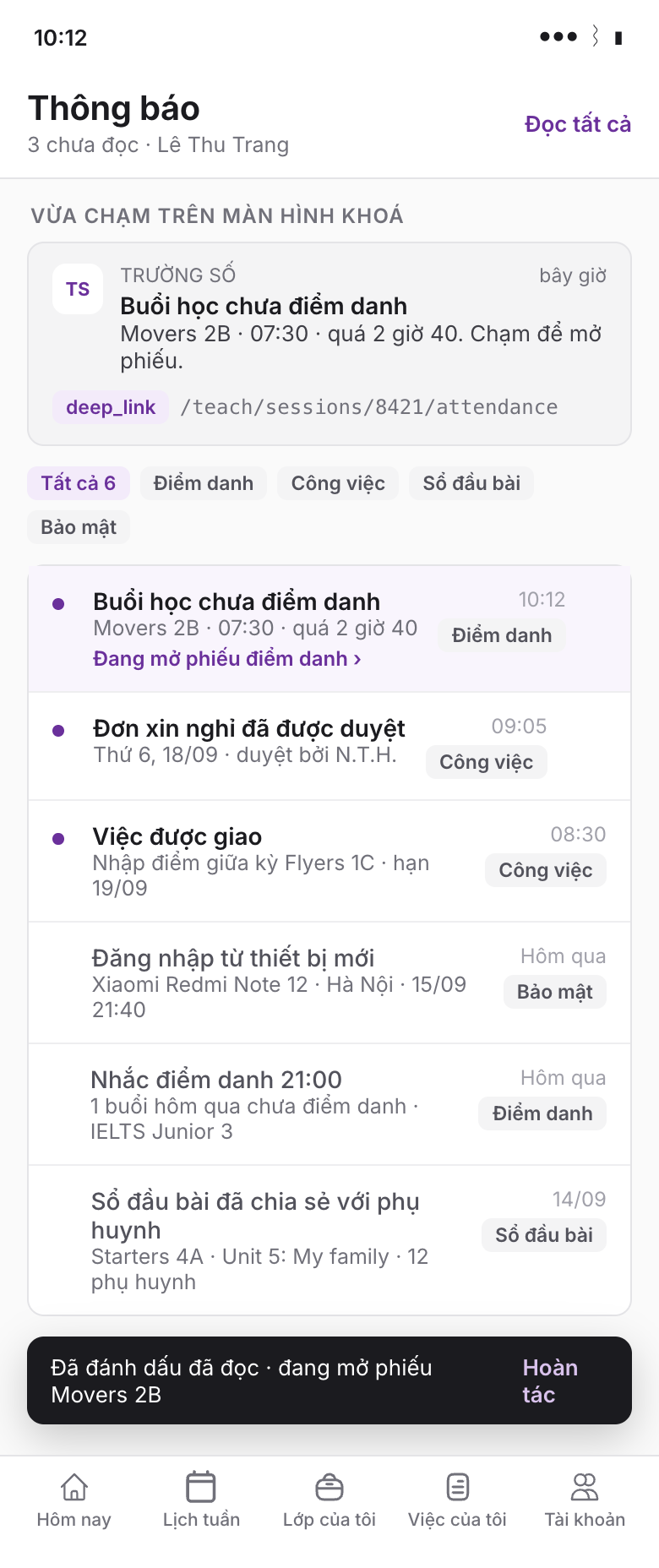
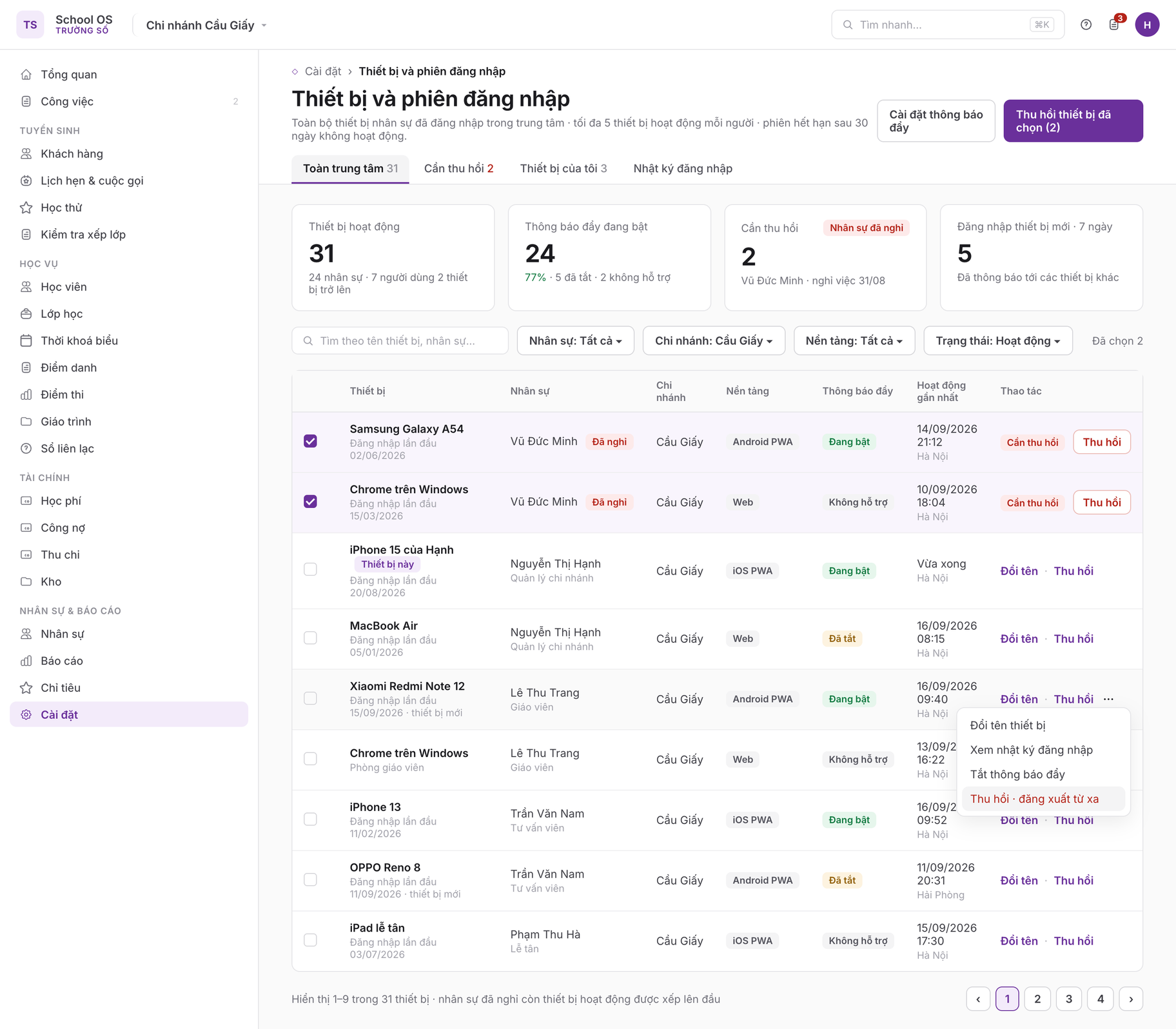
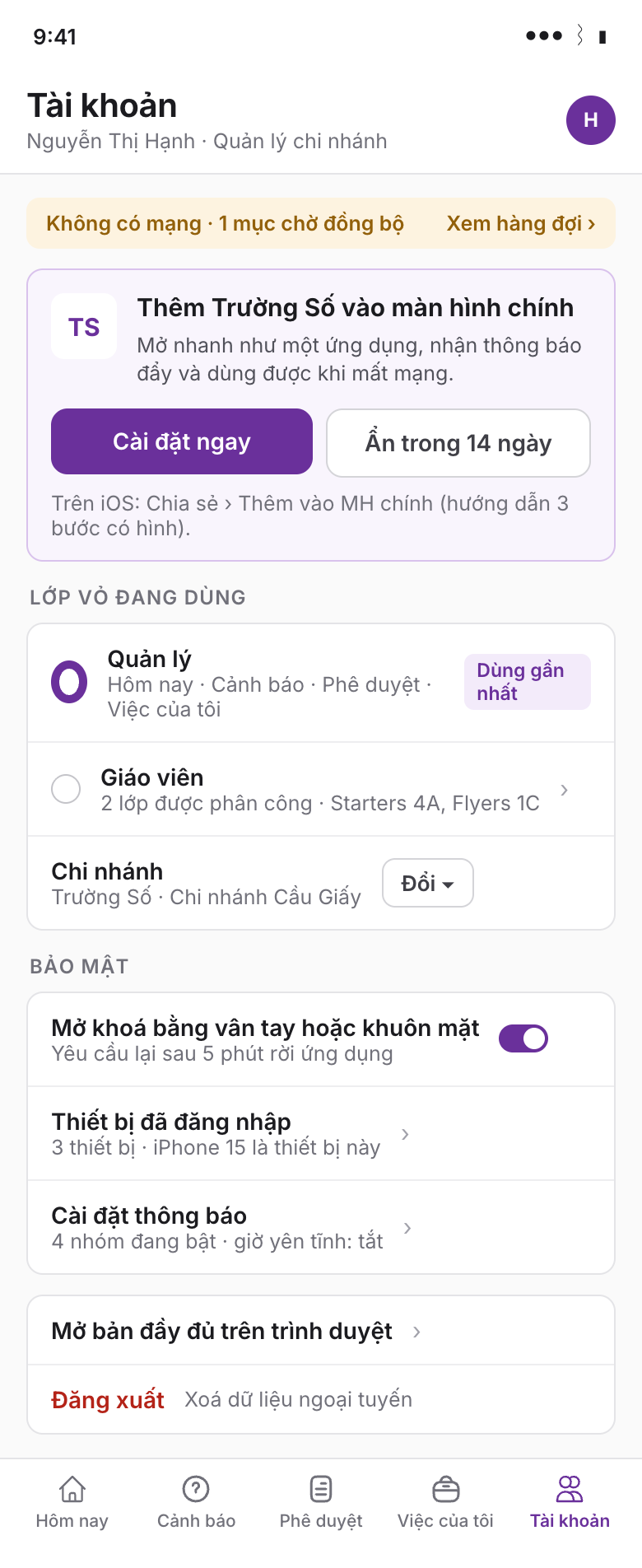
Six 390 px mobile screens for the four role shells on one codebase and one desktop screen for the device registry; the key point is that each shell holds only that role's work for the day, while network state, the sync queue and conflicts are always spelled out in text on the screen.

1 · Shared shell and role selection

/m · tab Tài khoản · mobile

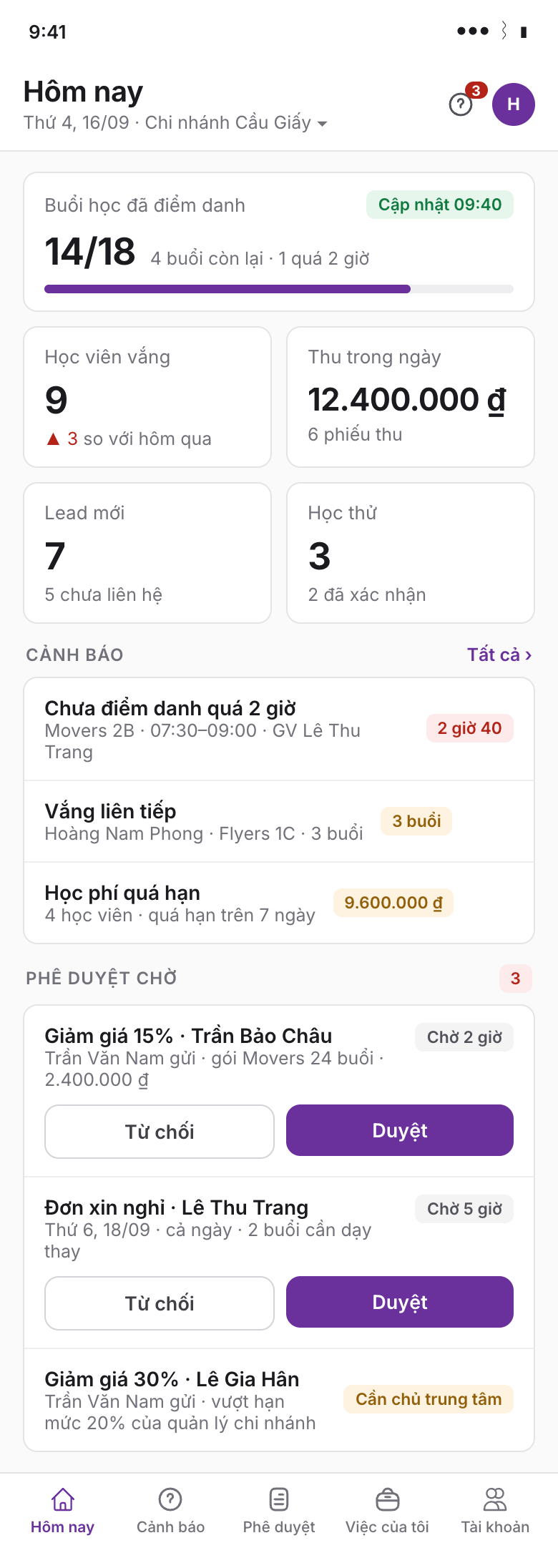
2 · Manager: today's numbers, alerts, pending approvals

/manage/today · mobile

Shared shell and role selection
Manager: today's numbers, alerts, pending approvals
Screen 1: the "Thêm Trường Số vào màn hình chính" card appears after the second login with Install now and Hide for 14 days (MOB-01); below it the shell switcher for multi-role users, the branch switcher, the biometric unlock toggle (MOB-07), the device list and "Open the full version" (rule 2); the amber banner reports no connection and one item waiting to sync. Screen 2: PRD 09 metric cards (sessions marked 14/18, absent students, cash received today, new leads, trials), three alerts with status chips and the pending-approval list with Reject and Approve buttons; the 30% discount request above the role's limit carries only the "Cần chủ trung tâm" label and no Approve button (MOB-04).

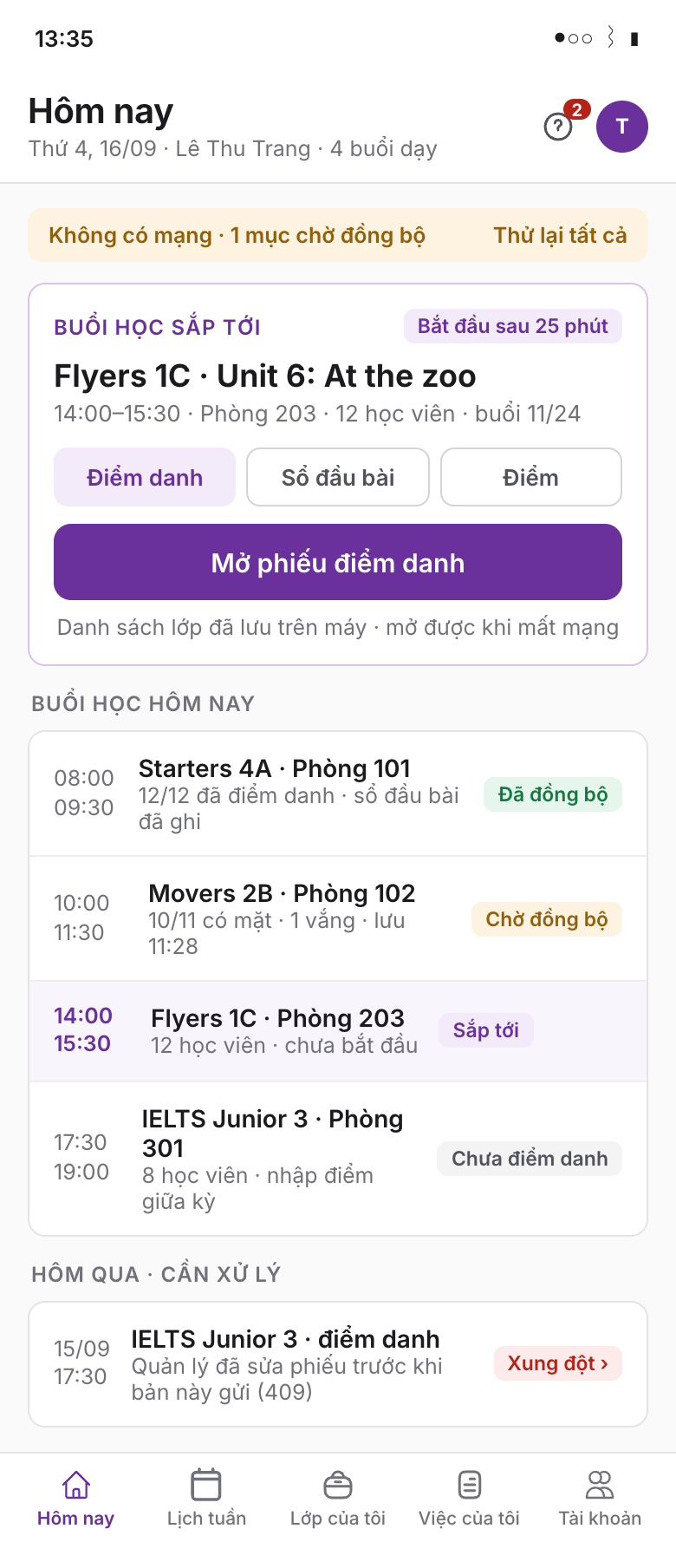
3 · Teacher: today and the next session

/teach/today · mobile

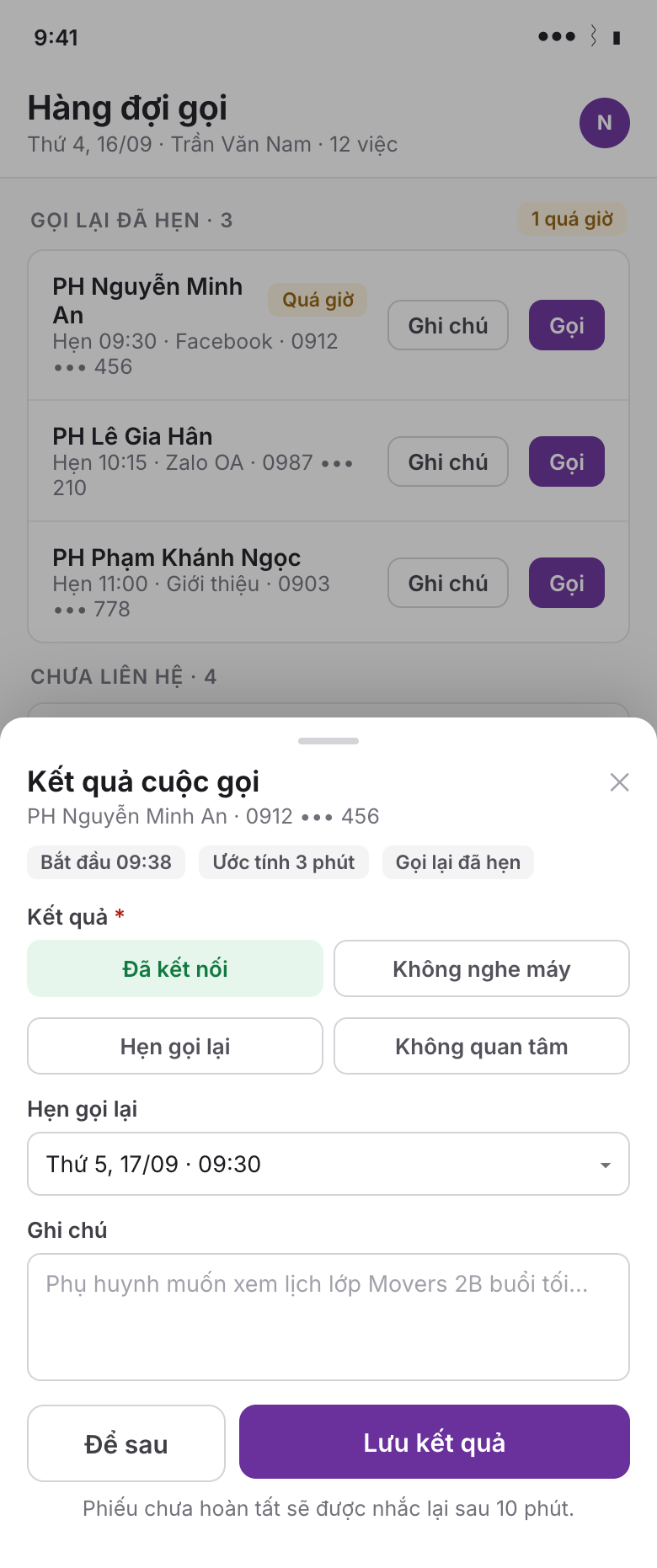
4 · Consultant: call queue and call-result sheet

/sales/queue · mobile

Teacher: today and the next session
Consultant: call queue and call-result sheet
Screen 3: the next-session card with the three segments Attendance, Lesson log, Grades and a button that opens the attendance sheet even offline; today's sessions carry sync chips Synced, Waiting to sync, Not marked, and one sheet from yesterday sits in Conflict because the server returned 409 on version (MOB-02, rule 6). Screen 4: four sections Scheduled callbacks (the overdue row carries the Quá giờ chip), Not contacted, Cold leads and Today's trials with its own empty state; phone numbers are partially masked; a lead flagged Do not call has no Call button; the call-result bottom sheet appears on returning to the app with start time, estimated duration, the preset outcomes of PRD 01 and the 10-minute re-prompt note (MOB-05).

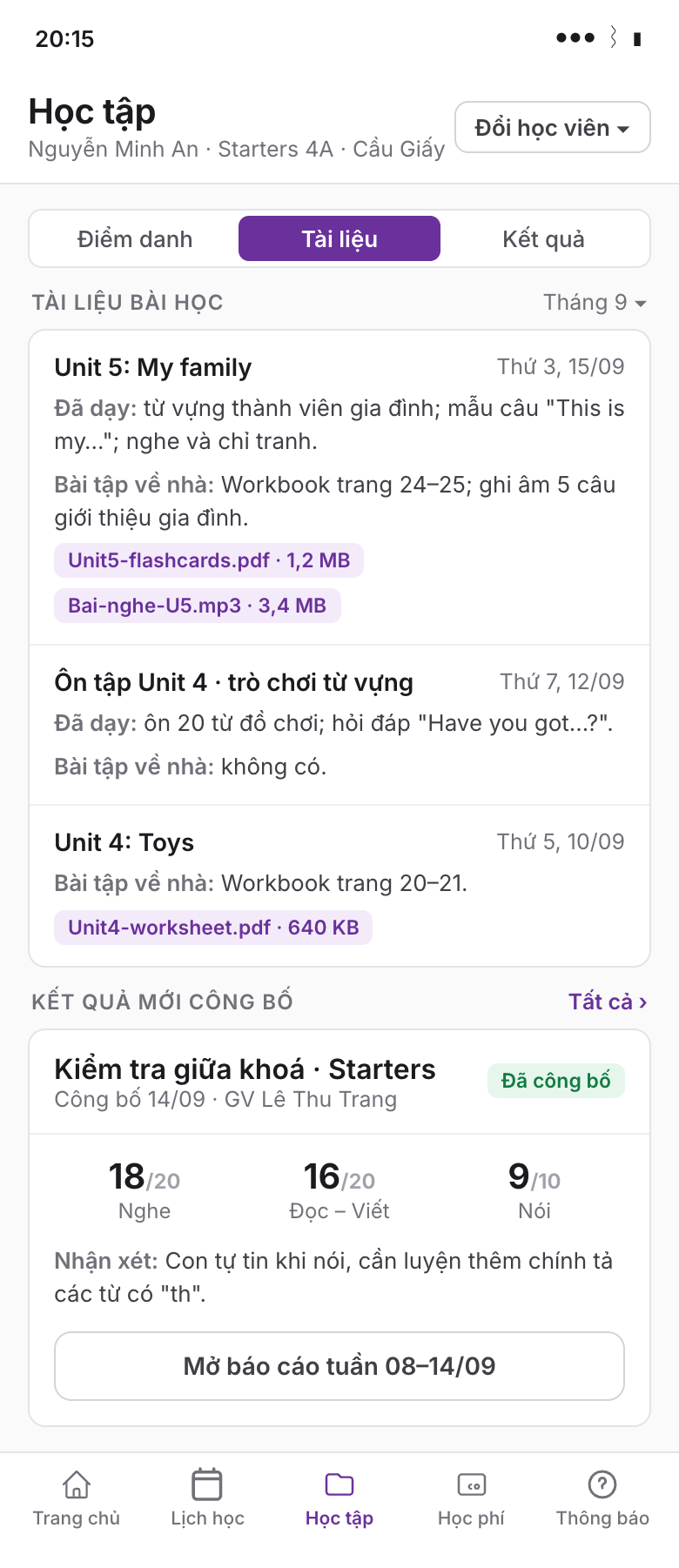
5 · Parent: learning

/parent/learners/:id/learning · mobile

6 · Push notification lands on the right screen

/m/notifications · mobile

Parent: learning
Push notification lands on the right screen
Screen 5: the three-segment picker Attendance, Materials, Results; the Materials segment lists per session the date, title, content taught, homework and attachments with size (downloaded only on tap); the newly published results card shows three skill scores, the comment and a button to open the weekly report; unpublished content never appears (MOB-06). Screen 6: the lock-screen preview carries only a title, a one-line summary and the deep_link to the attendance sheet, with no amount or full name (rule 7); the notification list is grouped by category with unread dots, the item just tapped is highlighted and marked read, and the dark toast offers undo (MOB-03).

7 · Devices and sessions

/manage/devices · desktop

Devices and sessions
The centre-owner page with four summary tiles, filters by staff, branch, platform and status, and a table with every column of section 4: device (with the "Thiết bị này" label), staff, branch, platform (Android PWA, iOS PWA, Web chips), push (On, Off, Not supported), last activity with city, and the Rename and Revoke actions. The two devices of a departed staff member are pinned to the top with the "Cần thu hồi" label, pre-selected for the primary button Revoke selected devices; the row menu shows the remote-revoke option (MOB-08, rules 9 and 10).

1Purpose

Most of a centre's daily work does not happen at a desk: teachers mark attendance in the classroom, branch managers approve requests while moving between sites, consultants call from their phones, and parents open Trường Số after a Zalo message. Trường Số today is a responsive web application shared by every role; it cannot be installed on the home screen, does not work without a connection and cannot send push notifications. This document specifies a mobile experience that shares its codebase with the web, split into role-specific shells, each containing only what that role needs during the day.

Platform decision: PWA first in P1 (installable, service worker, background sync, Web Push on Android and desktop, Web Push on iOS 16.4+ once added to the home screen); Capacitor wrappers in P2 for store presence and reliable iOS push. The interface is not rewritten in native technology.

In scope

Out of scope

Feature matrix by role and phase

FeatureManagerTeacherConsultantParentPRD
Today's numbers, alertsP1noP1 (own targets)no09
Approvals: discounts, leave requests, incidentsP1nonono05, 16
My tasks; leave requests, incident reportsP1P1P1excuse notice P116, 04
Today's teaching schedule / class scheduleP1P1P1 (trials)P103, 07
Offline attendance, background syncmark on behalf P1P1noview P104
Grades and comments; lesson logview P1P1 (offline)noresults, materials P113, 14
Call queue, in-app calling, cold leadsnonoP1no01
Tuition, QR paymentview receivables P1nonoP105, 07
Push: Web Push / store pushP1 / P2P1 / P2P1 / P2P1 / P217
Biometrics: WebAuthn / nativeP1 / P2P1 / P2P1 / P2P217, 12
Device registry, revocationP1 (whole tenant)P1 (own)P1 (own)P1 (own)17
Native apps on the storesP2P2P2P217

2Today

Trường Số has no store app and no PWA configuration. PRD 04 and PRD 07 already assume a teacher PWA with an offline attendance queue and a parent portal with OTP login; this document turns those two assumptions into a shared platform.

Existing capabilityEndpointKeep?
Current user, permissions, accessible branchesGET /v3/crm/me, /v3/crm/me/permissions, /v3/crm/me/accessible-schoolsexisting · keep; decides which shell is shown
Today planGET /v3/crm/me/today-planexisting · keep; PRD 09 and 16 add attendance, approval and assigned-task items
In-app notifications: list, unread count, read, read all, archiveGET /v3/crm/me/notifications, /unread-count, /read, /read-all, /archiveexisting · keep; add deep_link, category
Learner report and weekly report for parentsGET /v3/parent/learner/{id}/weekly-report, /reportexisting · keep; parent Results tab
Learner-side feature flagsGET /v3/learner/feature-configsexisting · keep; template for per-shell feature flags
Manifest, service worker, background sync, Web Push, device registry, native packagingnonenew

3User stories and acceptance criteria

MOB-01Install to the home screen
Staff and parents install Trường Số as an app without a store.
  • Given a second successful login on a mobile browser where the app is not installed
  • When the shell home screen renders
  • Then a card "Thêm Trường Số vào màn hình chính" appears; on Android and desktop it opens the browser install dialog; on iOS it opens an illustrated three-step guide; the card can be hidden for 14 days; once installed, the app opens in standalone mode with a Cloud-theme icon and splash screen.
MOB-02Teacher marks attendance without a connection
A teacher completes attendance in a classroom with no connectivity; the data syncs once online.
  • Given the app was opened at least once today while online, so today's schedule and rosters are cached
  • When the teacher opens the sheet offline, marks statuses and taps Lưu
  • Then the sheet enters the offline queue with client_saved_at; the session shows a "Chưa đồng bộ" chip and a "1 mục chờ đồng bộ" banner; when online, the service worker sends the queue through Background Sync or as soon as the app reopens; each item shows Đã đồng bộ or Xung đột; the success path needs no further action.
MOB-03Push notification opens the right screen
A user taps a notification and lands directly on the related object.
  • Given a registered push device and an event that produces a notification (unmarked session, leave request pending approval, assigned task, new receipt)
  • When the user taps the notification on the lock screen or in the tray
  • Then the app opens the route in deep_link (for example /teach/sessions/:id/attendance) even when not running; if the session has expired, the app re-authenticates and then continues to that route; the notification is marked read through /v3/crm/me/notifications/read; each notification belongs to a category that can be muted in notification settings.
MOB-04Manager reviews numbers and approves from a phone
A centre owner or branch manager sees the situation and clears pending requests in seconds.
  • Given the owner or branch_manager role with a branch or "Tất cả chi nhánh" selected
  • When the Hôm nay tab and then the Phê duyệt tab of the Manager shell are opened
  • Then Hôm nay shows metric cards from PRD 09 (sessions marked x/y, absent students, cash received today, new leads, trials) and alerts (unmarked over 2 h, consecutive absences, overdue tuition), each opening a detail list and cached locally for instant reopening; Phê duyệt lists discount requests (PRD 05), leave requests and incident reports (PRD 16) with requester, subject, waiting time and two buttons Duyệt and Từ chối (rejection needs a reason), audited per PRD 12; requests above the role's approval limit show "Cần chủ trung tâm" and no approve button.
MOB-05Consultant calls from the app and logs the result
A consultant works the call queue on a phone without re-entering results at a desk.
  • Given the consultant's own call queue from PRD 01 (scheduled callbacks, new uncontacted leads, cold leads over 14 days)
  • When Gọi is tapped on a row
  • Then the phone dialer opens with the full number (the interface shows a partially masked number); on returning to the app, a call-result sheet appears with start time, estimated duration and the preset outcomes of PRD 01; saving creates a Call interaction on the lead; an unfinished sheet is re-prompted after 10 minutes; leads flagged Không gọi have no call button.
MOB-06Parent views lesson materials and results
A parent opens the portal from a Zalo message and sees the student's learning content.
  • Given OTP login per PRD 07; the student has lesson logs (PRD 14) and published grades (PRD 13)
  • When the student's Học tập tab is opened
  • Then the parent sees Tài liệu bài học (per session: title, content taught, homework, attachments the teacher marked as shared) and Kết quả (published grades and comments, weekly and learner reports from /v3/parent/learner/{id}/weekly-report and /report); attachments open in the in-app viewer and download only on tap; unpublished content never appears.
MOB-07Biometric re-authentication
Staff reopen the app quickly while data stays protected.
  • Given a device with biometrics and "Mở khoá bằng vân tay hoặc khuôn mặt" enabled in Tài khoản
  • When the app returns to the foreground after more than 5 minutes (staff) or 30 minutes (parents), or before a screen with financial data and parent contacts opens
  • Then a lock screen covers the content and requests WebAuthn (P1) or native biometric (P2) authentication; success continues on the open screen; three failures require password or OTP login; the OS app-switcher preview is blanked.
MOB-08Device registration and revocation
Users and the centre owner know which devices are signed in and can revoke them.
  • Given a first login on a device
  • When the app starts after login
  • Then the device is registered through POST /v3/crm/me/devices (name, platform, version, push token if any); the audit log records "login from a new device" and the user's other devices are notified; in Tài khoản the user sees the device list and taps Thu hồi to sign out remotely; the owner sees devices across the tenant; a revoked device receives 401 with DEVICE_REVOKED on its next API call and wipes all local offline data.
MOB-09Native app on the stores (P2)
The centre points parents to an app downloaded from the App Store and Google Play.
  • Given a Capacitor build of the same web codebase published to both stores
  • When a parent installs from the store and logs in with OTP
  • Then the app behaves like the PWA; push goes through APNs or FCM; https://truongso.net/m/... links in Zalo messages open the native app directly (Universal Links, App Links); web content updates from the server without a store release unless native plugins change; builds below the minimum version get an update-required screen on launch.

4Screens

Shared shell and role selection /m · bottom tab bar per role

After login the app reads /v3/crm/me and /v3/crm/me/permissions to pick the shell: branch-management permissions go to Manager, a TeacherProfile with assigned classes goes to Teacher, a SaleProfile goes to Consultant; multi-role users get a shell switcher in the Tài khoản tab and the last-used shell is remembered. Parents enter at /parent per PRD 07. Shared components: header with branch switcher, notification bell with unread count from /unread-count, network and sync banner (opens the queue list with states Chờ, Đang gửi, Đã đồng bộ, Xung đột, Lỗi and a retry-all button), biometric lock screen.

ShellTab barNotes
ManagerHôm nay · Cảnh báo · Phê duyệt · Việc của tôi · Tài khoảnbranch switcher in the header
TeacherHôm nay · Lịch tuần · Lớp của tôi · Việc của tôi · Tài khoảnkeeps the PRD 04 structure, adds Việc của tôi
ConsultantHôm nay · Hàng đợi gọi · Khách hàng · Học thử · Tài khoảnHôm nay holds targets and the today plan
ParentTrang chủ · Lịch học · Học tập · Học phí · Thông báoHọc tập groups Điểm danh, Tài liệu, Kết quả
Teacher: today and session /teach/today · /teach/sessions/:id

Today's session list per PRD 04 with an added sync chip (Đã đồng bộ, Chờ đồng bộ, Xung đột). The session page has three segments: Điểm danh (PRD 04), Sổ đầu bài (PRD 14: content taught, homework, attachments, share-with-parents toggle), Điểm (PRD 13: grades and comments entered as a list, drafts saved offline, published when online). Đơn xin nghỉ and Báo cáo sự cố (PRD 16) sit in the overflow menu and in Việc của tôi. All three segments are readable offline when the session is inside the cached scope (section 5).

Consultant: call queue /sales/queue

Four sections: Gọi lại đã hẹn (sorted by scheduled time, overdue shows Quá giờ), Chưa liên hệ (newly assigned leads, sorted by priority), Khách hàng nguội (no interaction for 14 days per tenant threshold, sorted by expected amount), Học thử hôm nay (with confirmation status and a Nhắn Zalo button). Each row: guardian name, prospective learner, source, Gọi and Ghi chú buttons; the call-result sheet appears as a bottom sheet. The queue is cached for offline reading; sheets written offline enter the sync queue. Each section has its own empty state.

Parent: learning /parent/learners/:id/learning

Three segments: Điểm danh (month calendar per PRD 04), Tài liệu (per session: date, title, content taught, homework, attachments with size), Kết quả (published grade table by period, comments, button to the weekly report). Empty state: "Giáo viên chưa đăng tài liệu cho lớp này". Adult learners see the same screen for themselves.

Devices and sessions /settings/devices · /manage/devices

Table: device (OS-provided or user-set name, "Thiết bị này" label), platform (chip Android PWA / iOS PWA / iOS native / Android native / Web), push (Đang bật / Đã tắt / Không hỗ trợ), last activity (time, city inferred from IP), actions Đổi tên · Thu hồi. /manage/devices for the owner: every staff device in the tenant, filterable by staff, branch and status; staff with status Đã nghỉ who still have active devices are pinned on top with Cần thu hồi.

5Business rules

  1. One codebase: mobile shells are routes in center-crm-frontend sharing components, vi/en message files and the API layer with desktop; the P2 native wrapper loads the same web bundle.
  2. The shell is chosen by permissions, not screen size; the full desktop interface is always reachable through "Mở bản đầy đủ" in Tài khoản.
  3. Offline scope by role and time: teachers cache schedule, rosters, attendance sheets, lesson logs and grade drafts for sessions from yesterday to the end of tomorrow; managers cache today's numbers and alerts; consultants cache the day's call queue; parents cache the current week's schedule and 30 days of notifications. Full guardian phone numbers, ID numbers, invoices and financial data are never cached.
  4. Offline data is encrypted with a key bound to the device session and wiped on logout, on device revocation, or after 7 days without opening the app.
  5. Every offline write enters the queue with client_saved_at and idempotency_key; the server applies a batch in client-time order and returns a result per item; multiple writes to the same object in the queue collapse to the last one.
  6. Conflicts by data type: attendance sheets use version per PRD 04, a later submission with a stale version gets 409 and the user chooses; lesson logs and comments apply last-write-wins by client_saved_at with history; published grades are never overwritten from the offline queue, only drafts sync; call results and leave requests are new records, deduplicated by idempotency_key only.
  7. A push carries only a title, a one-line summary and deep_link; no phone numbers, amounts or full student names on the lock screen (initials are used).
  8. Parent push respects the PRD 07 quiet hours 21:30–07:00; staff have no quiet hours by default but can set their own; the PRD 04 21:00 attendance reminder still sends.
  9. A user may have at most 5 active devices; the oldest is revoked when exceeded; a push token is dropped after 3 consecutive "no longer registered" failures.
  10. Mobile sessions inherit PRD 12: expiry after 30 days of inactivity, password change revokes other sessions; biometric re-authentication does not replace the mandatory second factor for owner and accountant.
  11. Performance budgets on 3G (1.6 Mbps, 300 ms latency, mid-range 2022 Android): cold start to interactive ≤ 4.0 s; warm start from cache ≤ 1.0 s; opening a cached attendance sheet ≤ 500 ms; initial JS per shell ≤ 200 KB gzip; today-plan response ≤ 50 KB; images served as webp sized to the screen. PRD 12 API thresholds still apply.
  12. Per-shell feature flags are read from tenant configuration at launch; a disabled feature disappears from the tab bar rather than erroring. All strings live in message files (decision D9).

6Data model

EntityFieldsNotes
deviceid uuid; tenant_id; user_id null; parent_account_id null; name; platform enum(web, android_pwa, ios_pwa, android_native, ios_native); app_version; os_version; install_mode enum(browser, standalone, native); push_provider enum(webpush, fcm, apns) null; push_token null; push_status enum(active, disabled, unsupported, failed); device_fingerprint; last_seen_at; registered_at; revoked_at null; revoked_by nullnew; unique (user_id | parent_account_id, device_fingerprint)
notification (extended)+ category enum(attendance, approval, task, finance, admissions, parent, system); + deep_link; + push_sent_at null; + push_result enum(sent, failed, skipped) null; + collapse_keyextend
notification_preferenceid; tenant_id; user_id | parent_account_id; category; push bool; in_app bool; quiet_from; quiet_tonew; all on by default
sync_batchid uuid; tenant_id; school_id; user_id; device_id; received_at; item_count; ok_count; conflict_count; error_countnew; kept 30 days
sync_itemid; batch_id; idempotency_key (unique per tenant); type enum(attendance_sheet, lesson_log, grade_draft, call_result, leave_request, incident_report); target_id; client_saved_at; base_version null; payload jsonb; result enum(applied, merged, conflict, rejected); result_detail; server_versionnew
offline_queue, offline_cache_manifest (on device, IndexedDB)queue: key; type; target_id; payload; client_saved_at; idempotency_key; status enum(pending, sending, done, conflict, error); attempts. manifest: scope enum(teacher, manager, sales, parent); cached_at; expires_at; entries [{route, etag}]not on the server; encrypted per section 5
mobile_policy (tenant settings)max_devices_per_user (5); biometric_relock_minutes_staff (5); biometric_relock_minutes_parent (30); offline_retention_days (7); cold_lead_days (14); finance_requires_biometric bool; shell_features {manager, teacher, sales, parent: [feature_key]}stored in school config (PRD 10)

Scoping: device and notification_preference belong to the tenant; sync_batch and sync_item carry the school_id of the branch that produced the data so a branch manager can review sync history for teachers in the branch; parent devices carry no school_id because one parent account may have children in several branches.

7API contract

MethodPathPurposeStatus
GET/v3/crm/me · /v3/crm/me/permissions · /v3/crm/me/accessible-schoolsshell selection, branch scopeexisting
GET/v3/crm/me/today-planHôm nay tab of Manager and Consultantexisting
GET / POST/v3/crm/me/notifications · /unread-count · /read · /read-all · /archivenotification centre; add category parameter and deep_link fieldextend
GET/v3/parent/learner/{id}/weekly-report · /reportparent Results tabexisting
GET/v3/learner/feature-configslearner-side feature flags; unchangedexisting
POST/v3/crm/me/devices{name, platform, app_version, os_version, install_mode, device_fingerprint, push_provider?, push_token?} → device; idempotent by fingerprintnew
GET / PATCH / DELETE/v3/crm/me/devices[/{id}]own devices; rename; revoke; PUT /{id}/push-token refreshes the tokennew
GET / DELETE/v3/school/devices[/{id}]owner: devices across the tenant, filter staff_id, school_id, status; revokenew
GET / PUT/v3/crm/me/notification-preferencesper-category toggles, quiet hours; POST /v3/crm/push/test sends a test pushnew
GET/v3/crm/me/offline-bundle?scope=teacher|manager|sales&date=one aggregated response with everything in the role's offline scope, with per-part etagsnew
POST/v3/crm/sync/batch{device_id, items: [{idempotency_key, type, target_id, client_saved_at, payload, base_version?}]} → {batch_id, results: [{idempotency_key, result, server_version, detail}]}; max 50 items; each item is delegated to the business endpoint of PRD 04, 13, 14, 16, 01new
GET / POST / DELETE/v3/parent/me/devices[/{id}]parent devices, same contract as staffnew
GET/v3/parent/learner/{id}/lesson-logs · /gradesshared lesson materials (PRD 14), published results (PRD 13)new
GET / PUT/v3/teacher/school-configadd the mobile_policy block and minimum app version per platform (P2)extend

Push is sent by a server-side worker: every new notification whose category is enabled in the recipient's preferences produces one delivery to each active device through Web Push (VAPID), FCM or APNs; the outcome is written to push_result. Deep links use the same paths for the PWA and the native app.

8Permissions

Codeownerbranch_manageradmissionsacademic_adminaccountantteacherparent
mobile.shell.managerallbranchnobranch (no Phê duyệt)branch (finance numbers)nono
mobile.shell.teacherwhen assigned classeswhen assigned classesnononoyesno
mobile.shell.salesyesbranchown or team leadsnononono
mobile.shell.parentnonononononoown children
mobile.offlineyesyesyesyesno (financial data)yesyes
mobile.sync.overrideyesbranchown leadsbranchnoown sessions within 24 hno
devices.view_own, devices.revoke_ownyesyesyesyesyesyesyes
devices.view_all, devices.revoke_any, devices.sync_historyyesbranchnosync_history only, branchnoown sync_history onlyno
mobile.policyyesnononononono

9Analytics events

EventProperties
app_launched / install_completedshell, platform, install_mode, cold_start_ms, from_push, network (offline|3g|4g|wifi)
offline_write_queuedtype, shell, queue_length
sync_batch_completeditem_count, ok_count, conflict_count, error_count, seconds_offline, trigger (background|foreground|manual)
sync_conflict_resolvedtype, resolution (keep_server|override), by_role
push_permission_granted / push_permission_deniedshell, platform
push_delivered / push_openedcategory, provider, seconds_to_open, deep_link_route
biometric_enabled / biometric_relock / biometric_failedshell, method (webauthn|native), attempts
device_registered / device_revokedplatform, by (self|owner|limit), active_devices
mobile_approval_actionedtype (discount|leave|incident), action, seconds_waiting
parent_material_openedkind (lesson_log|attachment|grade|weekly_report), file_size_bucket, network
perf_budget_exceededmetric (cold_start|warm_start|sheet_open|bundle), value, budget, network

Weekly metrics on PRD 09: share of teachers marking attendance from mobile, share of sheets saved offline, push open rate by category, active devices per staff member, p75 cold start by platform.

10Edge cases

11Open questions

Trường Số (truongso.net) · FLYER internal