PRD 00 · Overview and architecture
Product vision for Trường Số as a center-management platform, the personas it serves, the tenancy and role model, the information architecture, and a precise map of what the current CRM codebase already provides versus what each PRD adds.
Key facts, origin and limits
Drafted by an AI assistant in a single session on 10/09/2026, from the original request quoted verbatim on the hub page; the Proposed design section was added on 16/09/2026. A proposal for team discussion, not a decision of the product team.
Sources
- Public competitor research (PSE ONE, pse4.one), the
center-crm-frontendcodebase and the staging/v3OpenAPI specification (182 paths), as of 10/09/2026. - Section 6 current state comes from a read of
center-crm-frontendon 10/09/2026 and the live staging OpenAPI (182 paths). The generated client in the repo is built at dev time from the same spec.
Limits
- Verification pending in-app survey, because automated login to the reference product was not authorised in the drafting session:
- Competitor's exact navigation tree and module names as shown to a logged-in admin.
- Whether their branch model is a switcher or a merged view, and whether a user can belong to several branches.
- Which roles they ship by default and whether permissions are per screen or per action.
- Their student lifecycle statuses and the trigger for "sắp hết hạn" (sessions remaining vs date).
Proposed design
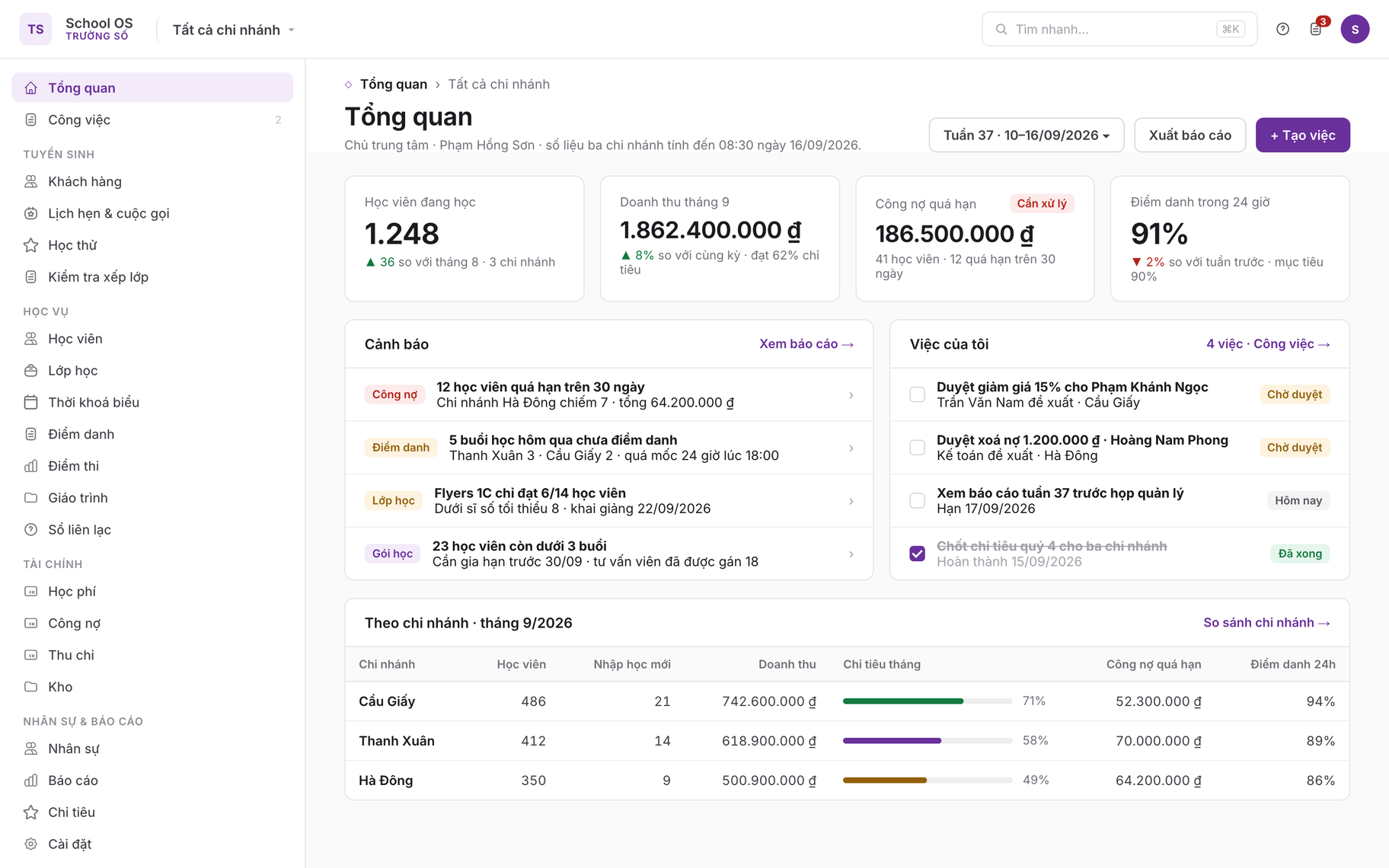
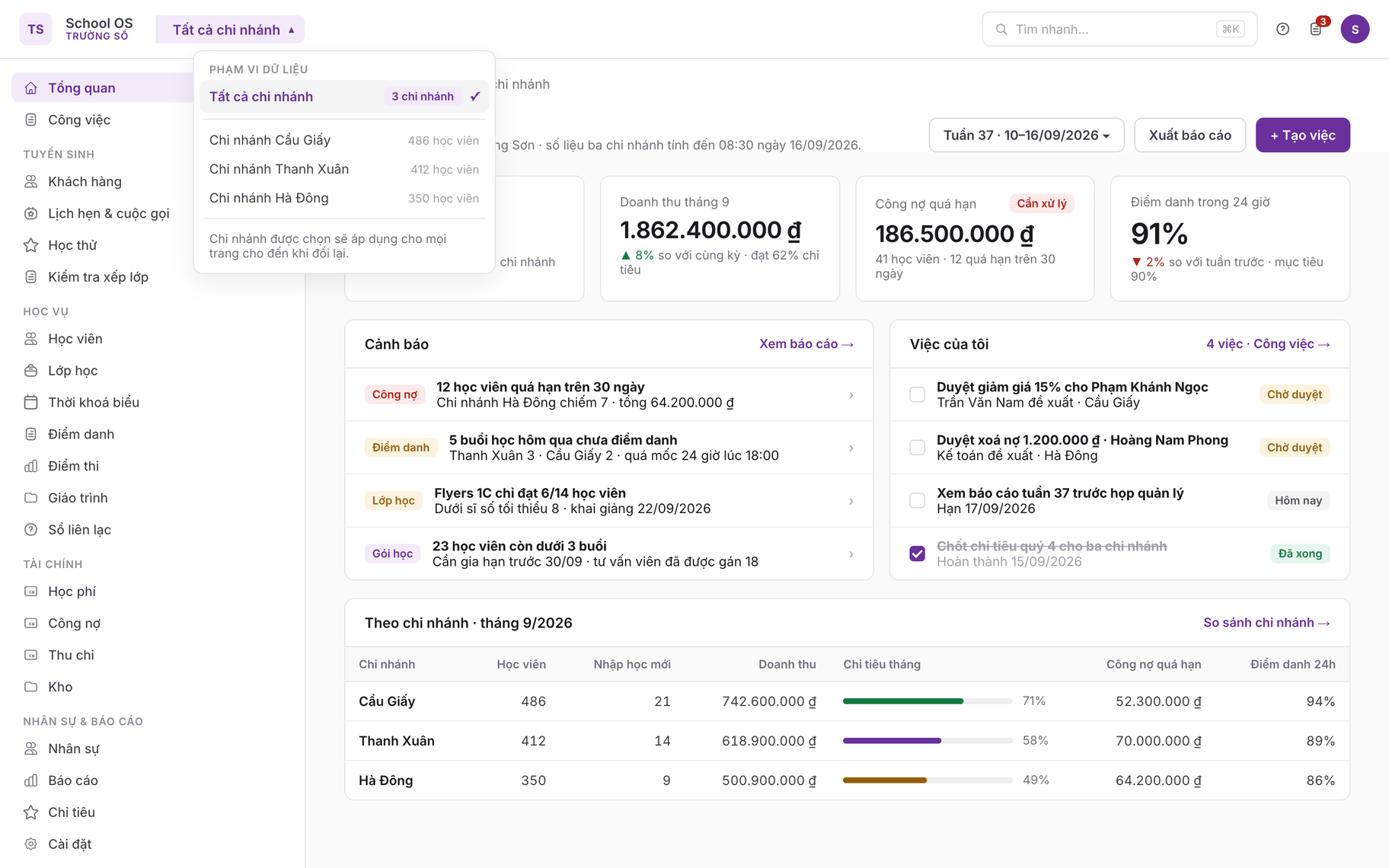
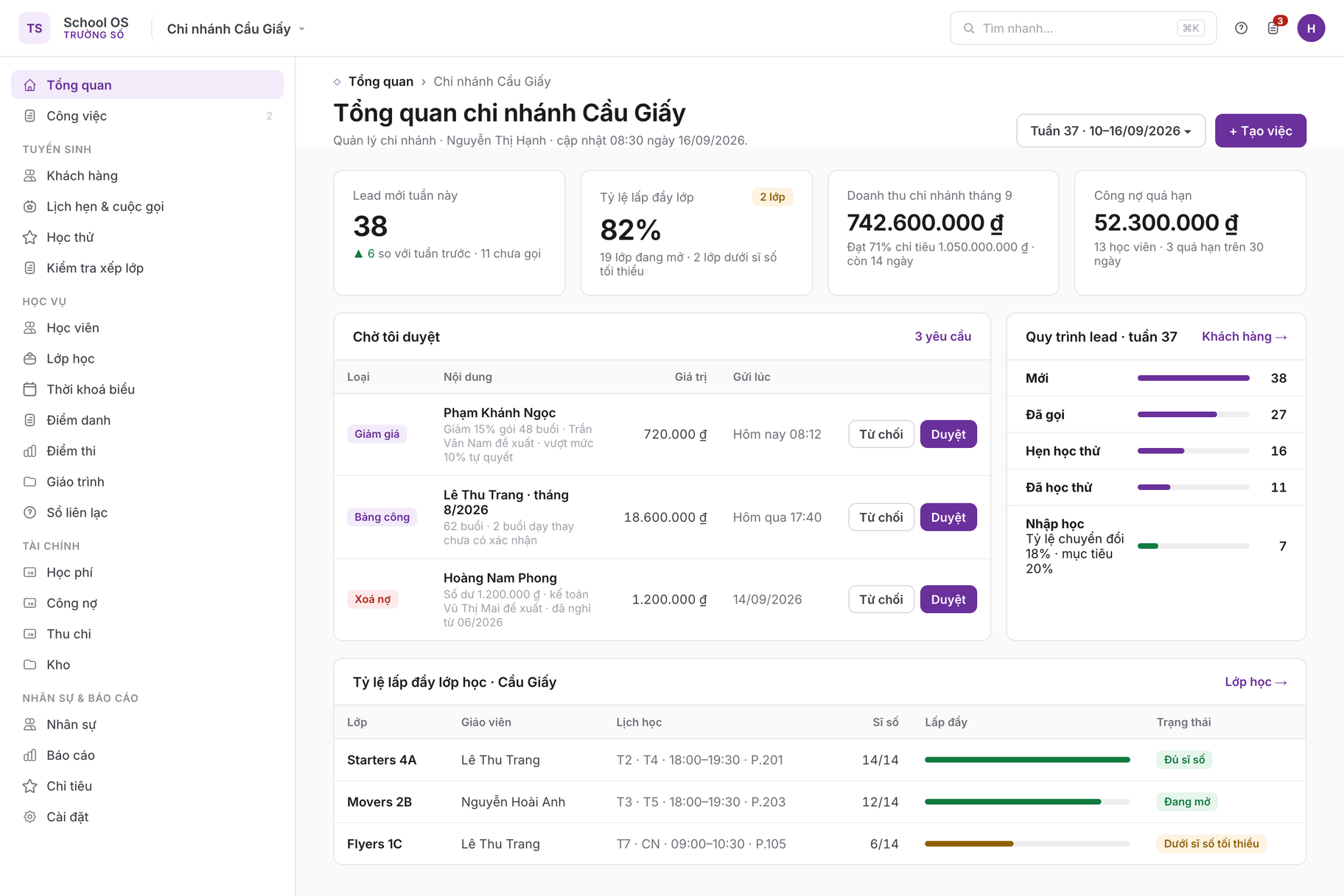
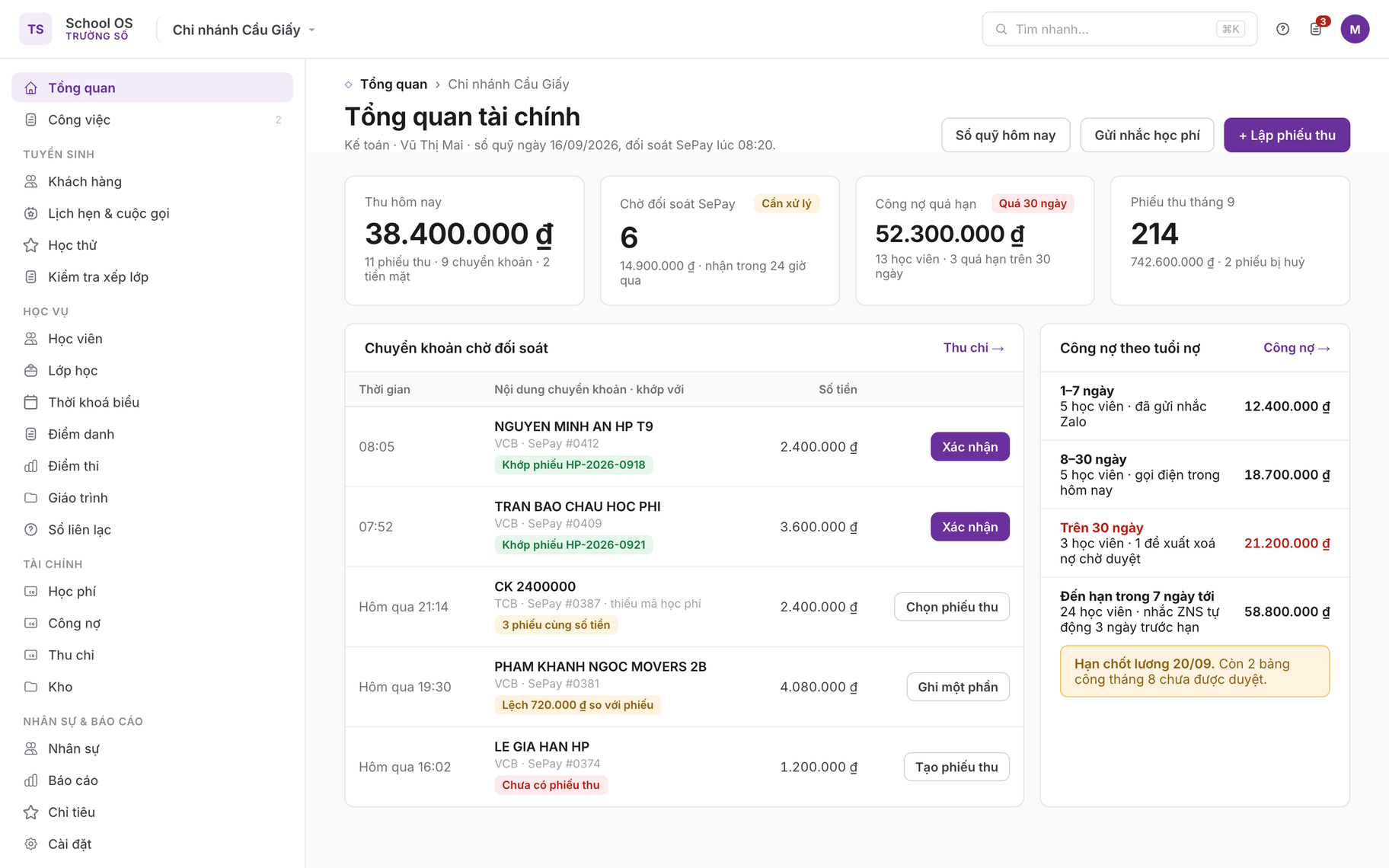
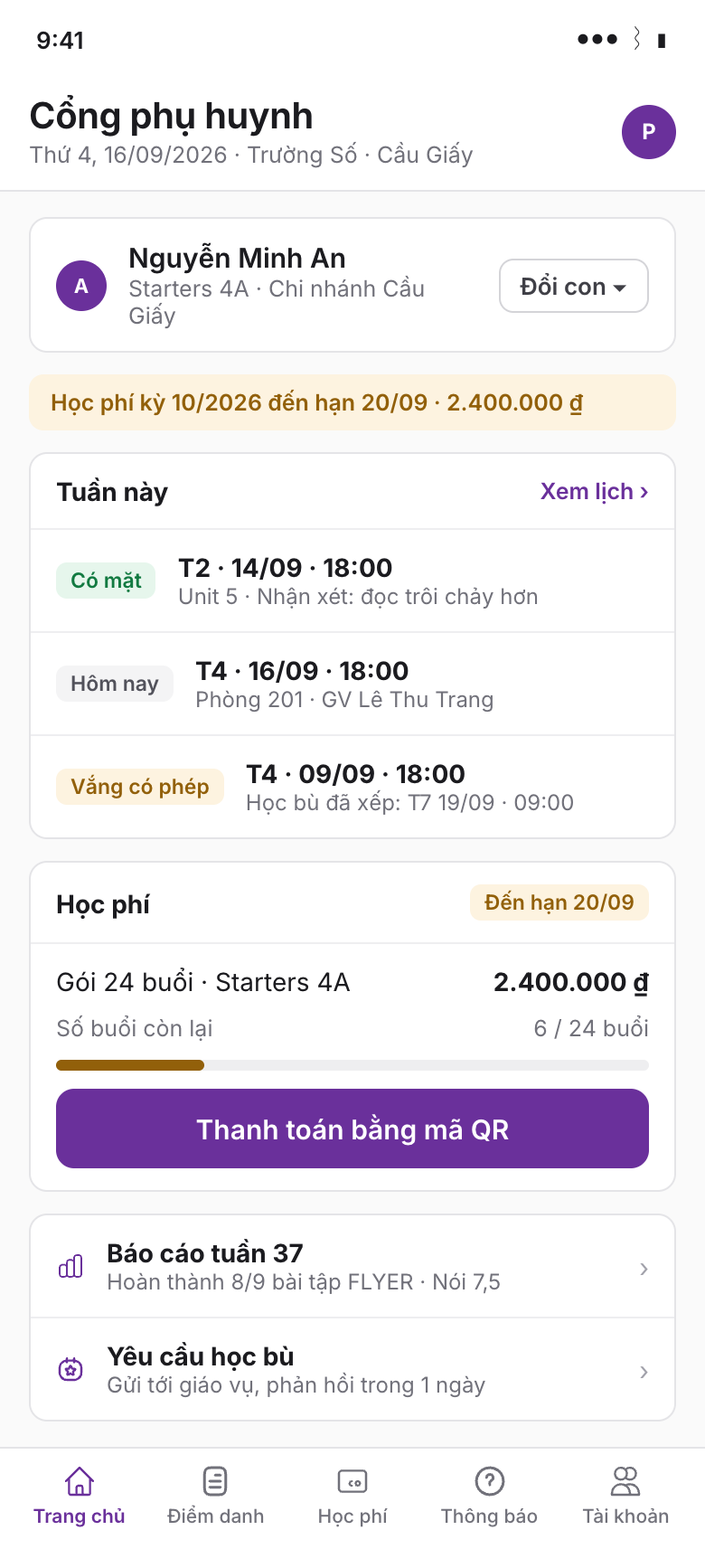
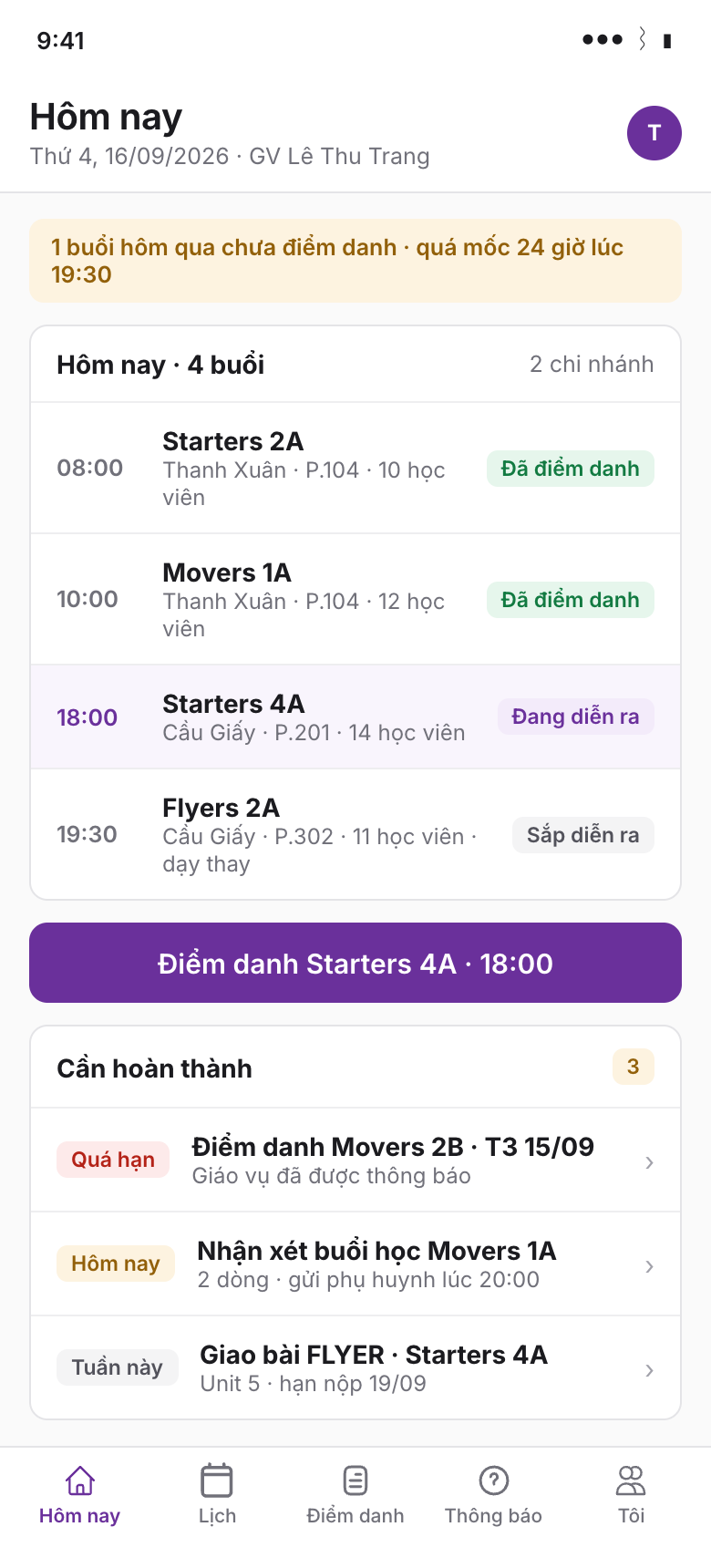
This set is the shell every other PRD sits in: one top bar with the branch switcher, one sidebar shared by every module, and a Dashboard whose content changes with the signed-in role; parents and teachers get their own mobile surfaces instead of reusing the sidebar.
1Product vision
Trường Số (truongso.net) is FLYER's operating system for English centers and small private schools in Vietnam. It starts from the admissions CRM that exists today at b2c.truongso.net and grows into the daily tool for the whole center: the receptionist who enrolls a child, the academic admin who builds the timetable, the teacher who marks attendance on a phone, the accountant who collects tuition and chases debt, and the owner who reads one dashboard across branches.
The competitive baseline is the category of Vietnamese center-management suites (PSE ONE and peers) that advertise seven modules: admissions, students, training, reports, inventory, finance and the parent contact book, sold per student tier from roughly 199,000 to 1,000,000 VND per month. Trường Số covers the same operational surface, but with three differences that the market leaders do not have:
- Learning data inside the operations record. Every student is a FLYER learner. Placement scores, assigned homework, completion rates and AI-graded speaking and writing results already exist in the FLYER platform and appear in the student profile without integration work.
- Money flows through verified bank transfer. The existing SePay bank-account link and payment QR make receipts self-reconciling; cash is the exception, not the default.
- One design system. The Cloud theme used across FLYER teacher products is the UI language, so a center that already uses teacher.flyer.us recognises every screen.
Success measures (12 months after P1 launch)
| Measure | Target | Source |
|---|---|---|
| Centers using Trường Số for enrollment and attendance weekly | 150 tenants, 60% weekly active | Tenant activity events |
| Tuition collected through the product (receipts issued) | 70% of active tenants issue at least one receipt per month | Finance events |
| Teacher attendance marked within 24 h of session | 90% of held sessions | Attendance events |
| Guardians reached by the contact book | 60% of active students have a verified guardian channel (Zalo or app) | Parent communication |
| Excel migration completed without support ticket | 80% of new tenants | Import jobs |
2Personas
Owner (Chủ trung tâm)
Runs one to five branches, 200 to 2,000 students. Checks revenue, debt, enrollment and teacher utilisation weekly. Wants numbers without asking staff. Uses a laptop and a phone.
Branch manager (Quản lý chi nhánh)
Owns one branch's targets. Approves discounts, timesheets and write-offs. Watches the lead pipeline and class fill rates daily.
Admissions consultant (Tư vấn tuyển sinh)
Handles 30 to 80 leads a week from Facebook, Zalo and walk-ins. Calls, books trials and placement tests, closes and hands over. Today's CRM user.
Academic admin / front desk (Giáo vụ)
Enrolls students, builds classes and timetables, assigns teachers, handles make-ups and transfers, prints attendance sheets, answers parents at the desk.
Accountant (Kế toán)
Issues receipts, records cash, reconciles bank transfers, chases overdue balances, books expenses, prepares payroll and e-invoices.
Teacher (Giáo viên)
Teaches 10 to 25 sessions a week, often at more than one branch. Marks attendance on a phone in class, writes a two-line session note, assigns homework on FLYER.
Guardian (Phụ huynh)
Receives attendance and fee messages on Zalo, sees the weekly learning report, pays by QR, asks for make-ups. Never installs a separate app if a Zalo link works.
Student (Học viên)
Learns on FLYER apps. In Trường Số the student is a record, not a user, except for adult learners who receive the parent-portal role for themselves.
3Multi-branch tenancy
The existing backend already has two containers: the CRM Center (center_id, string id, created at onboarding) and the FLYER School (school_id, int64, the unit that owns classes, students, tuition and teacher membership). The CRM Customer carries both ids, and GET /v3/crm/me/accessible-schools already returns several schools per CRM user.
A tenant is one CRM Center. Each physical branch is one FLYER School under that Center. The existing accessible_schools list becomes the user's branch scope, and the existing school filter dropdown becomes the branch switcher. No new "branch" table is required for phase 1; a branch_profile record (address, phone, rooms, bank account defaults) extends the School.
Consequences: students, classes, tuition and attendance are per branch (per school) as the backend already models them; leads are per center and are assigned a target branch when they convert; reports aggregate across schools of the center.
| Level | Existing identifier | Owns | Switcher UI |
|---|---|---|---|
| Tenant | Center (center_id) | Users and roles, pipelines, sources, channels, tags, packages, custom fields, leads, settings, integrations | None (one per login); account switcher if the user belongs to several centers |
| Branch | School (school_id) | Students, classes, sessions, attendance, tuition, bank accounts, staff assignment, inventory, rooms | Branch dropdown in the top bar: "Tất cả chi nhánh" for owner-level roles, otherwise the user's branches |
4Roles and permission matrix
The CRM already has tenant-defined roles with a permission catalog (GET /v3/crm/permissions-catalog, codes grouped by module) and per-user scope own | team | all. School membership uses the fixed SchoolRole enum OWNER / ADMIN / TEACHER. Decision D2: one role catalog. The CRM role model is extended with the new modules' permission codes; school membership role is derived (teacher flag, admin flag) when a Trường Số role is assigned, so the FLYER teacher apps keep working.
Default roles shipped with every tenant (cloneable, not deletable):
| Module permission group | owner | branch_manager | admissions | academic_admin | accountant | teacher | parent |
|---|---|---|---|---|---|---|---|
| Leads and pipeline (PRD 01) | all | branch | own / team | read | none | none | none |
| Students (PRD 02) | all | branch | create via convert | branch | read | own classes | own children |
| Classes and scheduling (PRD 03) | all | branch | read | branch | read | own classes read | own children's classes |
| Attendance (PRD 04) | all | branch | none | branch (edit any) | read | own sessions mark | own children read |
| Tuition and finance (PRD 05) | all | branch + approve discounts | read balance | issue receipts (if granted) | branch full | none | own invoices, pay |
| Teachers and staff (PRD 06) | all | branch | none | directory | contracts, pay, timesheets | self | none |
| Parent communication (PRD 07) | all | branch | none | send | fee reminders | own classes | receive, reply |
| Inventory (PRD 08) | all | branch | none | issue | manage | read | none |
| Reports (PRD 09) | all | branch | own funnel | academic | finance | own classes | none |
| Settings (PRD 10) | all | branch profile | none | catalogs | finance settings | none | none |
The full code list per module is in each PRD's Permissions section and consolidated in PRD 10.
5Information architecture and navigation map
The current sidebar shows Tổng quan, Khách hàng, Nhập dữ liệu and Cài đặt trung tâm. The constants file already declares routes for students, classes, attendance and tuition with Vietnamese nav labels, grouped as Tổng quan / CRM & Hiệu suất / Quản lý trường học / Tài chính / Cài đặt. The target navigation keeps that grouping and adds the new modules.
Route prefix note: existing CRM routes stay under /crm/* so links in notifications and bookmarks keep working. New modules live at the root (/students, /classes ...) inside the same (dashboard) layout. Settings consolidates under /settings with a redirect from /crm/settings/*.
Object model at a glance
6What exists today versus what the PRDs add
| Area | Frontend today | Backend today (/v3) | PRD adds |
|---|---|---|---|
| Auth and onboarding | Login (password, Google), register with OTP, onboarding (sale profile, create or join center) | GraphQL v2 viewer mutations; /v3/crm/onboarding/*, /v3/crm/me | Role-aware onboarding (first owner sets branches), parent OTP login (07) |
| Leads / customers | Kanban + table, filters, drawer create/edit, detail shell with timeline, products, discussions, attachments, assignments, linked learners; bulk archive and reassign; column config; xlsx export | Customers (60+ endpoints), pipelines, stages, statuses, sources, channels, tags, custom fields, packages, interactions, quick actions, search, notifications, today plan, dashboard | 01: trial bookings, callback queue, conversion wizard to enrolled student, lead retention rules; fixes: sources/channels settings pages use the API instead of localStorage mocks |
| Placement tests | List, create, submit result modal | /v3/crm/placement-tests, /v3/teacher/placement-test/send, FLYER report schema | 01: status labels aligned to API enum, result to class-level suggestion |
| Students | None (route constant only) | school-finance/students list and detail, StudentProfile, StudentParent, StudentStats, StudentScoreEntry, learner search | 02: student record with status lifecycle, guardians (multiple), enrollment history, documents, notes, consent |
| Classes | None | /v3/teacher/classes, ClassSchedule (recurrence + program lessons), class-schedules/{id}/remind, Course (price, lessons, pricing method) | 03: rooms, physical sessions calendar, capacity, teacher and substitute assignment, make-up, timetable views, conflict checks |
| Attendance | None | None | 04: entire module |
| Tuition | None | Tuition (cost, amount, discount, VAT, status, transactions CASH/BANK_TRANSFER, SePay), GroupInvoice, stats, notify (app/email/zalo), bank accounts, company legal profile, payment QR, parent tuition views | 05: fee plans and session packages, session balance, discounts and vouchers, receipts numbering, partial payment, debt aging, refunds and credit notes, expenses, e-invoice hook, revenue reports |
| Teachers and staff | Users page (CRM sale profiles) with mock school-access call | TeacherProfile, school membership, rollup KPIs, sale profiles and roles | 06: staff directory, contracts, pay rules, timesheets, evaluations |
| Parent communication | None | Parent tuition list, learner report, weekly report; notify channels app/email/zalo on tuition and class reminders | 07: announcements, contact-book messages, Zalo OA/ZNS configuration, parent portal, consent |
| Inventory | None | None | 08: entire module |
| Reports | Sales dashboard (sale and manager cards, funnel, trend, top sales), drill-down page | 5 dashboard endpoints | 09: executive dashboard across modules, academic and finance reports, exports |
| Settings | Users, roles (update only), sale permissions, tags (API), sources and channels (mock), tenant (not persisted) | Roles, permissions catalog, sale profiles, view configs, custom fields, school config | 10: branch profiles, rooms, catalogs for the new modules, integrations, audit log viewer, notification templates |
| Imports | 3-step wizard for leads with xlsx template and error report | ImportJob for customers | 11: import for students, guardians, classes, enrollments, opening balances, staff |
Known inconsistencies to resolve in P1
- Two
PermissionGateimplementations; the stub insrc/components/crmalways allows. Remove the stub. - Permission scope vocabularies differ: matrix editor uses none/read/write/manage,
/me/permissionsreturns own/team/all. PRD 10 fixes the vocabulary toown | branch | allplus action codes. - Placement-test status labels in i18n (scheduled) do not match the API enum (not_started, in_progress, completed, cancelled).
- Endpoints referenced in the frontend but absent from the spec: customers/{id}/convert, do-not-call, transfer-school, tasks, meetings, saved-views, users/{id}/school-access. PRD 01 and 10 specify the replacements.
- Several settings and form bodies are hard-coded English; all strings move to vi/en message files.
7Phasing
| Phase | Scope | Exit criterion |
|---|---|---|
| P1 (Q4/2026) | 00, 01 (conversion, trials), 02, 03 (classes, timetable, sessions), 04, 05 (fee plans, receipts, debt), 07 (Zalo ZNS attendance and fee messages), 09 (executive dashboard v1), 10 (branches, roles, catalogs), 11 (imports), 12 baseline | Three pilot centers run enrollment, attendance and tuition for one full month without Excel |
| P2 (Q1/2027) | 05 (vouchers, refunds, expenses, e-invoice), 06 (contracts, pay, timesheets), 07 (parent portal, announcements), 08, 09 (academic and finance reports), 12 hardening (2FA, PDPD tooling) | Payroll sheet and e-invoice used by pilot accountants |
| P3 (Q2/2027) | 06 evaluations, leave; 07 two-way chat; 09 custom report builder; Vietnam data region | Feature parity with the category baseline plus learning data differentiators |
8Decisions to ratify
- D1 Tenant = Center, Branch = School (section 3).
- D2 One role catalog extending CRM roles; school role derived (section 4).
- D3 Lists over boards: the pipeline keeps its Kanban as an option, but every new module ships a table view first and no board.
- D4 The enrolled student is the FLYER learner profile; conversion always creates or links a learner account so learning data is attached from day one.
- D5 Sessions are materialised rows generated from the class schedule, and attendance and timesheets hang off sessions, not off the schedule template.
- D6 Finance reuses the Tuition and GroupInvoice models; session packages are a fee plan type, and the student session balance is a maintained summary.
- D7 Guardians are contacted through Zalo ZNS first, in-app second, email third; SMS is not built.
- D8 Existing CRM routes stay under /crm; new modules are root routes in the same shell.
- D9 Vietnamese is the product language; English is a full second locale from day one, and all strings live in message files.
- D10 Inventory, staff pay and e-invoice are phase 2; phase 1 ships the daily loop of enroll, schedule, attend, collect, report.
Trường Số (truongso.net) · FLYER internal