Trường Số PRD/13 Exam scores
Trường Số · Product Requirements · 09/2026

PRD 13 · Exam scores and learning results

Centre-level assessments per class or per level, a skill-based score structure with weights and scales, grid entry for a whole class or per-student entry with teacher comments and attachments, a draft then review then publish flow, guardian notification through the contact book, score history for re-grading, grading labels, report cards and certificates. FLYER online exams already exist and attach to an assessment as a score source.

Key facts, origin and limits
Status
Draft v1
Owning module
Đào tạo
Backend
EXISTING FLYER exams, score-report, placement tests, parent report · EXTEND message templates, school-config · NEW assessment, assessment_score, assessment_comment, report_card, certificate
Phase
P1 (score entry, notification) / P2 (grading labels, certificates)
Depends on
02 Students, 03 Classes, 07 Parents, 09 Reports

Drafted by an AI assistant in a single session on 16/09/2026, extending the PRD set under the original request quoted verbatim on the hub page. A proposal for team discussion, not a decision of the product team.

Sources

  • Public competitor research (PSE ONE, pse4.one), the center-crm-frontend codebase and the staging /v3 OpenAPI specification (182 paths), as of 10/09/2026.
  • The existing / extend / new tags on this page come from a comparison with the staging /v3 specification at that date.
  • A second scan of PSE ONE's public sources on 16/09/2026 (features page, pricing, user-guide articles).
  • Competitor reference: PSE ONE (pse4.one, public scan of 16/09/2026) has a "Quản lý điểm thi" module with two entry modes, whole class and per student, video, image and document attachments, and guardian notification through a mobile application and email; certificates are only mentioned in marketing copy. The specification below is Trường Số's own design, adding a review step, score history and the FLYER score source.

Limits

  • Verification pending in-app survey, because automated login to the reference product was not authorised in the drafting session:
    • The competitor's score structure: a single column or several per skill, weighted or not.
    • Whether academic staff review before scores reach guardians or teachers send directly; whether post-send edits are logged.
    • What the parent app shows under "kết quả học tập": score, comment, label, ranking.
    • Attachment limits; whether Excel import or grid shortcuts exist.
    • Whether "chứng chỉ" is a real product feature or marketing copy; if real, whether it has templates, serials and verification.

Proposed design

An assessment list by status, the whole-class score grid as the central screen, the student drawer and the review modal layered over the grid, a Results tab on the student record, and two mobile screens for guardians and teachers. The key point: scores pass through draft, pending review and published before they reach a guardian, and every cell pulled from FLYER is marked as such.

1 · Assessment list

/assessments · desktop

Assessment list
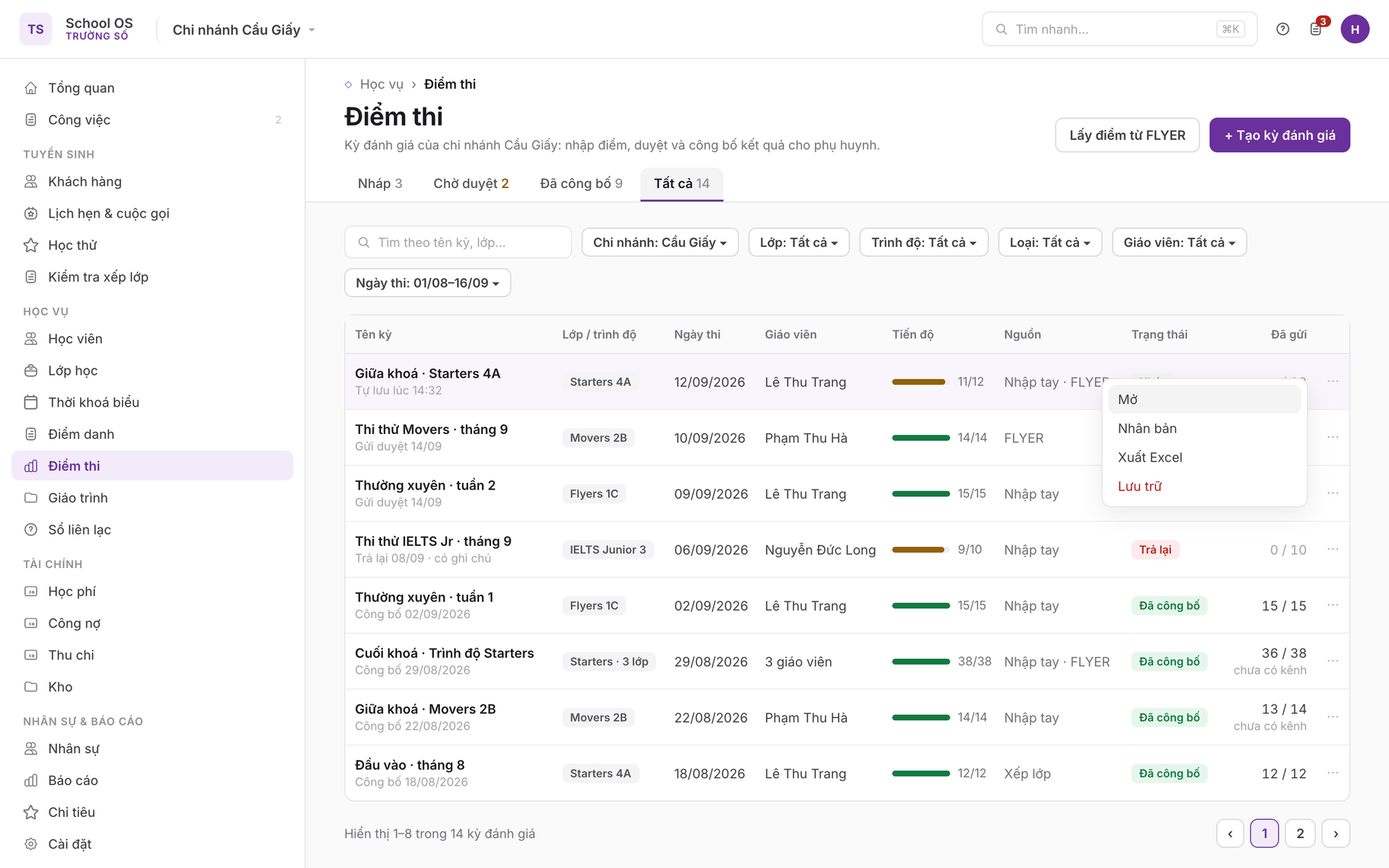
Tabs Nháp · Chờ duyệt · Đã công bố · Tất cả with counters; filters for branch, class, level, type, teacher and exam date range. Each row shows entry progress (11/12), the score source (Nhập tay · FLYER · Xếp lớp), one of four statuses including Trả lại, and notifications sent over total with a "chưa có kênh" note for guardians without a channel (section 10). The ⋯ menu offers Mở · Nhân bản · Xuất Excel · Lưu trữ.

2 · Assessment form (drawer)

/assessments/new · desktop

Assessment creation form
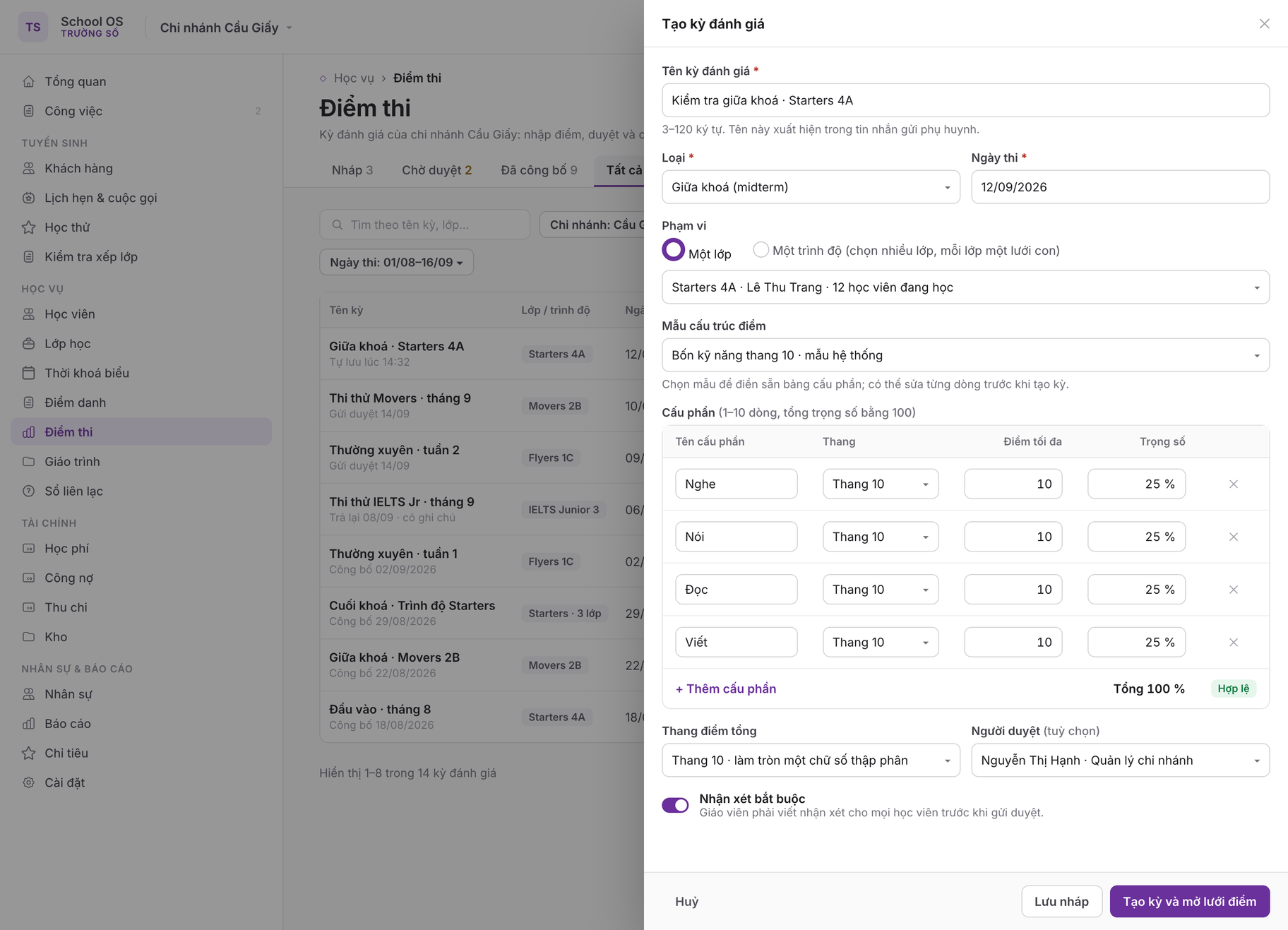
A right-hand drawer keeps the list behind it. Fields per SCR-01: name, type, scope of one class or one level, exam date, a score template that prefills the component table (name, scale, maximum, weight), a weight total of 100 % confirmed as "Hợp lệ" (rule 2), the total scale, the Comment required toggle and an optional reviewer (rule 4).

3 · Whole-class grid

/assessments/:id · desktop

Whole-class score grid
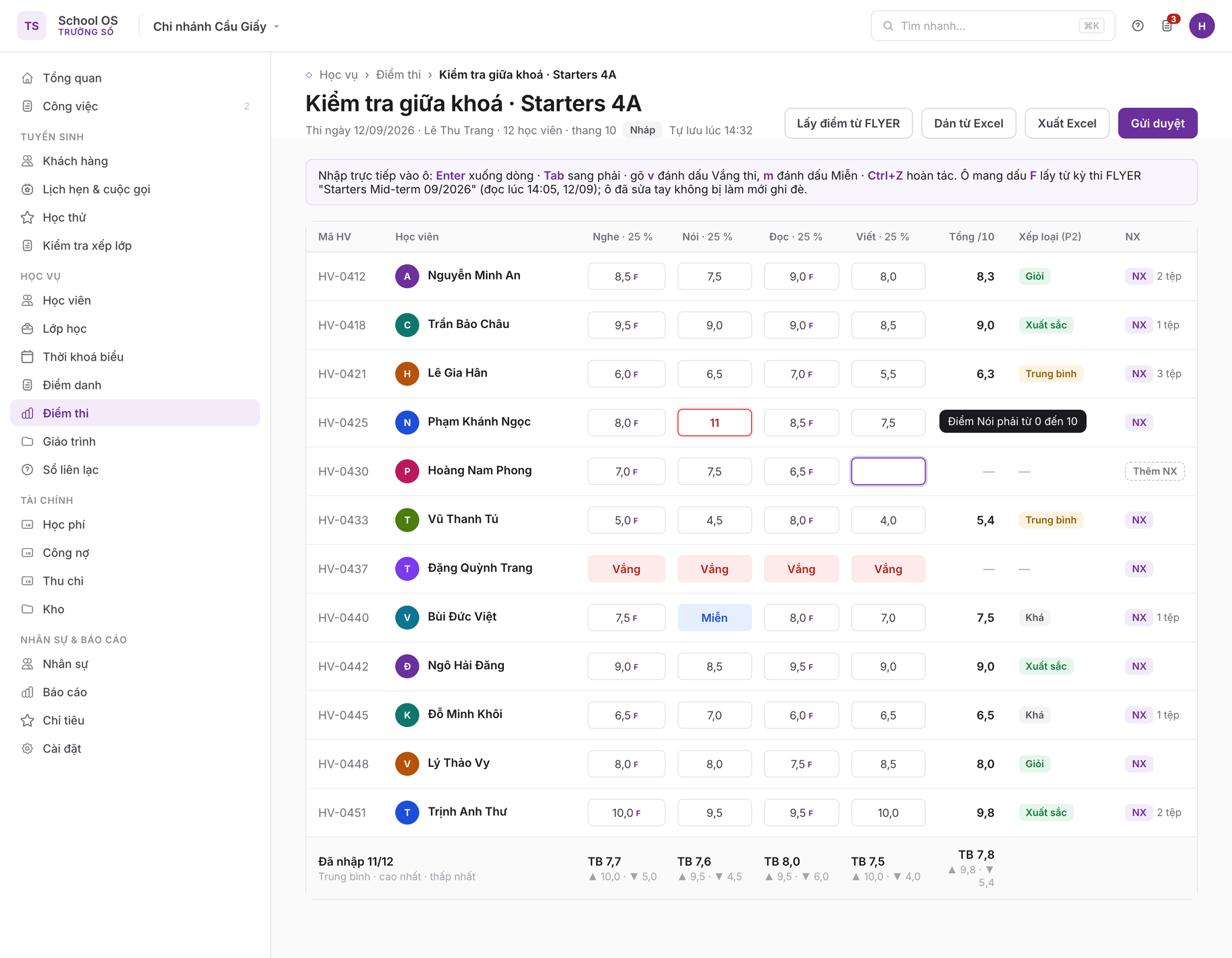
One row per student, one column per component with the weight in the header, plus Total, label (P2) and NX columns; the footer row shows entered 11/12, mean, highest and lowest. States on display: the cell being edited (Viết for Hoàng Nam Phong), an out-of-scale cell with a red border and message (Nói 11 for Phạm Khánh Ngọc, SCR-02), FLYER-sourced cells with an F mark, one absent row and one exempt cell (rule 2), and a row without a comment showing "Thêm NX".

4 · Student drawer

/assessments/:id/students/:studentId · desktop

Student detail drawer
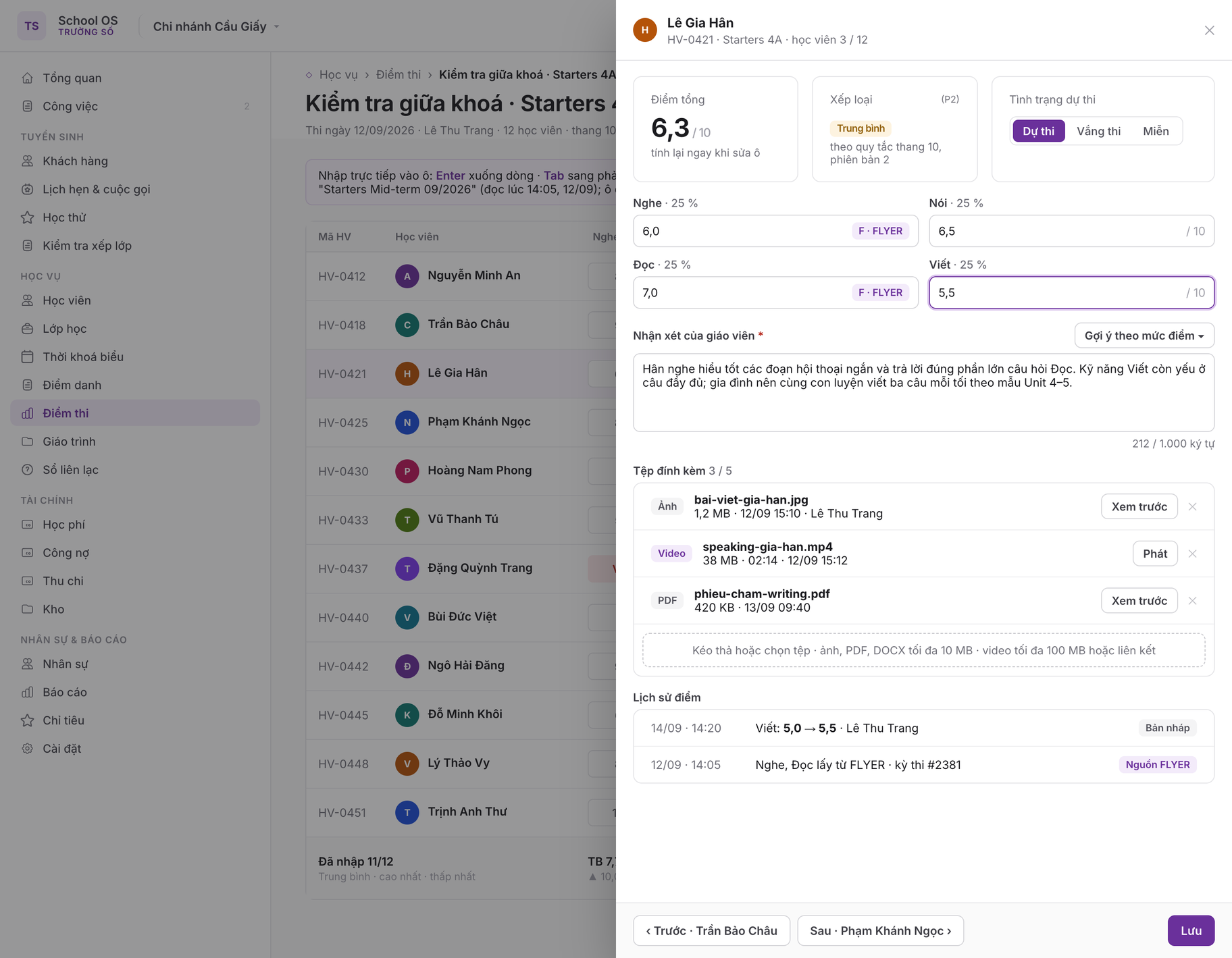
Opened from the NX column: total and label recalculated at once, a Dự thi / Vắng thi / Miễn switch, one field per component with FLYER cells labelled by source, a comment of up to 1,000 characters with a phrase-suggestion button by score band, up to 5 attachments with preview and video playback, and the score history (SCR-03, rule 10). Trước · Sau step through the class roster.

5 · Review and publish modal

/assessments/:id/review · desktop

Review and publish modal
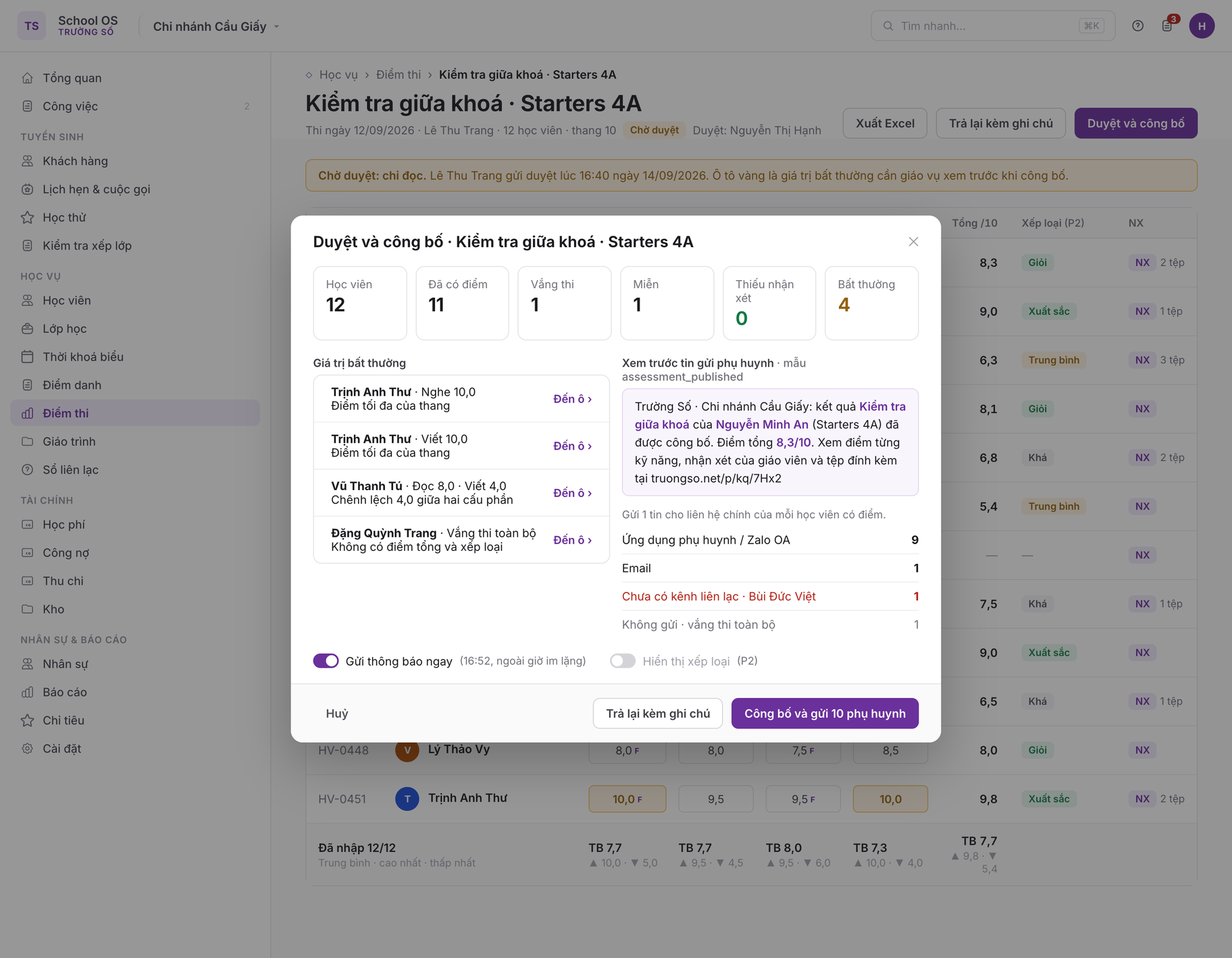
The grid behind is in Chờ duyệt: read-only, anomalous cells highlighted in amber. The modal summarises student count, scored, absent, exempt, missing comments and four anomalies linked to their cells (maximum score, a gap above 3 points, fully absent); a preview of the guardian message from the assessment_published template, reachable contacts per channel and one guardian without a channel; the Gửi thông báo ngay toggle; and Công bố, Trả lại with note, Huỷ (SCR-05, rule 6).

6 · Results tab on the student record

/students/:id#results · desktop

Results tab on the student record
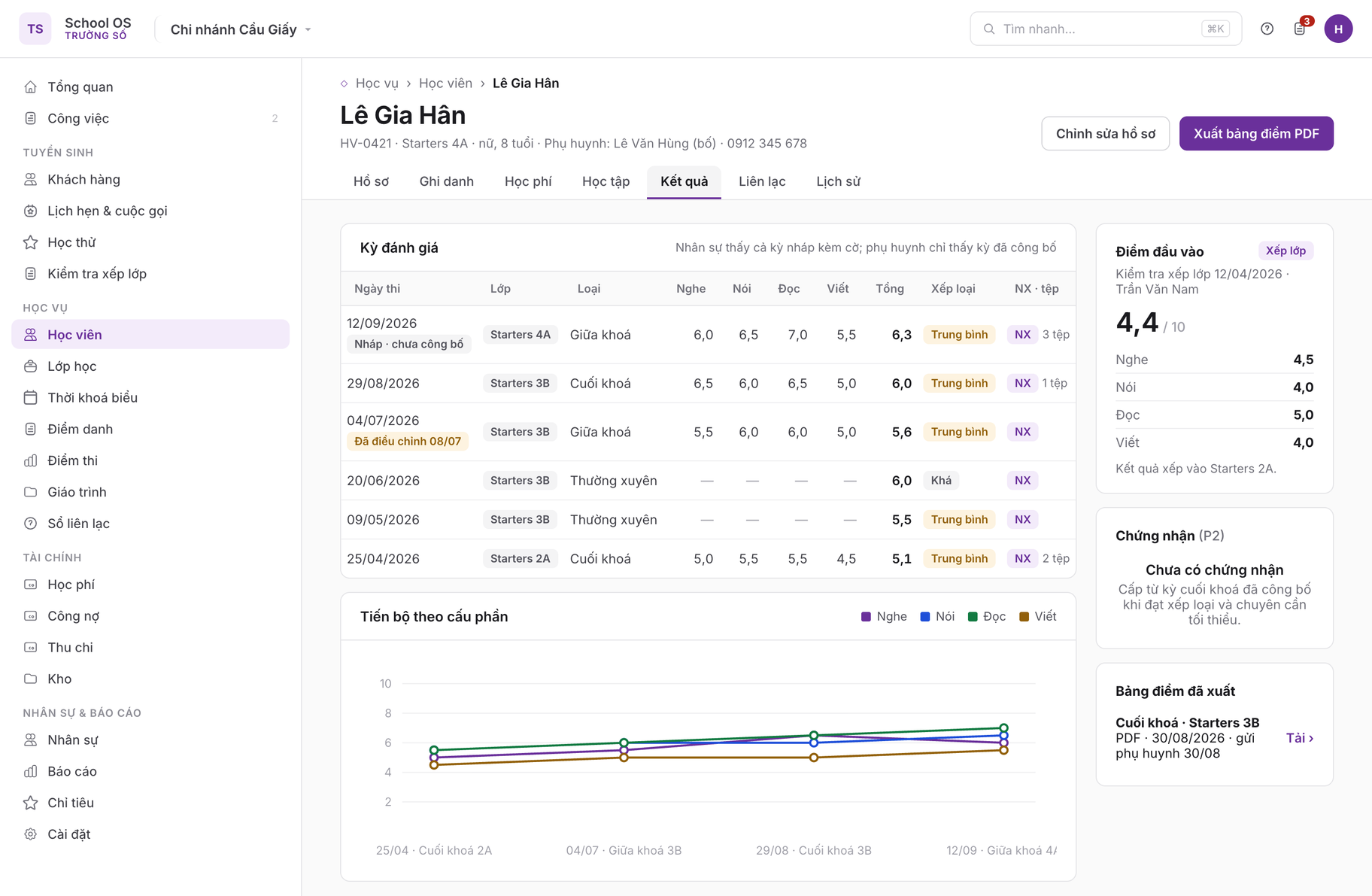
A table of assessments with each component, total, label, comment and files; a draft assessment is shown to staff with a flag, and one corrected after publishing carries the "Đã điều chỉnh" label (SCR-06). A line chart per component across assessments, the Điểm đầu vào block from the placement test, an empty certificates block (P2) and the PDF report card button (SCR-07).

7 · Parent portal · Results

/parent/results · mobile

8 · Teacher score entry on mobile

/assessments/:id/students/:studentId · mobile

Parent portal results page
Teacher entering scores per student on mobile
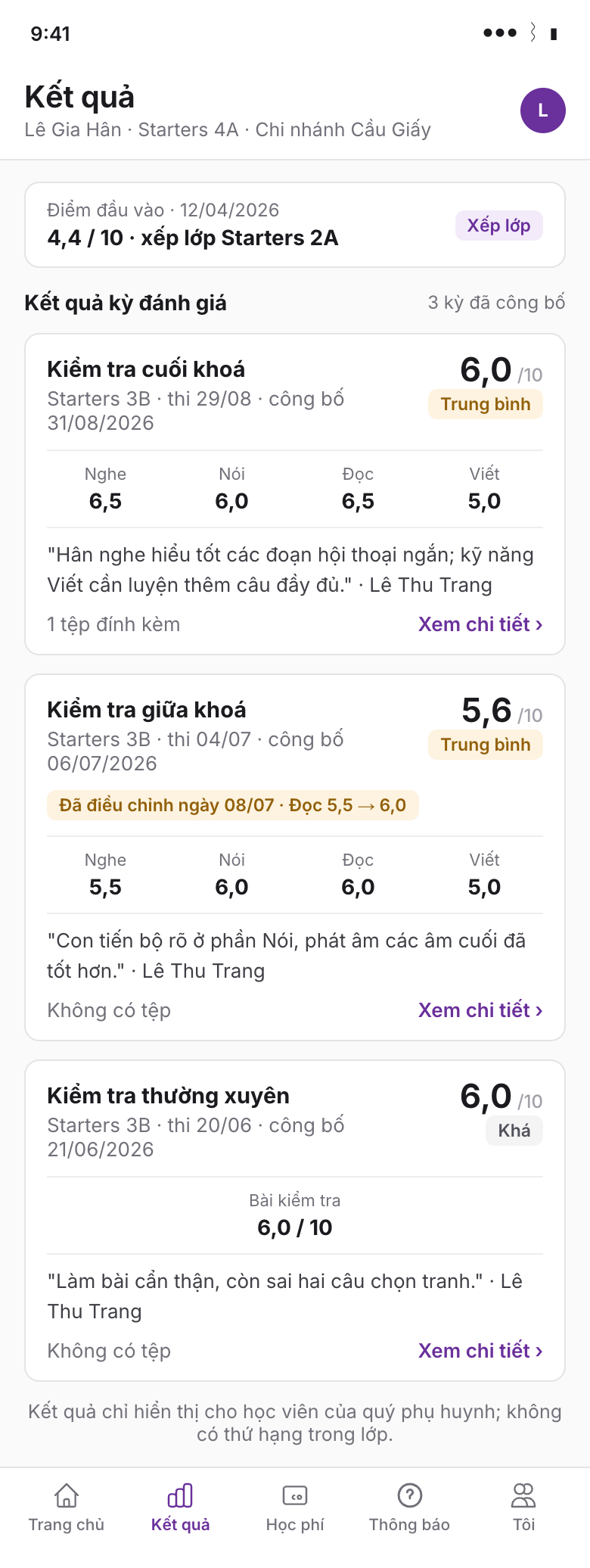
Left: each published assessment is a card with total, label, per-skill scores, the teacher's comment and the file count; an assessment corrected after publishing carries "Đã điều chỉnh ngày 08/07"; no ranking (out of scope). Right: the teacher steps through students one by one (5/12), picks Dự thi / Vắng thi / Miễn, enters each component with FLYER cells marked F, the total is computed only once every component is present, the comment is required, attachments are listed, then Lưu và sang học viên tiếp (SCR-03).

1Purpose

The evidence of progress a guardian trusts most is the score of a test the centre itself ran, with the class teacher's comment next to it. Today most centres keep scores in each teacher's spreadsheet and post a photo of the sheet into a Zalo group; academic staff have no way to check before scores reach guardians. This module turns an assessment into an operational record: a predefined score structure, a whole-class entry grid, a review step, automatic notification and a history of every correction. FLYER online exam results attach to an assessment as a score source instead of being retyped.

In scope

Out of scope

2Current state

The FLYER platform already covers the full life cycle of an online exam: exam creation, sessions, candidates, a four-skill score report, notification. Placement test results exist since PRD 01. What is missing is the centre-level assessment record where a paper test, a live speaking test and a FLYER exam sit side by side, get reviewed and get published to guardians.

Existing capabilityEndpointKeep?
FLYER exams, sessions, candidate listGET/POST /v3/teacher/exams; GET/PUT/DELETE .../{id}; POST .../{exam_id}/sessions; GET .../studentsexisting the source to pick when attaching to an assessment; matched against the class roster
Skill score report (overall, four skills, shields, CEFR, band)GET /v3/teacher/exams/{exam_id}/score-report; .../analytics/summaryexisting read when pulling scores from FLYER
Exam notification; learner-side examsPOST .../exams/{exam_id}/notify; GET /v3/learner/examsexisting kept for exam schedules; result notification goes through PRD 07
Placement test with four-skill scoresGET/POST /v3/crm/placement-tests; POST .../{id}/submit-resultexisting used as the entry score
Learner report for guardiansGET /v3/parent/learner/{id}/reportexisting the parent portal adds an assessment results section
FLYER scores on the student record (StudentScoreEntry)Học tập tab, PRD 02extend add a Results tab
Assessment, score structure, entry grid, review, publish, history, grading labels, report cards, certificatesnonenew

3User stories and acceptance criteria

SCR-01Create an assessment
As academic staff or a teacher I create an assessment with a score structure.
  • Given I have assessments.create and an active class
  • When I enter a name, type, exam date, and pick a centre score template or define components with weights and scales
  • Then the assessment is draft; the roster is snapshotted from the class on the exam date; an empty grid opens at once; weights not summing to 100 are blocked; for level scope, a parent assessment gets one child grid per class, each reviewed and published separately.
SCR-02Whole-class grid entry
As a teacher I enter scores for the whole class on one screen.
  • Given the assessment is draft or returned and I am assigned to the class
  • When I type into cells, use Enter to move down, Tab to move across, arrow keys to navigate, or paste a range from Excel
  • Then each cell is validated instantly against the component scale (0–10 with one decimal, 0–100 integer, shields 0–5, band 0–9 in steps of 0.5); invalid cells get a red border; the total recalculates live; the draft autosaves 10 seconds after the last keystroke; pasted data is matched by row order or by a Student code column, with a dialog stating how many cells will be overwritten.
SCR-03Per-student scores and comment
As a teacher I complete one student's score record.
  • Given the assessment grid
  • When I click a student's name to open the detail drawer, enter each component, mark Vắng thi or Miễn if needed, write a comment (up to 1,000 characters, with phrase suggestions by score band) and attach up to 5 files
  • Then the data saves into the same score record; files go through the existing upload service; the grid row shows a comment icon and file count; Previous and Next move through students.
SCR-04Pull scores from a FLYER exam
As a teacher I bring online exam scores into the assessment instead of retyping.
  • Given the assessment has skill components and the school has a completed FLYER exam
  • When I choose "Lấy điểm từ FLYER", pick the exam from GET /v3/teacher/exams, confirm the skill-to-component mapping and the conversion scale
  • Then the system reads the score-report, matches candidates to students through their FLYER accounts, fills cells with source flyer_exam; students without a test and candidates outside the class are listed; manually entered cells are overwritten only when "Ghi đè" is chosen explicitly.
SCR-05Submit, publish and notify guardians
As a teacher I submit; as academic staff I publish; as a guardian I receive results.
  • Given every student has scores or is marked Vắng thi or Miễn, and comments are complete per configuration
  • When the teacher chooses "Gửi duyệt"; academic staff review the grid with anomalies highlighted (zero, maximum, a gap above 3 points between components, empty comment) and choose "Công bố" or "Trả lại" with a note
  • Then submit moves to pending_review, locks the grid for the teacher and notifies holders of assessments.publish. Publish moves to published, locks scores and emits assessment.published; PRD 07 sends one message to the primary contact of each scored student (parent app, Zalo OA, email; ZNS template assessment_published) with the student name, assessment name, total and a link to the result page showing component scores, comment, files and grading label, with no ranking; delivery status is shown on the assessment. Return moves to returned, the teacher gets the note and the grid reopens.
SCR-06Re-grade after publishing
As academic staff I fix a wrong published score with a reason and audit.
  • Given the assessment is published and I have assessments.regrade
  • When I edit a score cell or comment, enter a reason (required, 10–300 characters) and choose whether to send an adjustment message
  • Then a history row stores before, after, actor, time and reason; total and label recalculate; the parent portal shows "Đã điều chỉnh ngày dd/MM"; the adjustment message goes only to the affected guardian; a teacher without this permission sees "Đề nghị sửa điểm", which creates a task for academic staff.
SCR-07Results on the student record and report card export
As academic staff I follow a student's progress across assessments.
  • Given a student with at least one published assessment
  • When I open the Results tab on the student record
  • Then I see a table of assessments (date, class, type, each component, total, label), a line chart per component, the entry score from the placement test, and "Xuất bảng điểm", which produces a one-page PDF with the centre logo, the score table and the comment; on the assessment screen, "Xuất Excel" produces a class xlsx with a scores sheet and a comments sheet.
SCR-08Grading labels and certificates (P2)
As an owner I define grading labels; as academic staff I issue certificates after the end-of-course assessment.
  • Given I have assessments.settings and a published end-of-course assessment
  • When I define label bands per scale (for a 10-point scale: Xuất sắc from 9.0; Giỏi from 8.0; Khá from 6.5; Trung bình from 5.0; Cần cố gắng below 5.0), then choose "Cấp chứng nhận", pick a template and confirm the list of eligible students (minimum label and attendance rate)
  • Then assessments published after the rule is saved show labels, earlier ones keep their old label unless "Áp dụng lại" is chosen; bands must cover the scale without overlap. Each certificate gets a unique serial (for example CN-2026-000123), a PDF rendered from the template with a QR code leading to a public verification page, and is sent to the guardian through PRD 07; revocation requires a reason and the verification page shows "Đã thu hồi".

4Screens

Assessment list /assessments

Tabs: Nháp (N) · Chờ duyệt (N) · Đã công bố · Tất cả. Filters: branch, class, level, type, teacher, exam date range. Columns: assessment name, class or level, exam date, teacher, entry progress (11/12), source (Nhập tay · FLYER · Xếp lớp), status (Nháp · Chờ duyệt · Đã công bố · Trả lại), notifications sent / total, kebab Mở · Nhân bản · Lưu trữ. Empty state: "Chưa có kỳ đánh giá. Tạo kỳ đánh giá đầu tiên từ một lớp đang học hoặc lấy điểm từ bài kiểm tra FLYER." Teachers only see their assigned classes.

Assessment form (drawer) /assessments/new · /assessments/:id/edit

Fields: Name (required, 3–120 characters); Type (midterm / final / regular / mock_cambridge / mock_ielts); Scope (one class / one level with class selection); Exam date (required); Score template (prefills the component table); Component table (name, scale, maximum, weight %; 1–10 rows, total = 100); Total scale (ten / hundred / shields / band); Comment required toggle; Reviewer (optional).

Whole-class grid /assessments/:id

Header: assessment name, exam date, status, autosave time; buttons Lấy điểm từ FLYER · Dán từ Excel · Xuất Excel · Gửi duyệt. Table: one row per student, one column per component (header shows the weight), a Total column, a label column (P2), an NX column; footer row: entered / total, mean, highest, lowest. The student column is pinned on horizontal scroll. Enter moves down, Tab right, arrow keys navigate, Escape cancels a cell edit, Ctrl+Z undoes. FLYER-sourced cells carry an F mark. Typing "v" marks Vắng thi, "m" marks Miễn. The NX column opens the student drawer. States: loading skeleton; empty roster "Lớp chưa có học viên tại ngày thi"; conflict "Lưới đã được [tên] cập nhật lúc HH:mm" with a reload button; banner "Chờ duyệt: chỉ đọc" or "Đã công bố: sửa điểm cần lý do".

Student drawer and review modal /assessments/:id/students/:studentId · /assessments/:id/review

Drawer: name, student code, total and label; one field per component; Vắng thi / Miễn toggle; comment (1,000 characters, "Gợi ý" inserts a phrase by score band); attachments (drag and drop, image preview, video playback); score history; Trước · Sau · Lưu. Review modal: student count, scored, absent, exempt, missing comments, anomalies linked to their cells; a preview of the guardian message with a sample student, the number of reachable guardians and the number without a channel; toggles "Gửi thông báo ngay" and "Hiển thị xếp loại" (P2); Công bố · Trả lại with note · Huỷ.

Results tab, parent portal and settings /students/:id#results · /parent/results · /settings/assessments

Student record: table of published assessments (date, class, type, each component, total, label, comment, files), a line chart per component over up to 12 assessments, an "Điểm đầu vào" block from the placement test, certificates (P2), a PDF report card button. Parent portal: a "Kết quả kỳ đánh giá" section on the PRD 07 results page, one card per assessment opening a detail page; no ranking. Settings: score templates (system templates: four skills on 10, Cambridge YLE shields, IELTS band, single-column regular test), comment phrases, grading rules (P2), certificate templates and serial format (P2).

5Business rules

  1. An assessment belongs to one branch and one class (or one level with child grids per class); the roster is snapshotted from active enrollments on the exam date; academic staff may add students manually before publishing, audited.
  2. Weights sum to 100. Total = sum (component score converted to the total scale × weight) / 100; rounded to one decimal on the 10-point scale, an integer on 100, steps of 0.5 for band. An absent component counts 0; an exempt component leaves the denominator; a fully absent student has no total and no label.
  3. States: draft → pending_review → published; pending_review → returned → pending_review; published → archived. Any other transition returns INVALID_TRANSITION.
  4. Submit requires every student scored or marked absent or exempt, and comments complete when "Nhận xét bắt buộc" is on. The reviewer must differ from the submitter when the centre enables "Tách vai trò duyệt" (default on for branches with at least 2 publish holders).
  5. After publishing, scores and comments change only through assessments.regrade with a reason; every change is written to history and never overwrites the old value; a published assessment cannot be deleted, only archived.
  6. Publish notification sends one message to each scored student's primary contact through PRD 07 with type assessment_published; quiet hours 21:30–07:00 apply; an adult student with a parent-portal role for themselves receives it directly.
  7. Values pulled from FLYER keep the exam_id and read time; refresh is allowed only in draft and returned; manually edited cells carry manual_override and are not overwritten by a refresh unless chosen explicitly.
  8. Fixed conversions: 100 to 10 divides by 10; Cambridge shields to 10 multiplies by 2; IELTS band keeps its value with the note "quy đổi tham khảo"; no reverse conversion from 10 to band.
  9. Labels (P2) are computed at publish time and stored with the rule version. Certificates (P2) are issued only from a published end-of-course assessment; serials are unique per tenant and never reused after revocation; the public verification page shows only the student name, course, issue date, branch and status.
  10. Attachments: up to 5 per student per assessment; images, PDF, DOCX up to 10 MB; video up to 100 MB or a link; retained 24 months after publishing.
  11. Assessments are branch-level data (school_id); score templates, grading rules, certificate templates and comment phrases are centre-level data (center_id).

6Data model

EntityFieldsNotes
assessment_templateid; center_id; name; components jsonb [{key, name, scale, max, weight}]; total_scale enum(ten, hundred, shields, band); comment_required; is_systemcentre level; new
assessmentid uuid; center_id; school_id; class_id null; level_id null; parent_assessment_id null; name; type enum(midterm, final, regular, mock_cambridge, mock_ielts); exam_date; components jsonb (snapshot from template); total_scale; comment_required; source enum(manual, flyer_exam, placement_test, mixed); flyer_exam_id null; flyer_synced_at; status enum(draft, pending_review, returned, published, archived); reviewer_staff_id null; published_by; published_at; return_note; show_grade; grading_rule_version; version int; created_by; updated_atbranch level; new; a level assessment is a parent record with child records per class
assessment_scoreid uuid; assessment_id; student_id; enrollment_id null; roster_type enum(enrolled, added); component_scores jsonb {key: {value, source, manual_override}}; total null; grade_label null; attendance_status enum(taken, absent, exempt); exempt_components[]; flyer_learner_id null; updated_by; updated_at; version intunique (assessment_id, student_id); new
assessment_commentid; assessment_score_id (unique); body text (≤ 1,000 characters); template_phrase_id null; author_staff_id; updated_atnew; separate table for full-text search
assessment_attachmentid; assessment_score_id; kind enum(image, document, video, video_link); file_id null; url null; name; size_bytes; uploaded_by; created_atnew; max 5 per score
assessment_score_historyid; assessment_score_id; field (component key | total | comment | attendance_status); from_value; to_value; reason; notify_sent; actor_id; created_ataudit detail; new
grading_rule (P2), comment_phrasegrading_rule: id; center_id; scale; version; bands jsonb [{label, min, max}]; min_component null; effective_from. comment_phrase: id; center_id; min_total; max_total; text; langcentre level; each rule edit creates a new version
report_cardid; school_id; student_id; scope enum(assessment, course, period); assessment_id null; period_from; period_to; file_id; generated_by; generated_at; sent_atnew; rendered PDF, immutable
certificate_template, certificate (P2)template: id; center_id; name; background_file_id; fields jsonb (positions of name, course, date, serial, QR); serial_format (CN-{yyyy}-{seq:6}); signer_name; signature_file_id; seal_file_id. certificate: id; center_id; school_id; student_id; assessment_id; template_id; serial (unique per center); course_name; grade_label; issued_by; issued_at; file_id; qr_token (unique); status enum(active, revoked); revoked_reasontemplate centre level; certificate branch level with centre-level serial; new
message_template (PRD 07)type adds assessment_published, assessment_adjusted, certificate_issuedextend

7API contract

MethodPathPurpose / request / responseStatus
GET/POST/v3/teacher/exams; GET/PUT/DELETE /v3/teacher/exams/{id}; GET .../{exam_id}/students, /score-report, /analytics/summaryFLYER exams, candidates and skill scores; read by the backend when attaching a FLYER sourceexisting
POST / GET/v3/teacher/exams/{exam_id}/sessions, /notify; /v3/learner/exams; /v3/parent/learner/{id}/report; /v3/crm/placement-tests, /{id}/submit-resultunchangedexisting
GET/POST/v3/crm/assessmentsfilters school_id, status, class_id, level_id, type, teacher_id, from, to → ListResponse; POST {school_id, name, type, exam_date, class_id | level_id + class_ids[], template_id | components[], total_scale, comment_required, reviewer_staff_id?} → assessment (children[] for level scope)new
GET/PUT/DELETE/v3/crm/assessments/{id}detail with counts; PUT only in draft/returned; DELETE only in draft; 409 STALE_VERSIONnew
GET / PUT/v3/crm/assessments/{id}/grid; PUT /{id}/scoresgrid → {assessment, components, rows: [{student, roster_type, score, comment_present, attachment_count, flags}], stats}; scores {rows: [{student_id, component_scores?, attendance_status?, exempt_components?}], mode: grid|paste, overwrite, version}; validated in full before writing; 422 with the list of invalid cells; Idempotency-Keynew
GET/PUT/v3/crm/assessments/{id}/students/{student_id}; POST/DELETE .../attachments[/{attachment_id}]; GET .../historyone student's scores, comment, files; PUT {component_scores, attendance_status, comment, reason? (required when published), notify_adjustment?}; score historynew
POST/v3/crm/assessments/{id}/roster; /link-flyer-exam; /submit; /return; /publish; /archiveroster {add[], remove[], reason} before publishing only; link-flyer-exam {exam_id, mapping, overwrite} → {filled, unmatched_students[]}; /return {note}; /publish {notify, show_grade} emits assessment.published; INVALID_TRANSITION, VALIDATION_INCOMPLETEnew
GET / POST/v3/crm/assessments/{id}/export?format=xlsx; POST /{id}/report-cardsclass xlsx; report-cards {student_ids[] | all} → {job_id}new
GET/v3/crm/students/{id}/resultspublished assessments (staff also see drafts, flagged), entry score, certificates, per-component seriesnew
GET/POST/PUT/DELETE/v3/crm/assessment-templates[/{id}]; /v3/crm/comment-phrases[/{id}]; GET/POST /v3/crm/grading-rules; /v3/crm/certificate-templatescentre-level catalogues; deleting a template in use is blocked; versioned grading rules (P2)new
GET/POST/v3/crm/certificates; POST /{id}/revoke; GET /{id}/file; GET /v3/crm/certificates/verify/{qr_token}{assessment_id, template_id, student_ids[]} → certificates with serials; revoke {reason}; verify is public, no login (P2)new
GET/v3/parent/learner/{id}/results; /results/{assessment_id}published results for the parent portal; no other student's datanew
GET/PUT/v3/teacher/school-configassessment_policy block: comment_required_default, separate_reviewer, notify_absent, show_grade_default, attachment_limitsextend

8Permissions

Codeownerbranch_manageradmissionsacademic_adminaccountantteacherparent
assessments.viewallbranchnobranchnoassigned classeslinked children (published only)
assessments.create, .enter_scores, .submit, .link_flyer, .exportyesbranchnobranchnoassigned classesown child's report card only
assessments.publish, assessments.roster_edityesbranchnobranchnonono
assessments.regradeyesbranchnobranchnorequest onlyno
certificates.issue, certificates.revoke (P2)yesbranchnoissue; revoke needs branch_managernonono
assessments.settings (templates, labels, certificate templates, phrases)yesnonocomment phrases onlynonono

9Analytics events

EventProperties
assessment_createdtype, scope (class|level), from_template, components_count, total_scale
assessment_scores_savedmode (grid|single|paste|flyer_import), cells_written, cells_invalid, seconds_in_grid, by_role, unmatched (flyer)
assessment_submitted / assessment_returnedstudents, absent_count, comments_missing, hours_from_exam_date, anomalies_flagged
assessment_publishedstudents, notified, skipped_no_channel, show_grade, hours_in_review
assessment_notification_sentchannel, outcome, template (published|adjusted|certificate)
assessment_score_regradedfield, days_after_publish, by_role, notify
assessment_exportedformat (xlsx|pdf), scope (class|student)
parent_result_viewedseconds_after_notification, has_attachment, has_grade
certificate_issued / certificate_revoked / certificate_verifiedtemplate_id, count, reason, source (qr|link)

10Edge cases

11Open questions

Trường Số (truongso.net) · FLYER internal