Trường Số PRD/14 Curriculum
Trường Số · Product Requirements · 09/2026

PRD 14 · Curriculum, lessons and digital resources

Curriculum as an ordered tree (curriculum, unit, lesson) versioned per centre and shared across branches; a course references one curriculum version and a class's sessions are pre-mapped to lessons in order; a per-session teaching log for teachers and a progress report per class; a digital resource library with folders, storage quota and permissions. Files live on FLYER's existing file service.

Key facts, origin and limits
Status
Draft v1
Owning module
Đào tạo
Backend
EXISTING customer-files, class-schedule lessons, assign-tests · NEW curriculum, unit, lesson, resource library, session mapping, teaching log
Phase
P1 (curriculum, lessons, session binding) / P2 (shared resource library, versioning)
Depends on
03 Classes, 06 Staff, 07 Parents, 10 Settings

Drafted by an AI assistant in a single session on 16/09/2026, extending the PRD set under the original request quoted verbatim on the hub page. A proposal for team discussion, not a decision of the product team.

Sources

  • Public competitor research (PSE ONE, pse4.one), the center-crm-frontend codebase and the staging /v3 OpenAPI specification (182 paths), as of 10/09/2026.
  • The existing / extend / new tags on this page come from a comparison with the staging /v3 specification at that date.
  • A second scan of PSE ONE's public sources on 16/09/2026 (features page, pricing, user-guide articles).
  • Competitor reference (pse4.one, public scan on 16/09/2026): the competitor offers a "Quản lý giáo trình" module inside its database administration area; curricula are organised as folders in a digital-resources tab, lessons are created from a "Bài học" resource template with application type HTML and can embed YouTube videos; online teaching is only in the Enterprise tier.

Limits

  • To verify in a hands-on survey of the application, because automated login to the reference product was not authorised in the drafting session:
    • Whether the competitor has curriculum versioning, or every edit applies immediately to running classes.
    • Whether their lessons are bound to specific timetable sessions or only sit in folders for teachers to look up.
    • Whether a per-session teaching log exists, and whether teachers write it on mobile or only on the web.
    • Storage quota per tier and allowed file types; resource templates other than "Bài học" and application types other than "HTML".
    • Whether the student app shows "tài liệu học tập" per session, per class or for the whole curriculum, and whether parents can see untaught lessons.
    • Whether the competitor's "Quản trị dữ liệu" right is granted for the whole module or per folder.

Proposed design

The curriculum is an ordered, versioned tree; lessons are pre-mapped to each class session so progress is derived automatically, and the teacher only confirms "Taught" on the phone after each session. The screens below show the state that matters most: a class three lessons behind because a cancelled session has not been shifted and two sessions are unlogged.

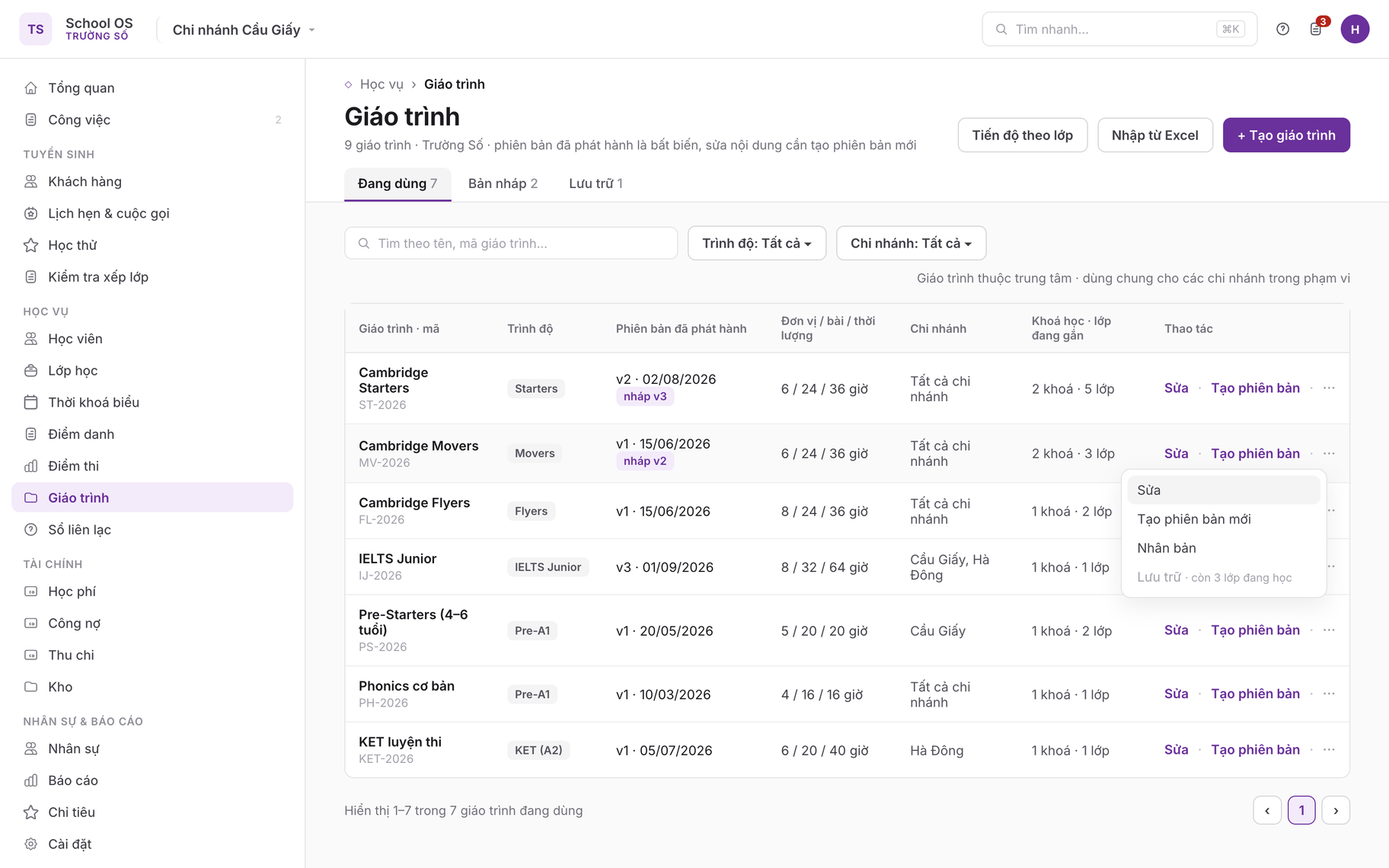
1 · Curriculum list

/curriculum · desktop

Curriculum list
Active / Draft / Archived tabs with level and branch filters; each row shows name and code, the latest published version with a "draft v3" chip when a draft exists, units / lessons / duration, branch scope and the number of courses and classes bound (rules 1, 2). The row menu for Cambridge Movers shows Archive greyed out because three classes are still running (rule 12). Primary actions: Create curriculum and Import from Excel (CUR-01).

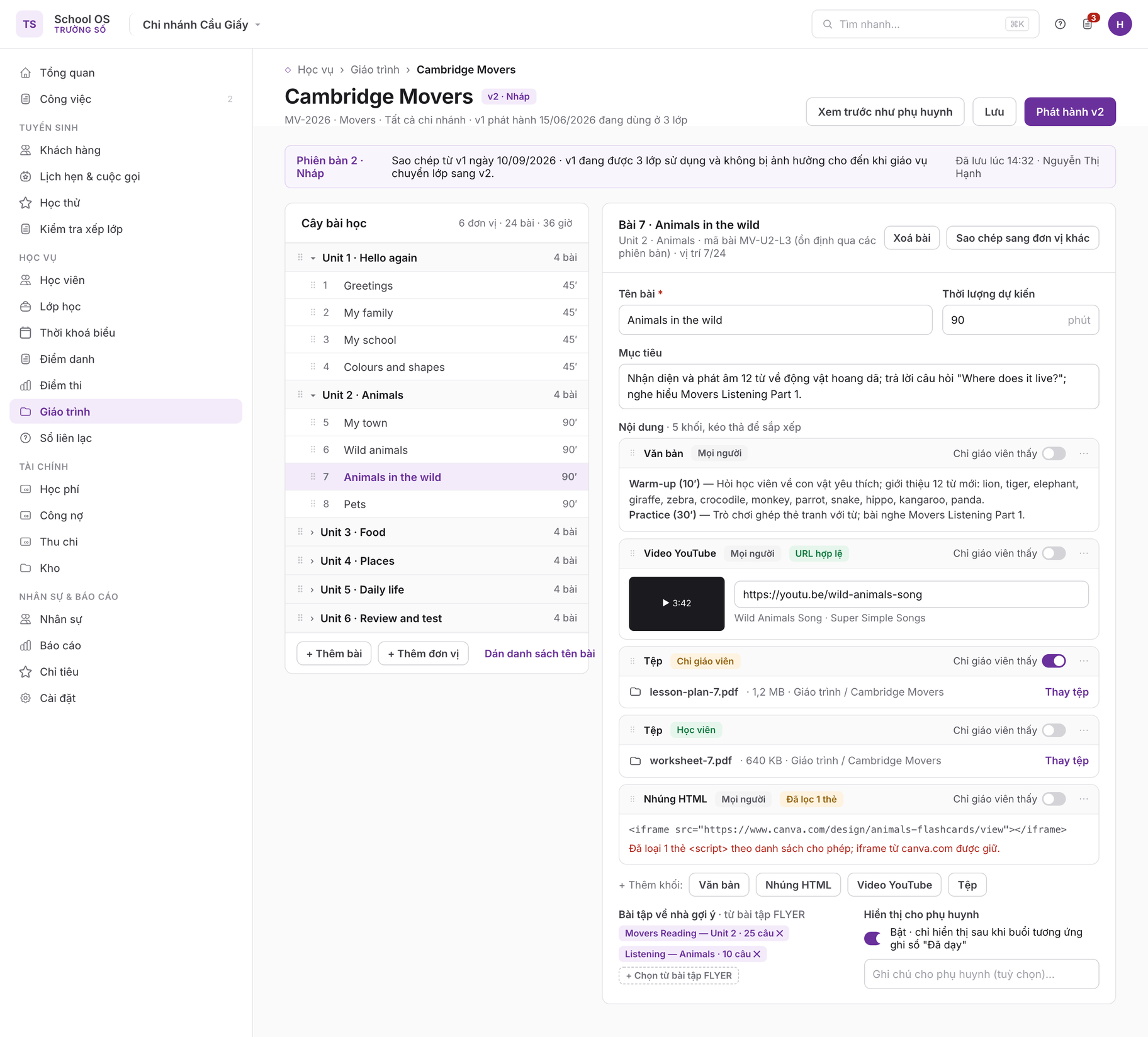
2 · Curriculum page and lesson editor

/curriculum/:id/lessons/:lessonId · desktop

Curriculum page and lesson editor
Left column is the drag-and-drop unit and lesson tree with lesson 7 selected; right column is the editor with objectives, duration and five ordered content blocks: rich text, a YouTube video with a validated URL, two files (teacher material with "Teacher only" switched on, student material) and an HTML embed from which one script tag was stripped by the allowlist (CUR-02, rule 13). The top bar states that version 2 is a draft while v1 stays in use by three classes until published and rebound (CUR-03). Suggested homework is picked from FLYER assignments; the parent visibility flag only takes effect once the session is logged as "Taught" (rule 8).

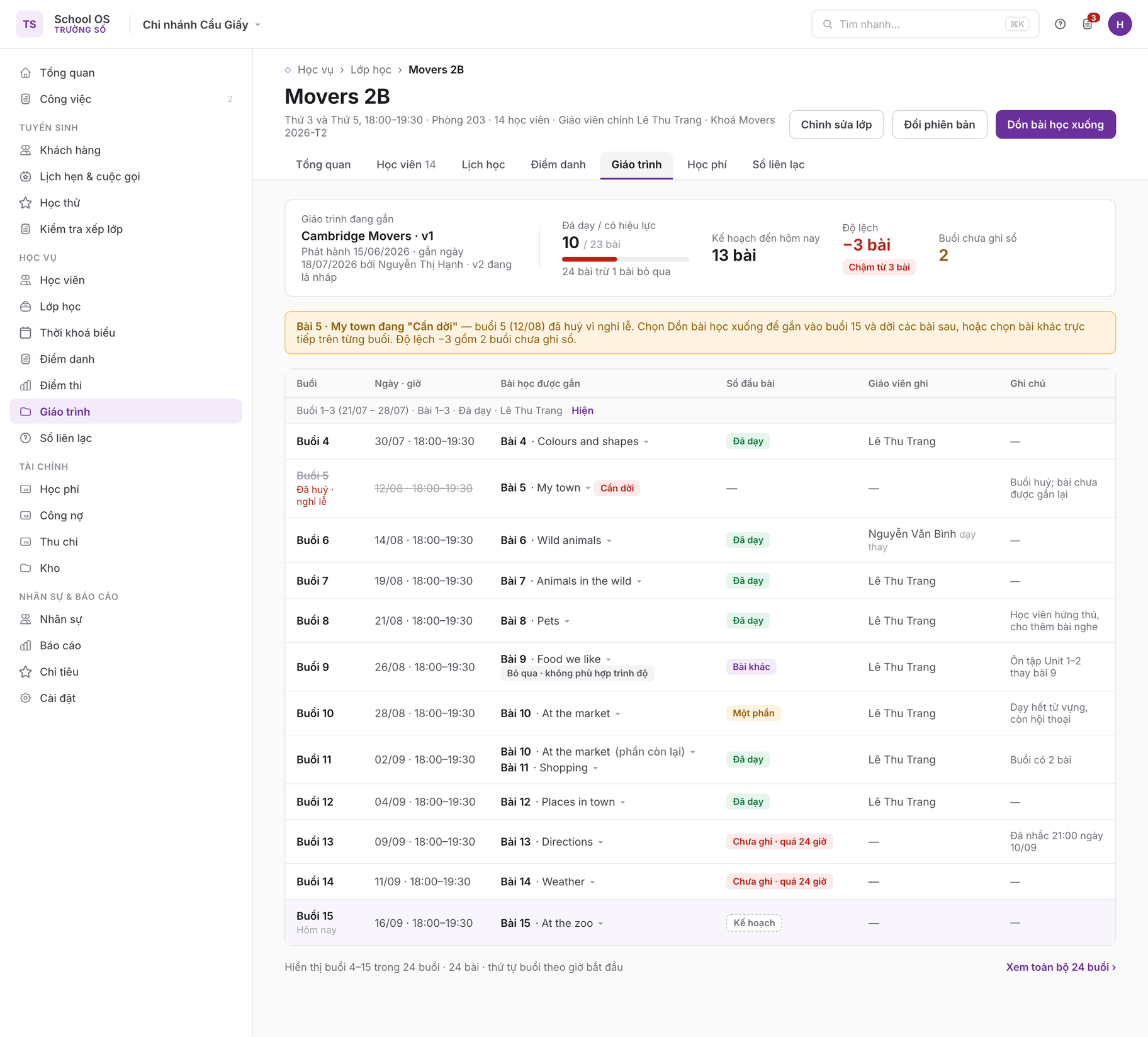
3 · Class Curriculum tab

/classes/:id#syllabus · desktop

Class Curriculum tab
The header summarises the bound curriculum and version, 10 lessons taught out of 23 effective (24 minus 1 skipped), 13 planned to date, a −3 deviation and the "3+ lessons behind" chip (CUR-07, rule 5). The session ↔ lesson table shows every state: the cancelled session 5 struck through with lesson 5 flagged "Needs moving" (rule 4), session 6 logged by a substitute teacher, lesson 9 skipped with a reason and an "Other lesson" log, session 10 partially taught and session 11 carrying two lessons, and two sessions "Unlogged · over 24 h" already reminded at 21:00 (CUR-05, CUR-06).

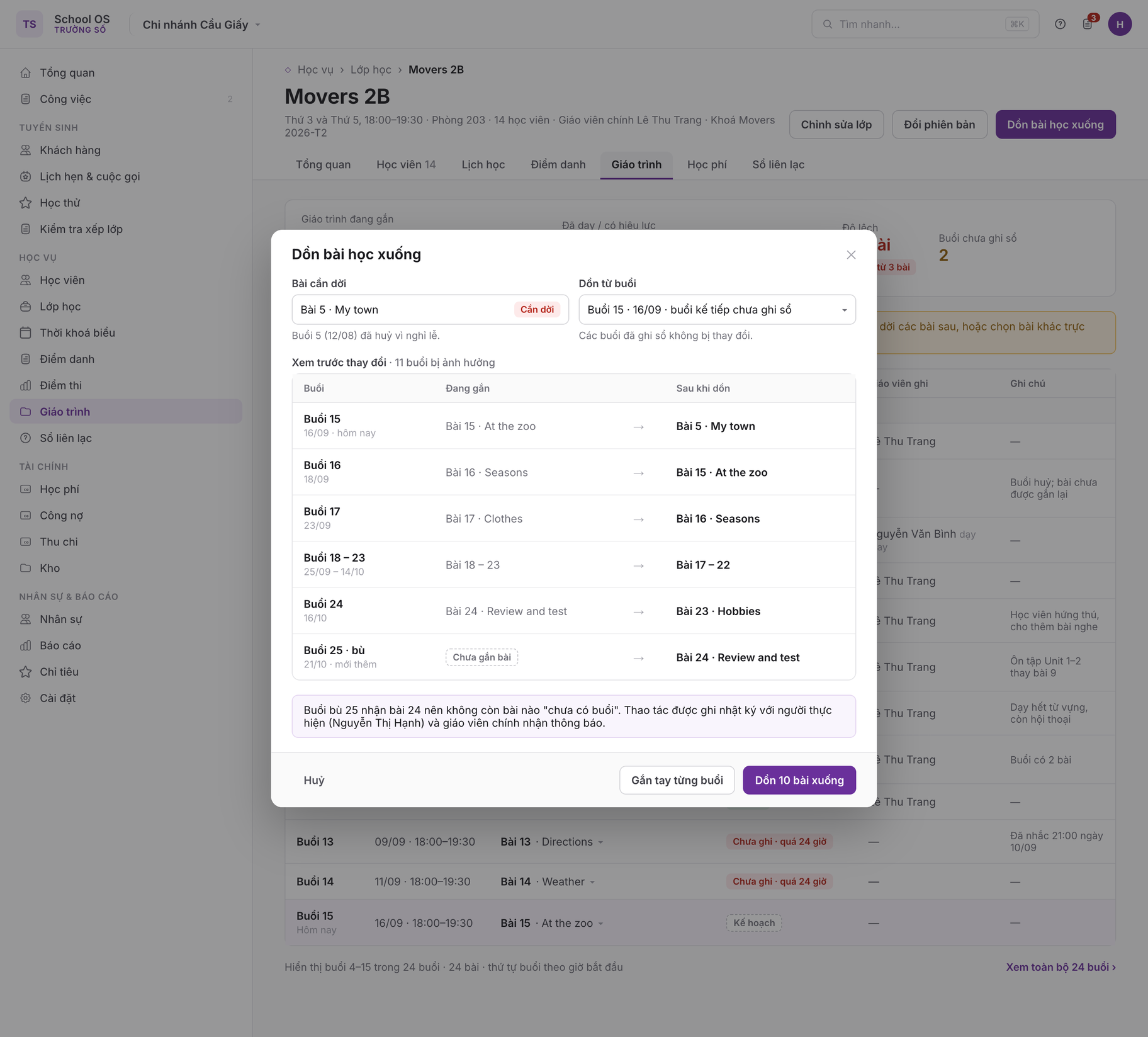
4 · Shift lessons down

/classes/:id#syllabus · hộp thoại

Shift lessons down dialog
Confirmation dialog before shifting: the lesson to move, the session to shift from (the next unlogged session; logged sessions are untouched) and a preview table of old → new mapping, where the newly added make-up session 25 receives lesson 24 (CUR-05). The action is audit-logged with the actor; Cancel sits far left and "Map manually per session" is the alternative.

5 – 6 · Teacher's session log on the phone

/teach/sessions/:id/log · mobile

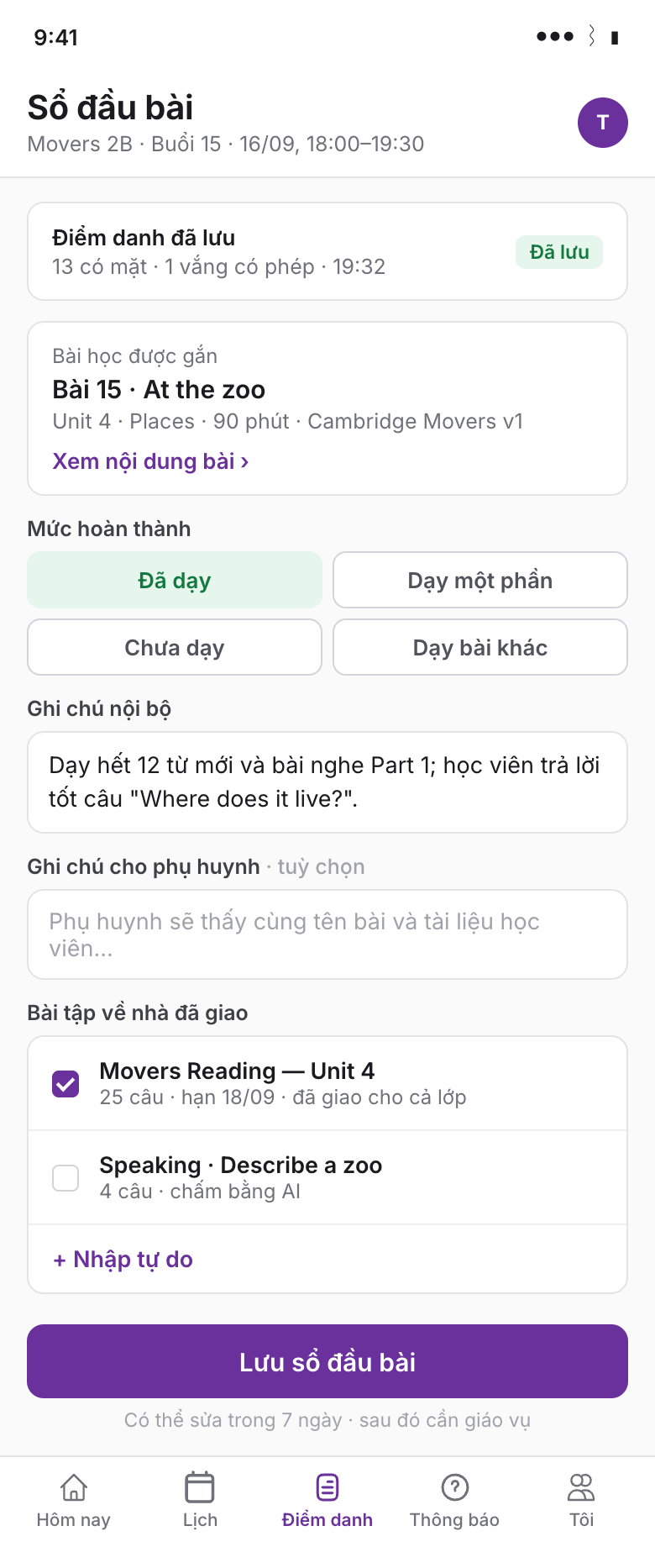
Session log on the phone, Taught state
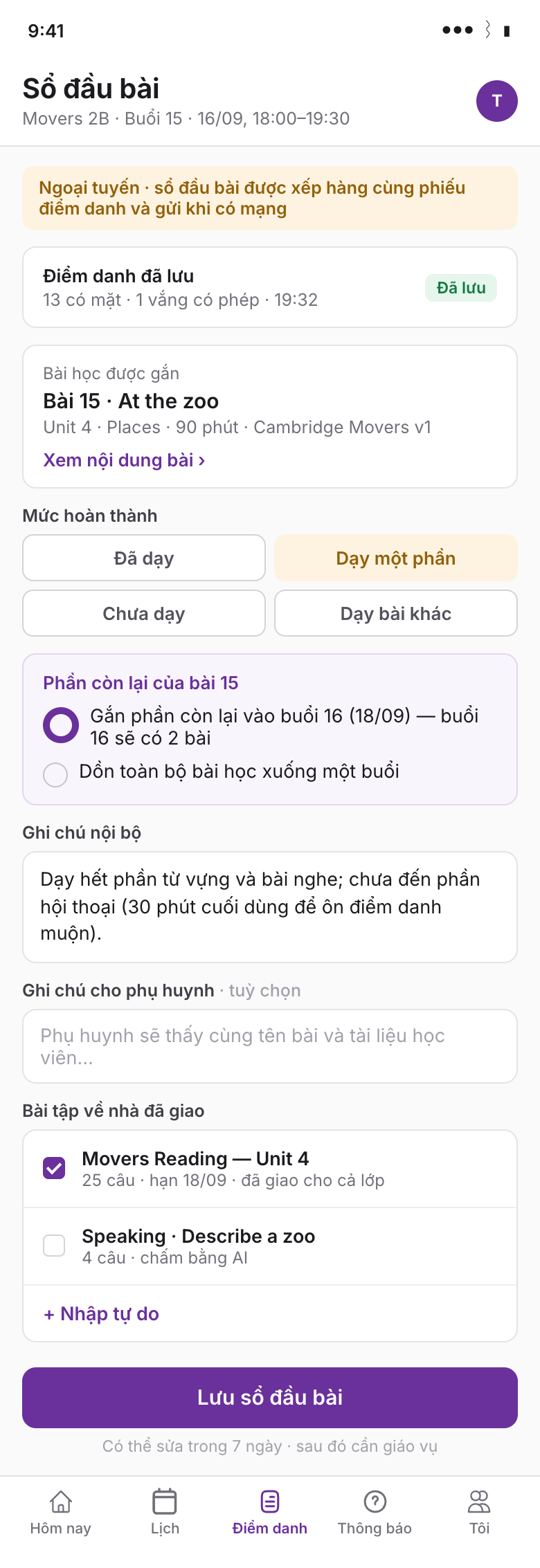
Session log on the phone, Partially taught state while offline
Shown directly under the attendance sheet just saved: the pre-mapped lesson, four completion levels chosen with one tap, internal note, note for parents, homework picked from the class's assignments or typed freely, and a sticky Save button (CUR-06). The right-hand frame selects "Partially taught": the system offers to attach the remainder to session 16 or shift everything down (CUR-05), and the "Offline" banner states the log is queued with the attendance sheet.

7 · Session teaching log on desktop

/classes/:id/sessions/:sessionId#log · desktop

Session teaching log on desktop
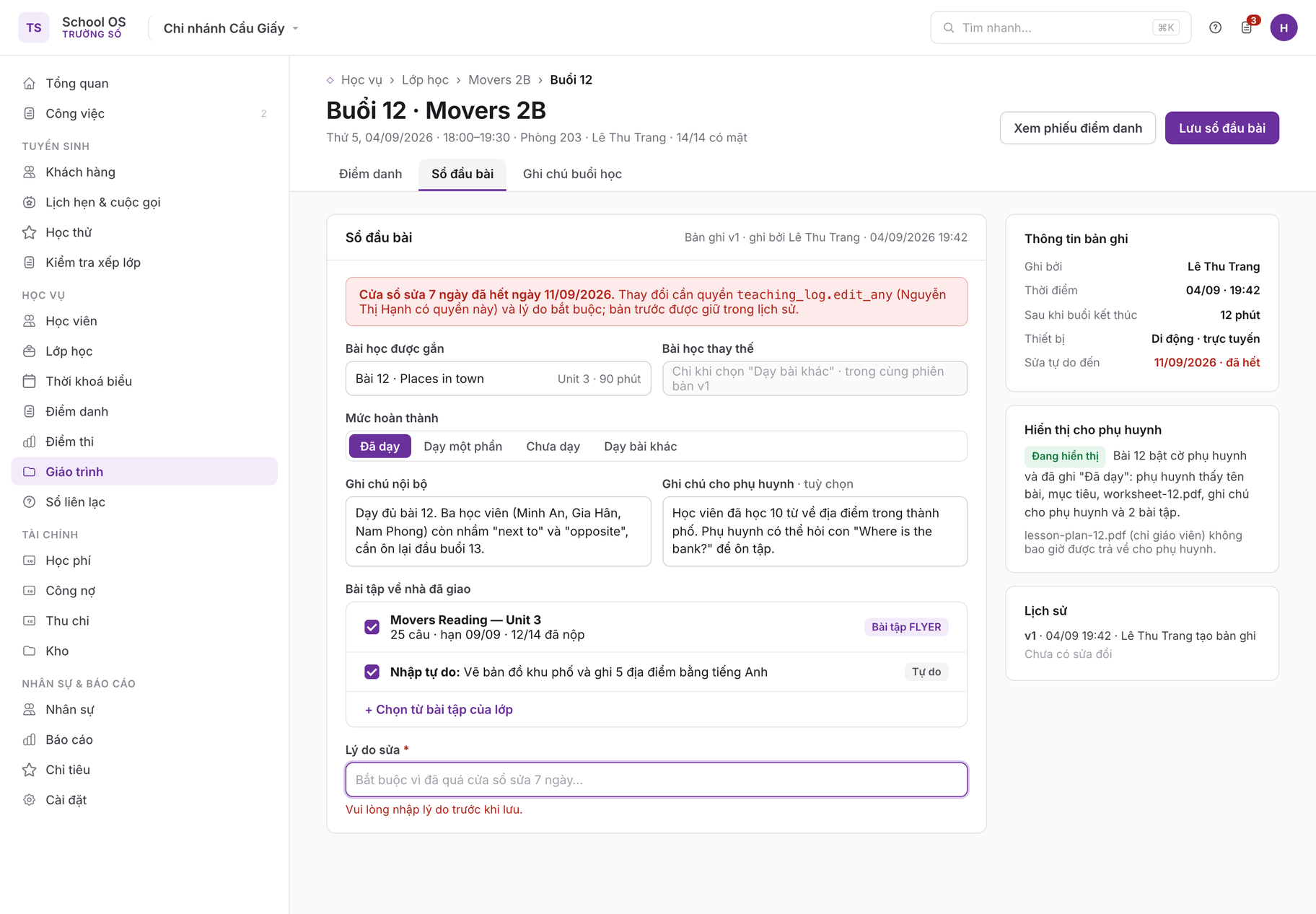
A manager opens the session 12 record after the 7-day edit window has closed: the alert names the required teaching_log.edit_any permission and the mandatory "Reason for edit" field is showing a validation error (rule 6). The right rail shows when and on which device the log was written, the version history, and parent visibility: the lesson was taught so parents see the worksheet, while the teacher-only lesson plan is never returned (CUR-09, rules 7, 8).

8 · Progress by class

/curriculum/progress · desktop

Progress by class
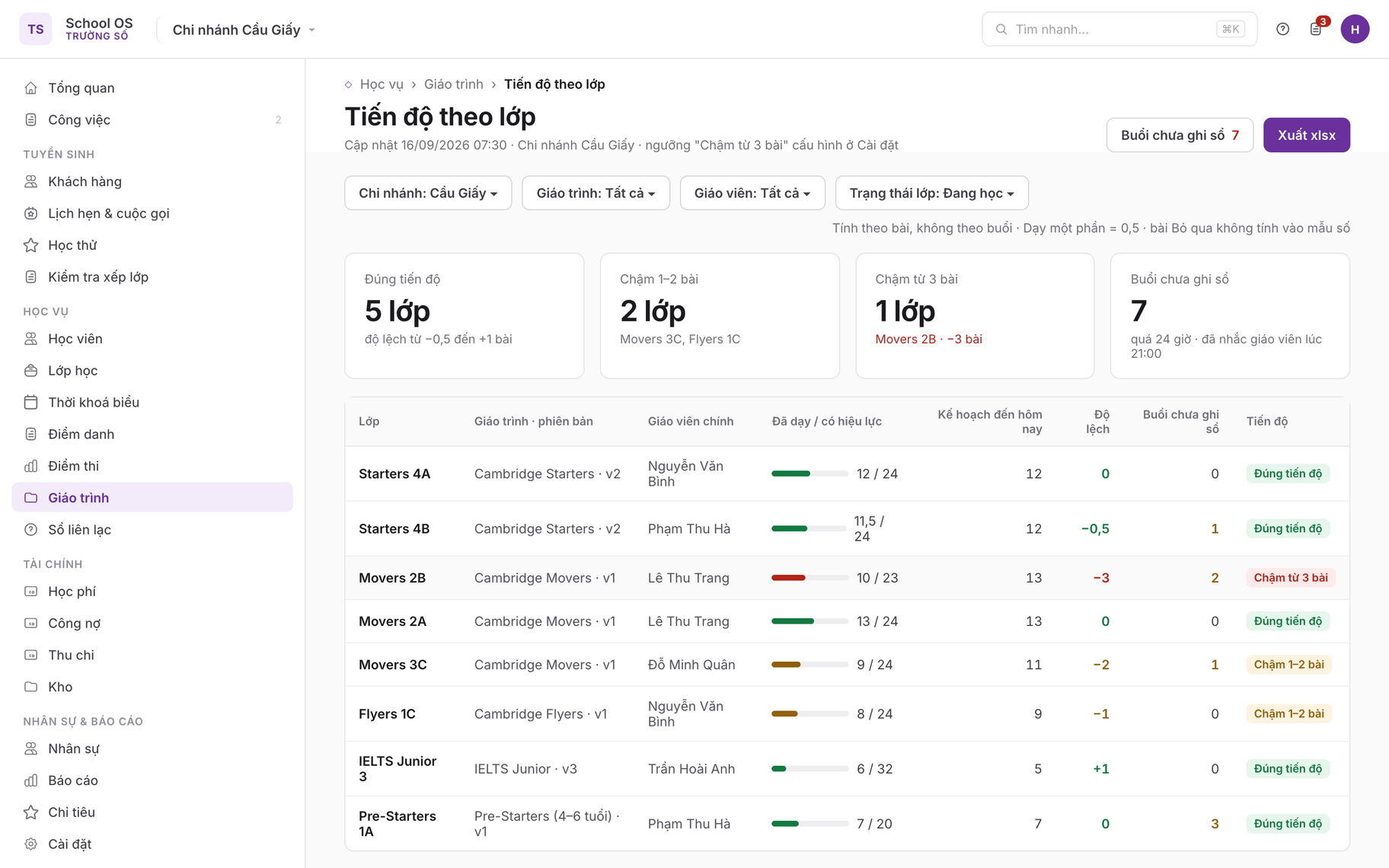
Filters for branch, curriculum, teacher and class status; four summary tiles and a per-class table with taught / effective, planned to date, deviation, unlogged sessions and the progress chip (CUR-07). Movers 2B stands out at −3 lessons with 2 unlogged sessions; selecting a row opens the class's Curriculum tab; Export xlsx sits top right.

9 · Digital resource library

/resources/folders/:id · desktop

Digital resource library
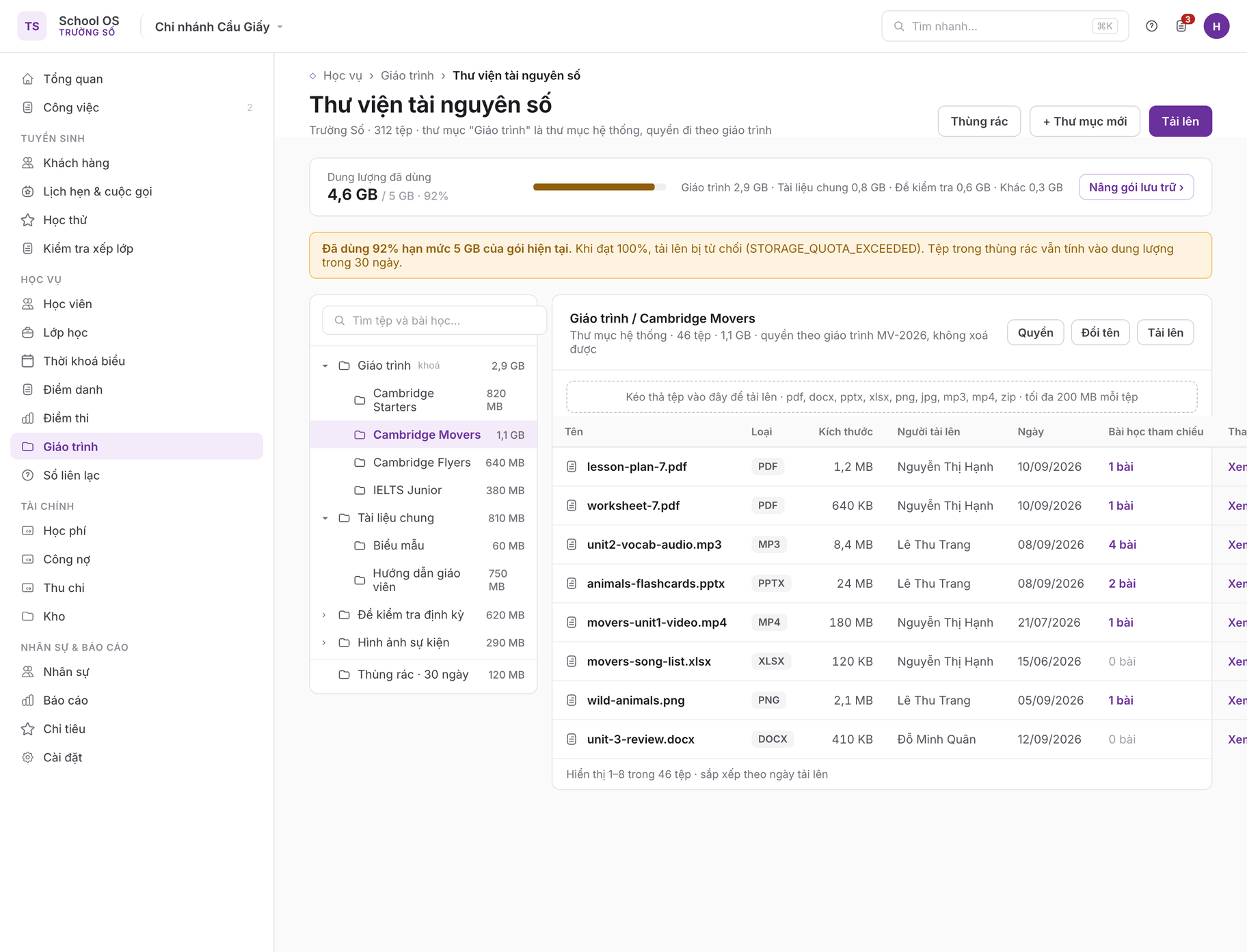
The storage bar at 4.6 / 5 GB (92%) turns to the warning colour with a link to upgrade the storage plan and a reminder that files in the bin still count for 30 days (CUR-08, rules 9, 10). The left column is the folder tree with the locked system folder "Curriculum"; the right column is the file table with name, type, size, uploader, date, referencing lessons and actions; the drop zone lists allowed types and the 200 MB limit.

10 · Folder permissions

/resources/folders/:id · hộp thoại

Folder permissions dialog
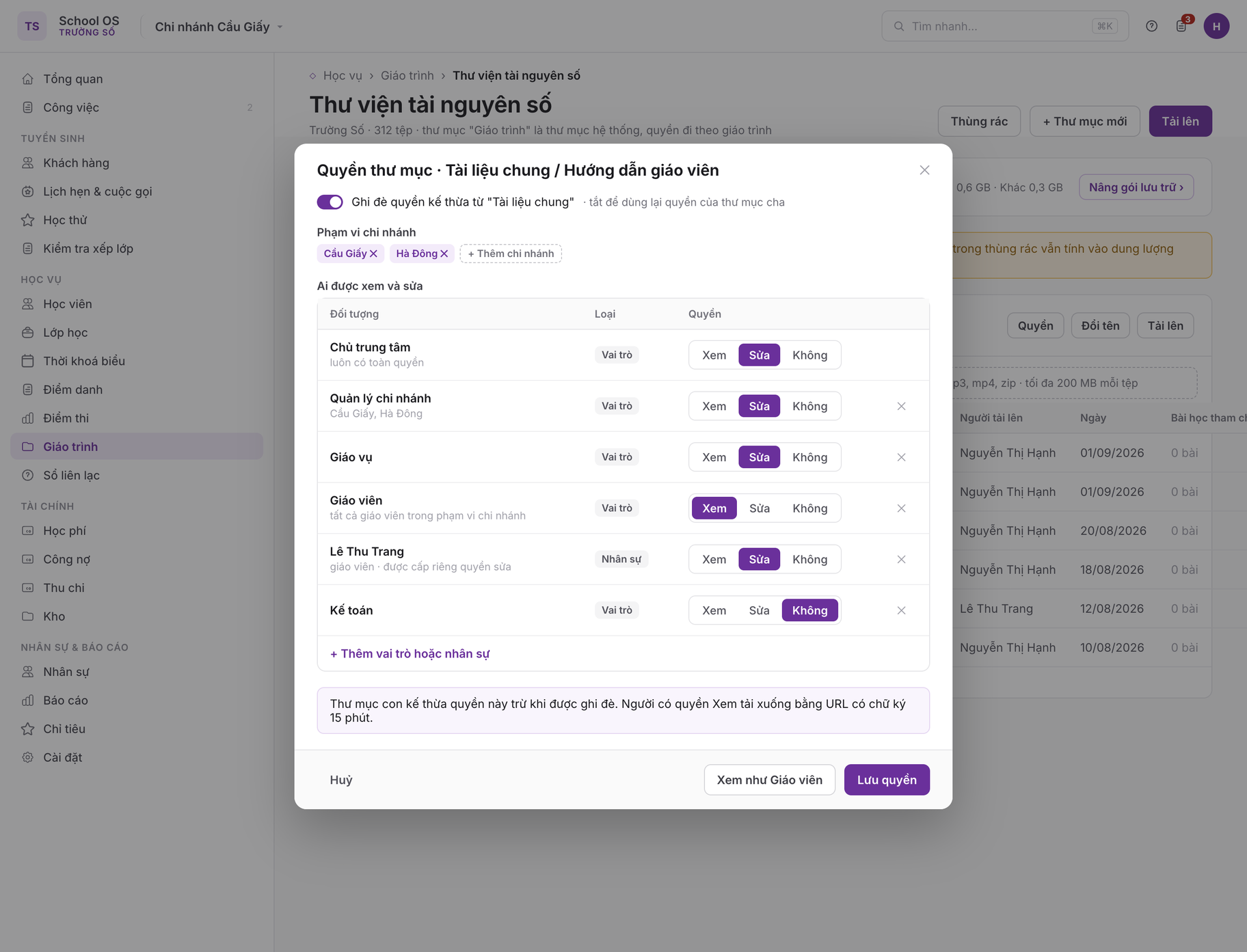
Permissions of the user folder "Teacher guides": a switch to override the permissions inherited from the parent folder, branch scope, and a table of principals by role or specific staff member with three levels View / Edit / None (CUR-08, rule 11). The centre owner always has full access and cannot be removed; "View as Teacher" checks the resulting access.

1Purpose

A centre runs smoothly when every class at the same level teaches the same content at the same pace, whoever is in front of it. Today most centres keep their curriculum in Word files, Google Drive folders and teachers' memory; a substitute teacher does not know where the class has got to, and academic staff cannot tell whether a class is behind plan. This module brings the curriculum into the system as an ordered tree, binds lessons to sessions the moment a class is created, lets the teacher log the lesson in one minute after each session, and gives managers a per-class progress report.

In scope

Out of scope

2Today

center-crm-frontend has no screen for curriculum or resources. FLYER /v3 already has a "lesson" concept attached to ClassSchedule (the FLYER app study path, used for homework reminders) and a file-upload pattern for CRM customer files.

Existing capabilityEndpointKeep?
FLYER study-path lesson attached to a class schedule (study_unit, book, remind status)DELETE /v3/teacher/class-schedules/{id}/lessons/{lesson_id}existing keep; the FLYER lesson is a content source a curriculum lesson may reference, not a replacement entity
Assignments given to a class (filter by status, level, skill, date)GET /v3/teacher/classes/{class_id}/assign-testsexisting keep; source for suggested homework and for homework given in the teaching log
File upload for customer records (file_id, file_name, file_type; file stored on the FLYER file service)GET/POST /v3/crm/customer-files, DELETE /v3/crm/customer-files/{id}existing upload pattern reused; the resource record is a new entity
Curriculum, unit, lesson, version, session-lesson mapping, teaching log, resource library, storage quotanonenew

Trường Số takes its own direction on two points: the curriculum is a versioned, ordered entity rather than a folder tree, and lessons are bound directly to class sessions so progress is derived without the teacher re-entering it.

3User stories and acceptance criteria

CUR-01Create a curriculum and its lesson tree
Academic staff build a curriculum for a level.
  • Given the curriculum.manage permission and a level from the catalogue (PRD 03)
  • When they create a curriculum with name, code, level, branch scope, then add units and lessons by typing or by pasting a list of lesson names (one per line)
  • Then the curriculum is created with version 1 in draft; units and lessons get consecutive position values; drag-and-drop reordering saves immediately; a duplicate code within the centre is rejected and the form offers to open the existing curriculum.
CUR-02Author a lesson
Academic staff or an authorised teacher write lesson content.
  • Given a curriculum version in draft
  • When they open a lesson and enter objectives, expected duration, content blocks (rich text, HTML embed, YouTube video, file attachment), mark which blocks are teacher-only, and pick suggested homework from FLYER assignments
  • Then content is saved as ordered blocks; files are uploaded to the FLYER file service following the customer-files pattern and a resource record is created in the curriculum's system folder; the YouTube URL is validated; HTML embeds are sanitised per rule 13.
CUR-03Publish and create a new version
Academic staff publish a curriculum and revise it without affecting running classes.
  • Given version 1 is published and used by three classes
  • When they choose Create new version, edit content, then Publish
  • Then version 2 is copied from version 1, becomes published and content-locked; the three running classes stay on version 1; the course has the option "New classes use the latest version"; academic staff can move one class to version 2 with a lesson-code reconciliation, unmatched lessons listed for manual mapping.
CUR-04Bind a curriculum to a course and a class
Academic staff create a class and get a ready lesson schedule.
  • Given a course (PRD 03) referencing a published curriculum version with 24 lessons
  • When they create a class from that course with 24 sessions generated from the schedule pattern
  • Then session N is mapped to lesson N; the class Curriculum tab shows the session-to-lesson table; if session and lesson counts differ, the remainder is flagged "Chưa gắn bài" or "Bài chưa có buổi" and staff are warned in the class-creation preview. A course without a curriculum still creates the class normally; the Curriculum tab offers "Gắn giáo trình".
CUR-05Re-map, skip and catch up
Academic staff or the main teacher adjust the plan when the class drifts.
  • Given session 5 is cancelled for a holiday and a make-up session is appended at the end
  • When they open the class Curriculum tab and choose "Dồn bài học xuống" (shift lessons down)
  • Then lesson 5 and all later lessons move one session forward, the final make-up session receives lesson 24; the mapping records the action and the actor.
  • Given session 12 covered only half of lesson 12, or the teacher finds lesson 9 unsuitable
  • When they log "Dạy một phần" (partially taught), or mark lesson 9 as Skipped with a reason
  • Then the system offers to attach the rest of lesson 12 to session 13 (session 13 then has two lessons) or to shift everything; a skipped lesson leaves the progress denominator and its session takes the next lesson if shifted, or stays empty for free content.
CUR-06Teacher writes the teaching log
The teacher records what was taught right after the session, on a phone.
  • Given the session has just ended and the teacher has saved attendance (PRD 04)
  • When the post-attendance summary shows the Teaching log section with the mapped lesson pre-filled
  • Then the teacher confirms "Đã dạy" with one tap, or switches to "Dạy một phần" / "Chưa dạy" / "Dạy bài khác" (picking a lesson from the curriculum), adds a note and the homework given; the record saves in one request; offline it is queued with the attendance sheet; sessions unlogged for over 24 h are reminded at 21:00 and appear in the academic staff's "Chưa ghi sổ" list.
CUR-07Progress report per class
The branch manager sees which classes are behind plan.
  • Given classes with a curriculum and teaching logs in the branch
  • When they open Đào tạo → Tiến độ
  • Then each class shows lessons taught over effective lessons, lessons planned to date, the gap, and a chip Đúng tiến độ / Chậm 1–2 bài / Chậm từ 3 bài; filters by branch, curriculum, teacher; xlsx export.
CUR-08Digital resource library
Academic staff organise shared materials for the whole centre.
  • Given the resources.manage permission
  • When they create folders, upload several files at once, and set folder permissions (who edits, who views: by role or named staff, by branch)
  • Then files are stored on the FLYER file service; the resource record stores size, type, uploader, folder; the centre's used storage is updated; above 90% of quota the storage bar turns to warning colour, at 100% uploads are refused with a clear message and a link to the storage plan (PRD 19).
CUR-09Parents and students view materials
A guardian sees the session content and materials the centre chose to share.
  • Given a lesson flagged "Hiển thị cho phụ huynh" with student material, and the session's teaching log says "Đã dạy"
  • When the guardian opens that session in the parent portal (PRD 07)
  • Then they see the lesson name, objectives, student material, the note for parents and the homework given; never teacher material or internal notes; untaught lessons are hidden unless the centre enables "Cho xem trước lộ trình" (preview the path).

4Screens

Curriculum list /curriculum

Tabs: Đang dùng (N) · Bản nháp (N) · Lưu trữ. Filters: search, level, branch. Columns: name and code, level, latest published version (with "nháp v3" if a draft exists), units / lessons / total duration, branches, courses and classes using it, actions (Sửa, Tạo phiên bản mới, Nhân bản, Lưu trữ). Actions: + Tạo giáo trình, Nhập từ Excel (columns: unit, lesson, objectives, duration). Empty state: "Chưa có giáo trình. Tạo giáo trình đầu tiên hoặc nhập từ Excel để gắn bài học vào buổi học của lớp."

Curriculum page and lesson editor /curriculum/:id · /curriculum/:id/lessons/:lessonId
┌──────────────────────────────┬──────────────────────────────────────────┐ │ Movers (v2 · nháp) [Phát hành] │ Bài 7 · Animals in the wild │ │ ▾ Unit 1 · Hello again (4 bài) │ Mục tiêu [ nhận diện 12 từ về động vật ] │ │ 1 · Greetings 45' │ Thời lượng dự kiến [ 90 ] phút │ │ 2 · My family 45' │ Nội dung │ │ ▾ Unit 2 · Animals (4 bài) │ ▣ Văn bản ▣ Video YouTube ▣ Tệp │ │ 7 · Animals in the wild ● │ Tài liệu giáo viên lesson-plan-7.pdf │ │ 8 · Pets 90' │ Tài liệu học viên worksheet-7.pdf │ │ + Thêm bài + Thêm đơn vị │ Bài tập gợi ý [ Chọn từ bài tập FLYER ] │ │ │ Hiển thị cho phụ huynh [x] │ └──────────────────────────────┴──────────────────────────────────────────┘

Left column is the drag-and-drop tree; right column is the editor for the selected lesson, each block with a "teacher only" toggle. Top bar: version status, classes using it, Lưu, Phát hành, Xem trước như phụ huynh (preview as parent). Empty state for a lesson: "Bài học chưa có nội dung."

Class Curriculum tab /classes/:id#syllabus

Header: bound curriculum and version, progress (taught / effective, gap to plan), buttons Đổi phiên bản and Dồn bài học xuống. Table: session (number, date, time), mapped lesson (pick another from the list), teaching-log status (Chưa ghi / Đã dạy / Một phần / Bỏ qua / Bài khác), logging teacher, short note. Cancelled sessions are struck through and their lesson flagged "Cần dời". Empty state: "Lớp chưa gắn giáo trình" with the action Gắn giáo trình.

Session teaching log (mobile and desktop) /teach/sessions/:id/log · /classes/:id/sessions/:sessionId#log

Shown directly under the post-attendance summary (PRD 04) and openable on its own. Fields: mapped lesson, completion (Đã dạy / Dạy một phần / Chưa dạy / Dạy bài khác), replacement lesson, internal note, note for parents (optional), homework given (pick from the class's assignments or free text). Sticky Lưu button; editable for 7 days after saving, then teaching_log.edit_any is required.

Progress by class /curriculum/progress

Filters: branch, curriculum, teacher, class status. Table: class, curriculum and version, main teacher, taught / effective, planned to date, gap, unlogged sessions, progress chip. Selecting a row opens the class Curriculum tab. xlsx export. Empty state: "Chưa có lớp nào gắn giáo trình trong phạm vi lọc."

Digital resource library /resources · /resources/folders/:id

Left column: folder tree (the system folder "Giáo trình" cannot be deleted; user-created folders). Right column: file table with name, type, size, uploader, date, referencing lessons, actions (Xem trước, Tải xuống, Đổi tên, Di chuyển, Xoá). Storage bar used / quota at the top; a single search box over files and lessons within the caller's view scope; drag and drop to upload. Empty state: "Thư mục trống. Kéo thả tệp hoặc chọn Tải lên."

5Business rules

  1. A curriculum belongs to the centre. Branch scope is a list of school_id or empty (all branches); a branch's course may only pick a curriculum whose scope includes that branch.
  2. A curriculum has many versions; at most one draft at a time. A published version is immutable; changing content requires a new version. Typo fixes in lesson names are allowed on a published version and audited.
  3. A course references exactly one curriculum_version_id or the flag use_latest_published; a class references exactly one version at creation and never switches automatically; new classes never use a draft.
  4. Default mapping on class creation: session N takes lesson N by curriculum-wide position (ignoring unit boundaries), sessions ordered by start time. The lesson of a cancelled session is flagged "Cần dời" until staff shift or re-map manually.
  5. A session may carry 0, 1 or several lessons; a lesson may span several sessions. Progress is counted in lessons, not sessions: rate = lessons "Đã dạy" (a "Dạy một phần" counts 0.5) / effective lessons (total minus skipped); planned to date = lessons mapped to non-cancelled sessions dated today or earlier; gap = taught minus planned.
  6. The teaching log may be written only by the session's main or substitute teacher, or by a holder of teaching_log.edit_any; one record per session, edits keep history; after the 7-day window a reason is required.
  7. Teacher material is never returned by any parent- or student-facing endpoint; enforced at the API layer, not only in the UI.
  8. The parent visibility flag is off by default; when on, content appears only after the session's teaching log says "Đã dạy" or "Dạy một phần", unless the centre enables "Cho xem trước lộ trình" (PRD 10).
  9. Allowed files: pdf, doc/docx, ppt/pptx, xls/xlsx, png, jpg, mp3, mp4, zip; 200 MB per file; the centre-wide quota comes from the storage plan (PRD 19), default 5 GB; uploads at quota are refused with STORAGE_QUOTA_EXCEEDED.
  10. Deleting a file referenced by lessons requires confirmation and lists those lessons; deleted files sit in a 30-day trash before physical deletion and still count towards quota until then.
  11. Folder permissions inherit from the parent unless overridden; files belonging to a curriculum follow the curriculum's permissions.
  12. Archiving a curriculum is allowed only when no active class is bound to any of its versions; finished classes keep their reference for history.
  13. HTML embeds are sanitised with an allowlist: no script, no form, iframes only from domains in the centre's configured list (default youtube.com, docs.google.com, canva.com).

6Data model

EntityFieldsNotes
curriculumid uuid; center_id; code (unique per centre); name; level_code; description; school_ids uuid[] null (null = all branches); status enum(active, archived); latest_published_version_id null; created_by; created_atnew; tenant scope
curriculum_versionid uuid; curriculum_id; version_no int; status enum(draft, published, retired); published_at null; published_by null; source_version_id null; lesson_count; total_duration_min; change_noteunique (curriculum_id, version_no); at most one draft
curriculum_unitid uuid; version_id; position int; name; descriptionunique (version_id, position)
lessonid uuid; version_id; unit_id; position int (version-wide); lesson_code (stable across versions, used for reconciliation); name; objectives; duration_min; parent_visible bool; parent_note null; suggested_assign_test_ids int64[]; flyer_book_lesson_id null; tags text[]unique (version_id, position)
lesson_blockid uuid; lesson_id; position int; kind enum(rich_text, html_embed, youtube, file); audience enum(all, teacher_only, student); body null; url null; resource_file_id nullaudience=teacher_only is never returned to parents
course (PRD 03)+ curriculum_id null; curriculum_version_id null; use_latest_published boolextend
class_syllabusclass_id PK; school_id; curriculum_version_id; bound_at; bound_by; effective_lesson_count; taught_count; planned_to_date_countnew; branch scope; counts are cached
session_lesson_mapid uuid; class_id; session_id; lesson_id; position_in_session int; status enum(planned, taught, partial, skipped, moved); skip_reason null; source enum(auto, manual, shift); updated_by; updated_atunique (session_id, lesson_id)
teaching_logid uuid; session_id (unique); class_id; school_id; staff_id; completion enum(taught, partial, not_taught, other_lesson); actual_lesson_id null; note; parent_note null; homework_text null; homework_assign_test_ids int64[]; logged_at; version intnew; history in teaching_log_history (before, after, actor_id, reason)
resource_folderid uuid; center_id; parent_id null; name; kind enum(user, curriculum_system); curriculum_id null; school_ids uuid[] null; permissions jsonb [{principal_type: role|staff, principal_id, access: view|edit}]; created_bynew; system folder bound to a curriculum
resource_fileid uuid; center_id; folder_id; flyer_file_id; file_name; mime_type; size_bytes; tags text[]; uploaded_by; uploaded_at; deleted_at null (trash); ref_count intnew; bytes live on the FLYER file service
storage_usagecenter_id PK; used_bytes; quota_bytes (synced from the PRD 19 storage plan); warned_at null; recalculated_atcache, recalculated nightly
curriculum_policy (tenant settings)allow_preview_for_parents bool; log_edit_window_days (7); log_reminder_hour (21); max_file_mb (200); allowed_embed_domains text[]; behind_schedule_threshold (3)stored in centre config (PRD 10)

7API contract

MethodPathPurposeStatus
GET/POST · GET/PATCH/DELETE/v3/crm/curricula · /v3/crm/curricula/{id}list filtered by level_code, school_id, status; create with version 1 draft; detail with versions; DELETE = archive, blocked while active classes existnew
POST/v3/crm/curricula/{id}/versionsnew draft copied from the given version; 409 if a draft existsnew
GET · POST · PUT/v3/crm/curriculum-versions/{id}/tree · /publish · /import · /orderfull tree (audience filtered by caller role); draft → published; xlsx import via the PRD 11 wizard; {units: [{id, lessons: [id]}]} reorders the whole treenew
POST/PATCH/DELETE/v3/crm/curriculum-units/{id} · /v3/crm/lessons/{id}add, edit, delete units and lessons (draft only); lesson PATCH takes the full ordered blocks arraynew
GET/v3/teacher/classes/{class_id}/assign-testssource for suggested homework and homework given in the teaching logexisting
DELETE/v3/teacher/class-schedules/{id}/lessons/{lesson_id}detach a FLYER lesson from the class schedule when the centre moves to its own curriculum; unchangedexisting
GET/PUT/v3/crm/classes/{class_id}/syllabus{curriculum_version_id, strategy: sequential | manual} → class_syllabus + session_lesson_map[]; dry_run=true returns a preview with count-mismatch warningsnew
PATCH · POST/v3/crm/classes/{class_id}/syllabus/map · /shift · /rebind{changes: [{session_id, lesson_ids[]}], skips: [{lesson_id, reason}]}; {from_session_id} shifts lessons; {curriculum_version_id} switches version, reconciles by lesson_code, returns unmatched lessonsnew
GET/PUT/v3/crm/sessions/{id}/teaching-logread and write the teaching log; PUT idempotent by version; 409 STALE_VERSION; reason required after the edit windownew
GET/v3/crm/teaching-logs?school_id&from&to&missing=trueunlogged sessions by teachernew
GET/v3/crm/curriculum/progressschool_id, curriculum_id, staff_id → progress per class; format=xlsxnew
GET/POST · DELETE/v3/crm/customer-files · /v3/crm/customer-files/{id}two-step upload pattern (file_id from the file service, then record) reused for resource-files; unchangedexisting
GET/POST/PATCH/DELETE/v3/crm/resource-folders · /v3/crm/resource-folders/{id}folder tree; folder permissions via PATCH {permissions[]}new
GET/POST · PATCH/DELETE/v3/crm/resource-files · /v3/crm/resource-files/{id}list by folder_id, search q; create {folder_id, flyer_file_id, file_name, mime_type, size_bytes, tags}, 413 STORAGE_QUOTA_EXCEEDED; rename, move, trash, restore=true; GET .../download-url returns a 15-minute signed URLnew
GET/v3/crm/storage-usageused_bytes, quota_bytes, breakdown by foldernew
GET/v3/parent/learner/{id}/sessions/{session_id}/lessonlesson content for guardians: only blocks with audience all or student, only when parent_visible and taughtnew
GET/PUT/v3/teacher/school-configcurriculum_policy block addedextend

8Permissions

Permissionownerbranch_manageracademic_adminteacheraccountantparent
curriculum.viewallbranchbranchcurricula of assigned classesnotaught lessons of own child (parent-facing blocks only)
curriculum.manage (create, edit draft, reorder)yesbranch (curricula scoped to that branch only)branchonly when granted per curriculumnono
curriculum.publish, curriculum.archiveyespublish only, branchnononono
syllabus.bind (bind curriculum to course, class; switch version)yesbranchbranchnonono
syllabus.remap (re-map, shift, skip)yesbranchbranchassigned classesnono
teaching_log.writeyesbranchbranchassigned sessionsnono
teaching_log.edit_anyyesbranchbranchnonono
curriculum.progress, curriculum.exportyesbranchbranchassigned classesnono
resources.viewallbranchbranchgranted foldersgranted foldersno
resources.manage (folders, upload, permissions)yesbranchbranchfolders with edit grantnono
resources.deleteyesbranchbranchown uploads within 24 hnono
curriculum.policyyesnonononono

9Analytics events

EventProperties
curriculum_createdlevel_code, branch_scope (all|subset), source (manual|import|duplicate)
curriculum_publishedversion_no, unit_count, lesson_count, total_duration_min, days_in_draft
lesson_savedblock_kinds[], has_teacher_material, has_student_material, parent_visible, suggested_assign_test_count
syllabus_boundclass_id, strategy, session_count, lesson_count, mismatch
syllabus_remappedaction (manual|shift|skip|rebind), affected_sessions, by_role
teaching_log_savedcompletion, minutes_after_session_end, device, offline_queued, has_parent_note, homework_count
teaching_log_editeddays_after_log, by_role, reason_given
progress_report_viewedfilters, behind_count, on_track_count, exported
resource_uploadedmime_type, size_bytes, folder_kind, quota_ratio_after
resource_quota_warningratio (0.9|1.0), used_bytes, quota_bytes
parent_lesson_viewedlearner_id, lesson_code, has_student_material, homework_count

10Edge cases

11Open questions

Trường Số (truongso.net) · FLYER internal