Trường Số · Product Requirements · 09/2026

PRD 15 · Targets and performance

Monthly and quarterly targets for the center, each branch and each individual; actual values are computed automatically from existing admissions, tuition and attendance data, never typed in. The target board shows goal, actual, percentage, forecast to finish, pace alerts and a revision history with reasons. Bonus rules are formula-only; payout belongs to PRD 06.

Key facts, origin and limits
Status
Draft v1
Owning module
Điều hành
Backend
EXISTING 5 CRM dashboard endpoints, tuition stats, sale-profiles · EXTEND funnel, tuition stats, digest · NEW target, target_line, target_snapshot, target_revision, bonus_rule
Phase
P1 (admissions and revenue targets) / P2 (academic, teacher and bonus targets)
Depends on
01 Admissions CRM, 05 Finance, 06 Staff, 09 Reports

Drafted by an AI assistant in a single session on 16/09/2026, extending the PRD set under the original request quoted verbatim on the hub page. A proposal for team discussion, not a decision of the product team.

Sources

  • Public competitor research (PSE ONE, pse4.one), the center-crm-frontend codebase and the staging /v3 OpenAPI specification (182 paths), as of 10/09/2026.
  • The existing / extend / new tags on this page come from a comparison with the staging /v3 specification at that date.
  • A second scan of PSE ONE's public sources on 16/09/2026 (features page, pricing, user-guide articles).
  • Competitor reference: the pse4.one home page (public scan on 16/09/2026) lists a "Quản lý chỉ tiêu" (target management) module; its reporting module offers "Thống kê doanh số tư vấn", "Thống kê giáo viên", "Thống kê buổi học còn lại" among roughly 50 report types; teacher salary is described as computed automatically from teaching hours, coefficients, bonuses and penalties. How targets are set is not published; the design below is Trường Số's own.

Limits

  • Verification pending in-app survey, because automated login to the reference product was not authorised in the drafting session:
    • At which scope (center, branch, individual) and period (month, quarter, year) the competitor's "Quản lý chỉ tiêu" module sets targets.
    • Whether their actuals are computed automatically or typed in, and whether any forecast exists.
    • Whether "Thống kê doanh số tư vấn" compares against targets and includes a staff ranking.
    • Whether bonus and penalty in the teacher salary formula are tied to targets or entered by hand on the payroll.

Proposed design

The target board puts goal and actual on the same row with a pace-based status chip; the three-step create-and-allocate flow blocks publishing while child lines do not add up to the parent; consultants see only their own targets and rank, on the phone as well.

1 · Target board · Branch tab

/targets · desktop

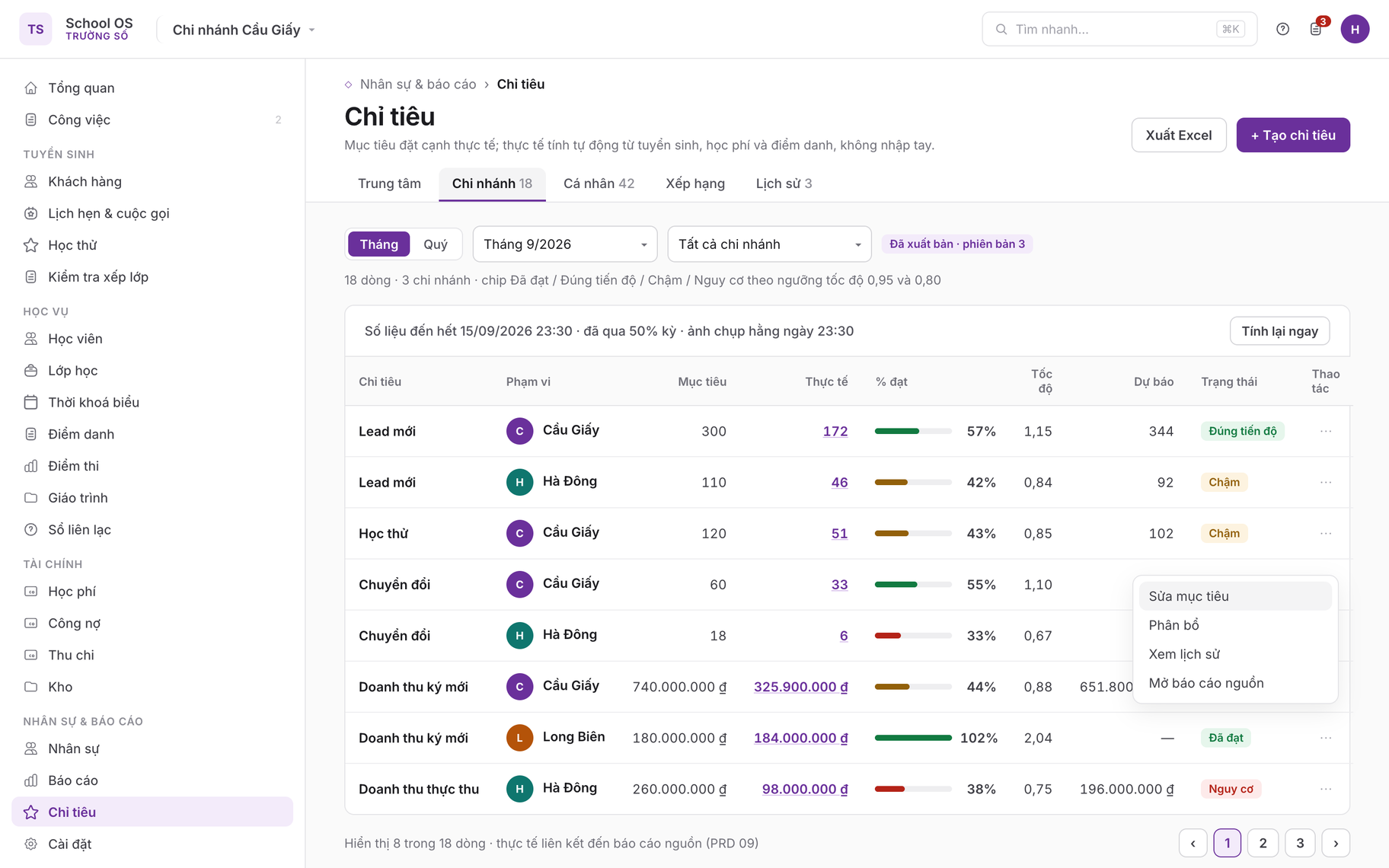
Target board · Branch tab
Period selector (month/quarter), branch filter and the five tabs Centre · Branch · Individual · Ranking · History. The table header states "Data through 15/09/2026 23:30" with a "Recompute now" button for managers. Every row carries metric, scope, goal, actual (drill-down link), percentage bar, pace, forecast and a status chip; the sample deliberately shows all four states Achieved, On track, Behind, At risk at the 0.95 and 0.80 thresholds (TGT-03, rule 5); the ⋯ menu opens Edit goal, Allocate, View history.

2 · Target line detail

/targets/:id · desktop

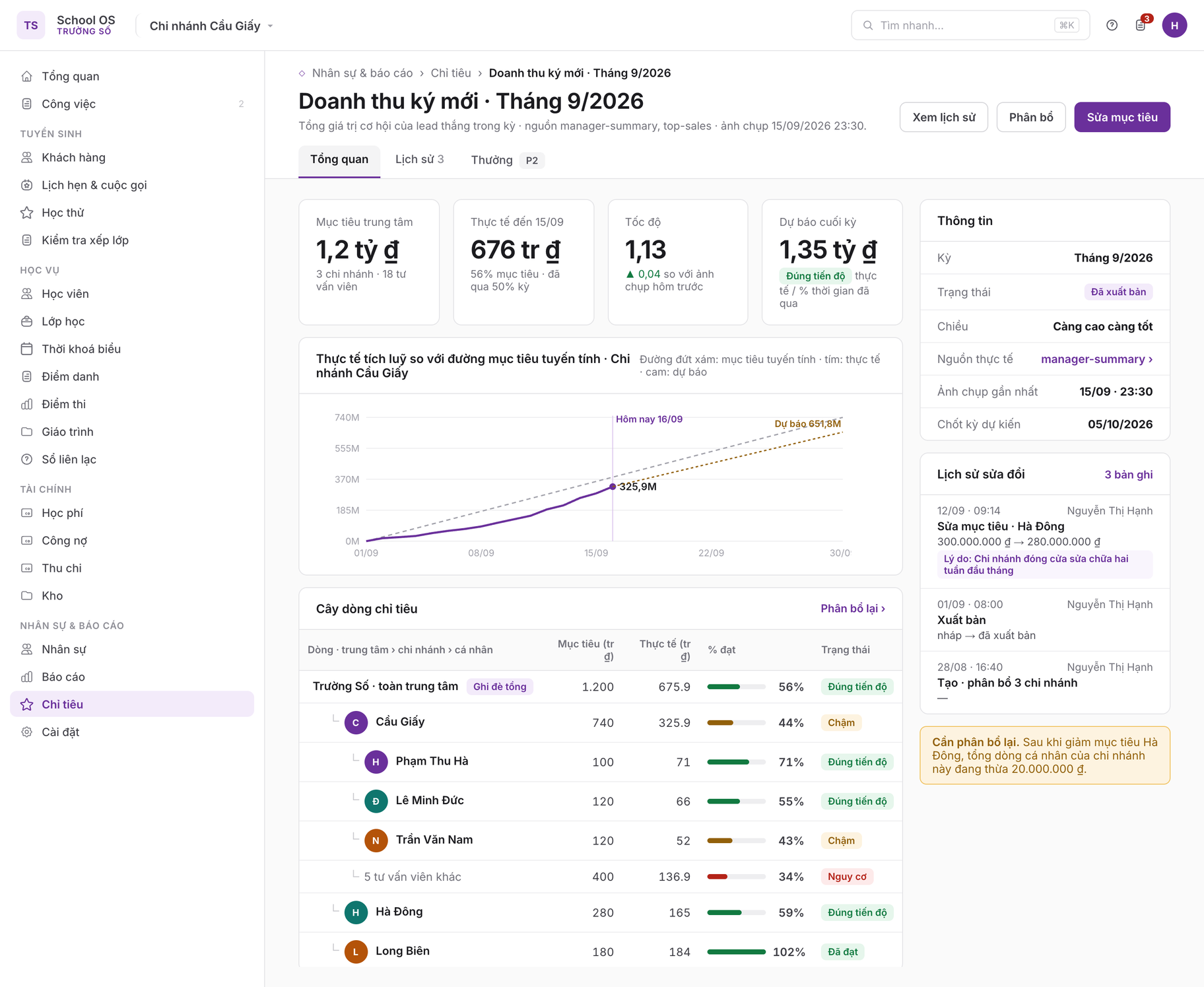
Target line detail
Detail page for the signed-revenue metric: four tiles for goal, actual, pace and forecast; a cumulative daily actual line against the linear target line with a forecast segment; the line tree centre → branch → individual with the parent flagged as sum-overridden. The rail shows the actual source, the latest snapshot, the expected close date and the revision history with old value, new value, actor and reason (TGT-05, rules 7 and 8); a "needs re-allocation" warning appears after a branch goal was lowered.

3 · Create target · step 1 Period and metrics

/targets/new · desktop

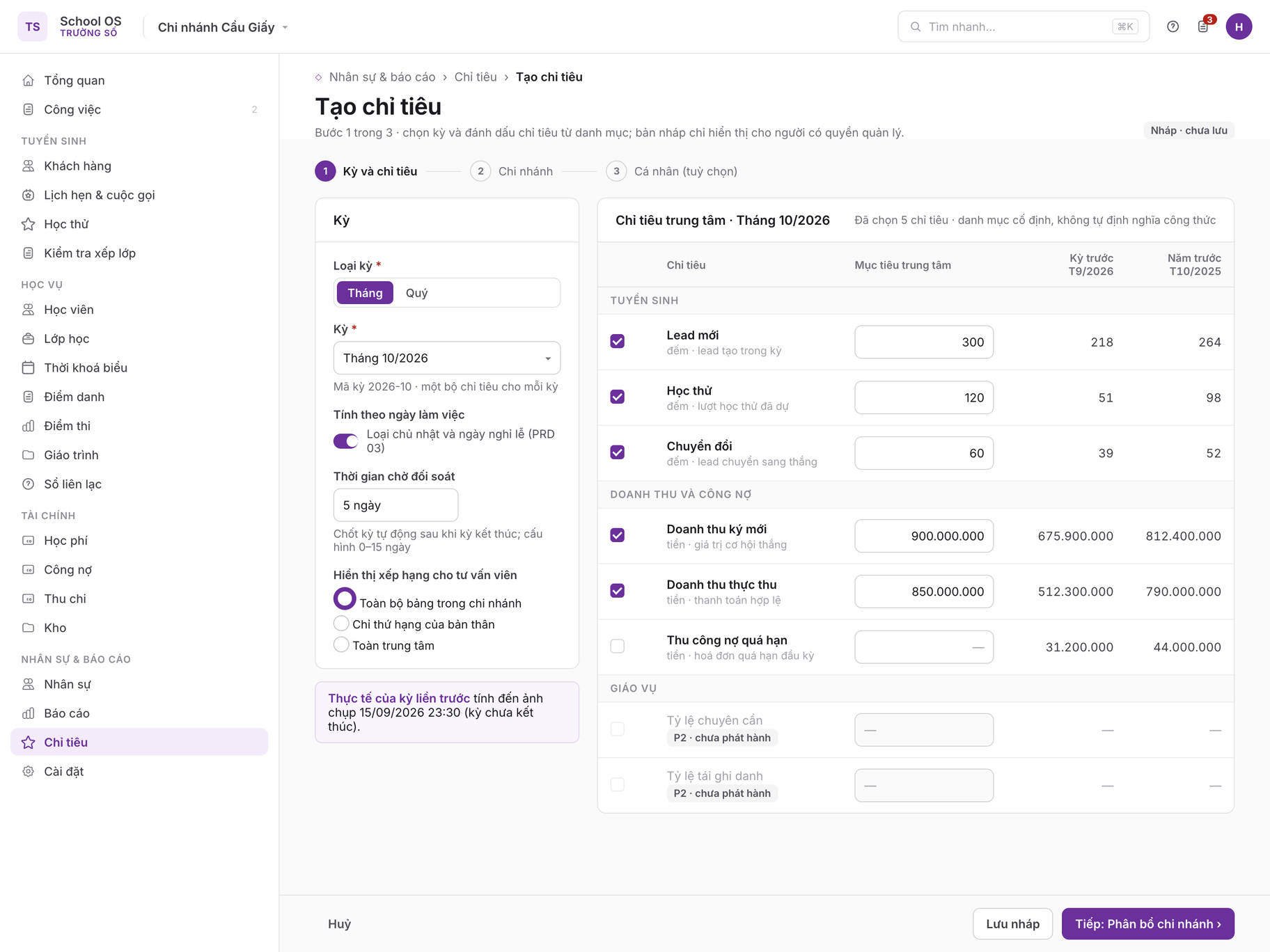
Create target · step 1 Period and metrics
Left column: period type, period, the working-days option, reconciliation grace and ranking visibility. The table on the right lists the fixed catalogue by group; each metric has a centre goal input plus two reference columns, previous period and same period last year (TGT-01). P2 academic metrics are greyed out with a "not released" label per rule 1.

4 · Branch allocation · sum validation error

/targets/:id/allocate · desktop

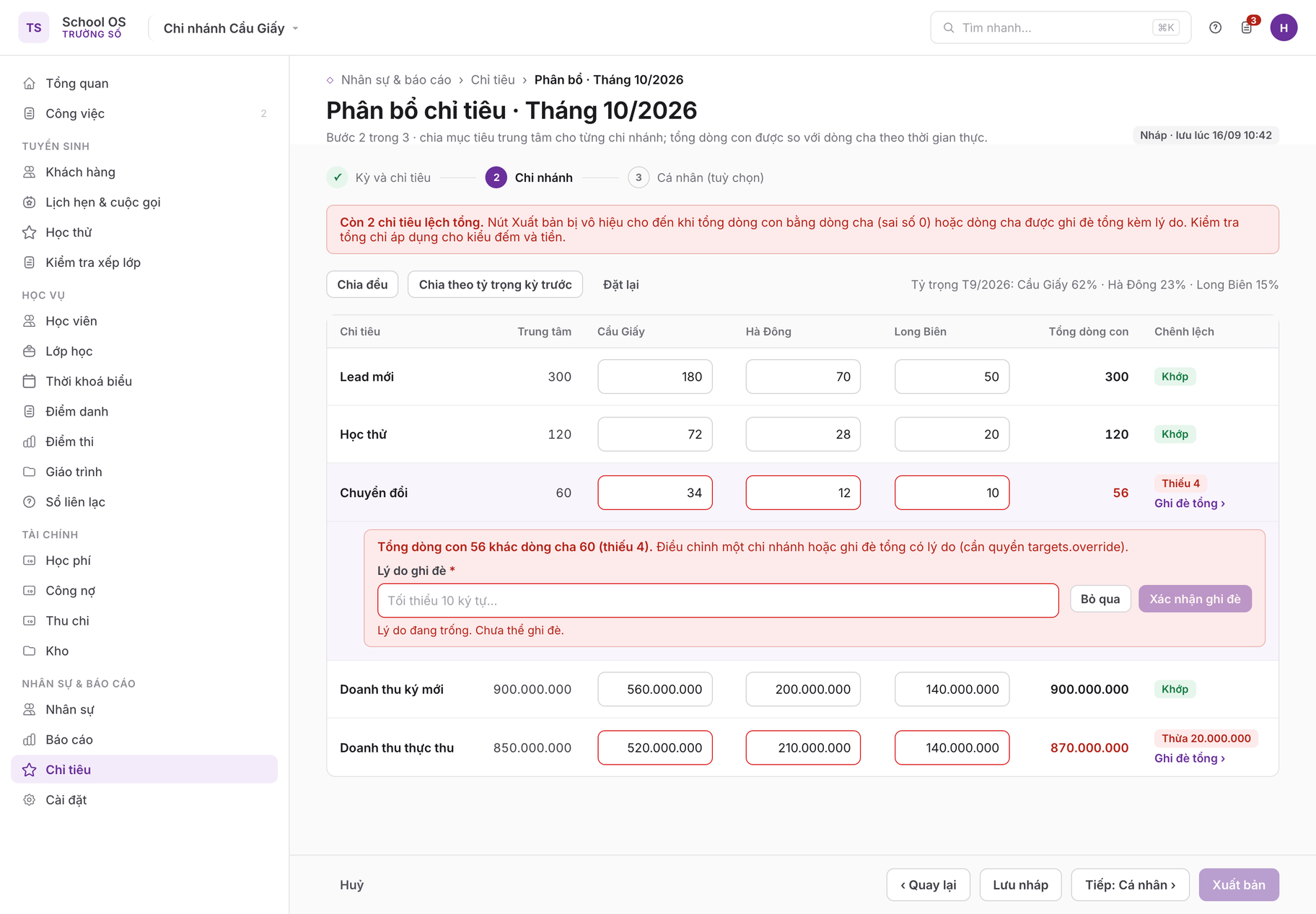
Branch allocation · sum validation error
Step 2 splits the centre goal across three branches with "Split evenly" and "Split by last period weights". The child sum is compared with the parent in real time: two mismatched lines (Short 4, Over 20,000,000) turn red and Publish is disabled; the override panel opens under the failing row and requires a reason of at least 10 characters (TGT-02, rule 3).

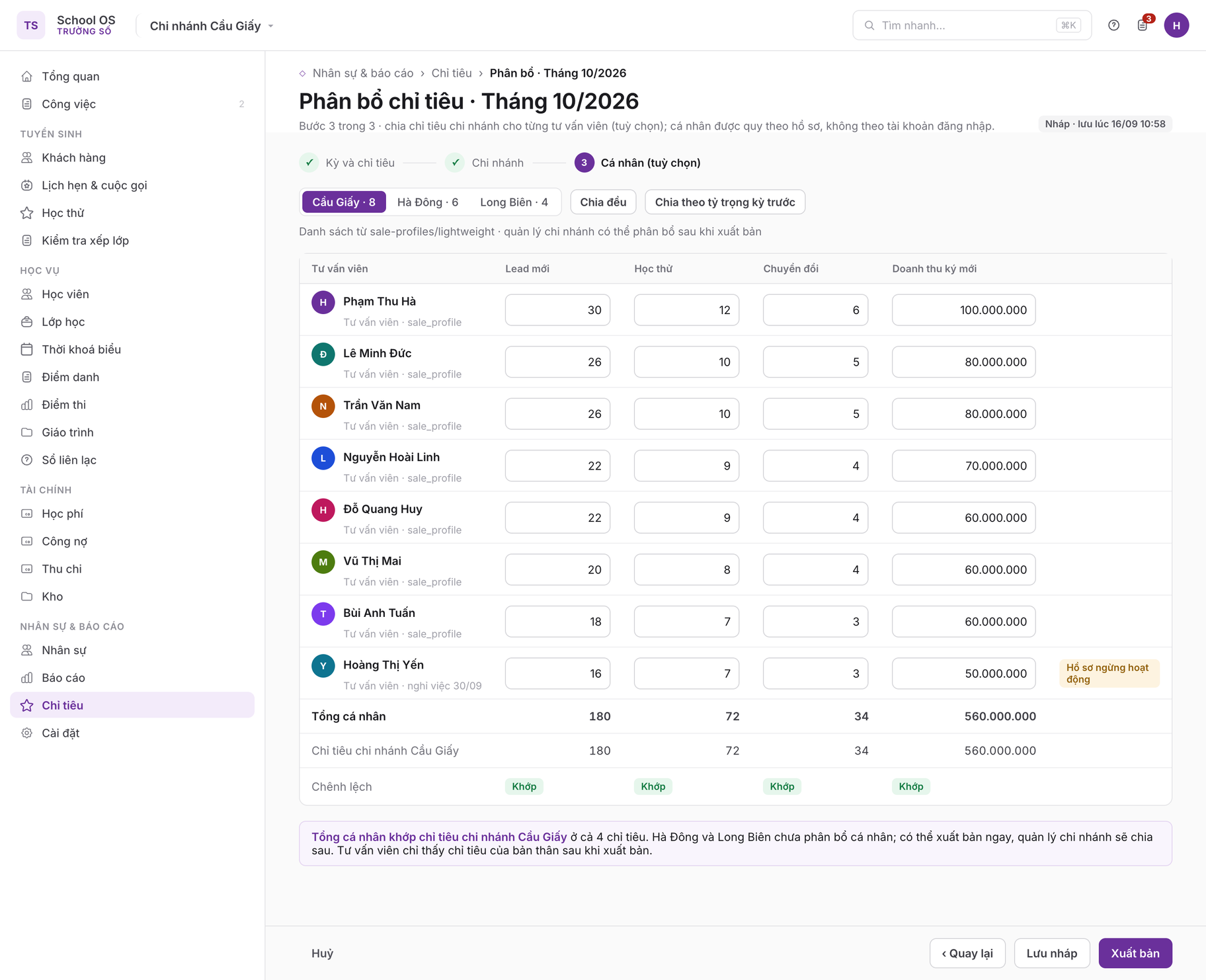
5 · Individual allocation · step 3

/targets/:id/allocate · desktop

Individual allocation · step 3
Pick a branch, then split four metrics across eight consultants from sale-profiles; the last three rows are the individual total, the branch goal and the difference, all Matched so Publish is enabled. A profile about to become inactive is labelled because targets follow the profile, not the login account (rule 9); this step is optional and a branch manager can do it after publishing.

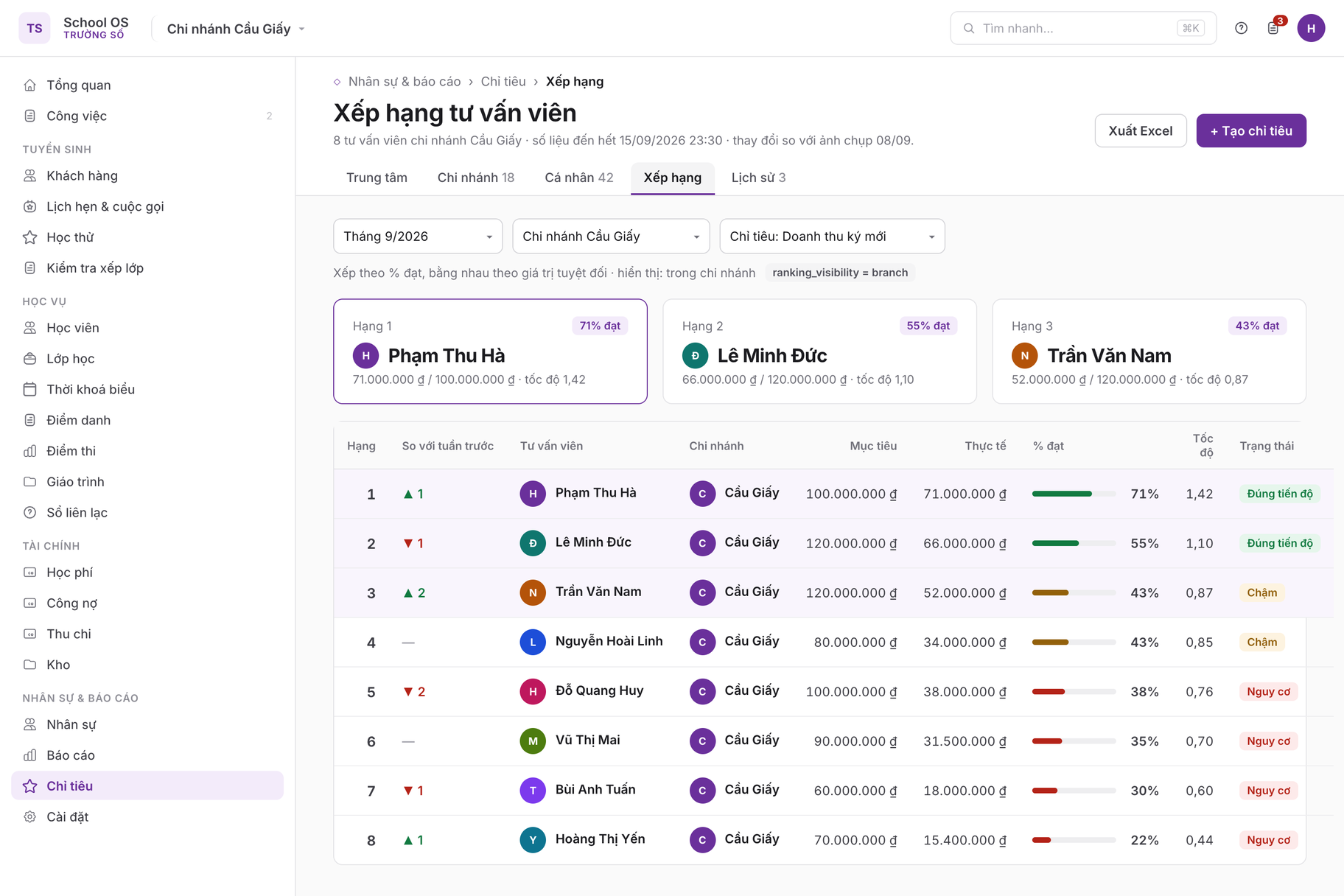
6 · Consultant ranking

/targets/ranking · desktop

Consultant ranking
Period, branch and ranking metric selectors (default signed revenue). Sorted by percentage achieved, with two consultants at 43% separated by absolute value (rule 10); the top three rows have a tinted background and the week-over-week column uses arrows with a number. The ranking_visibility = branch label shows consultants see the whole branch table.

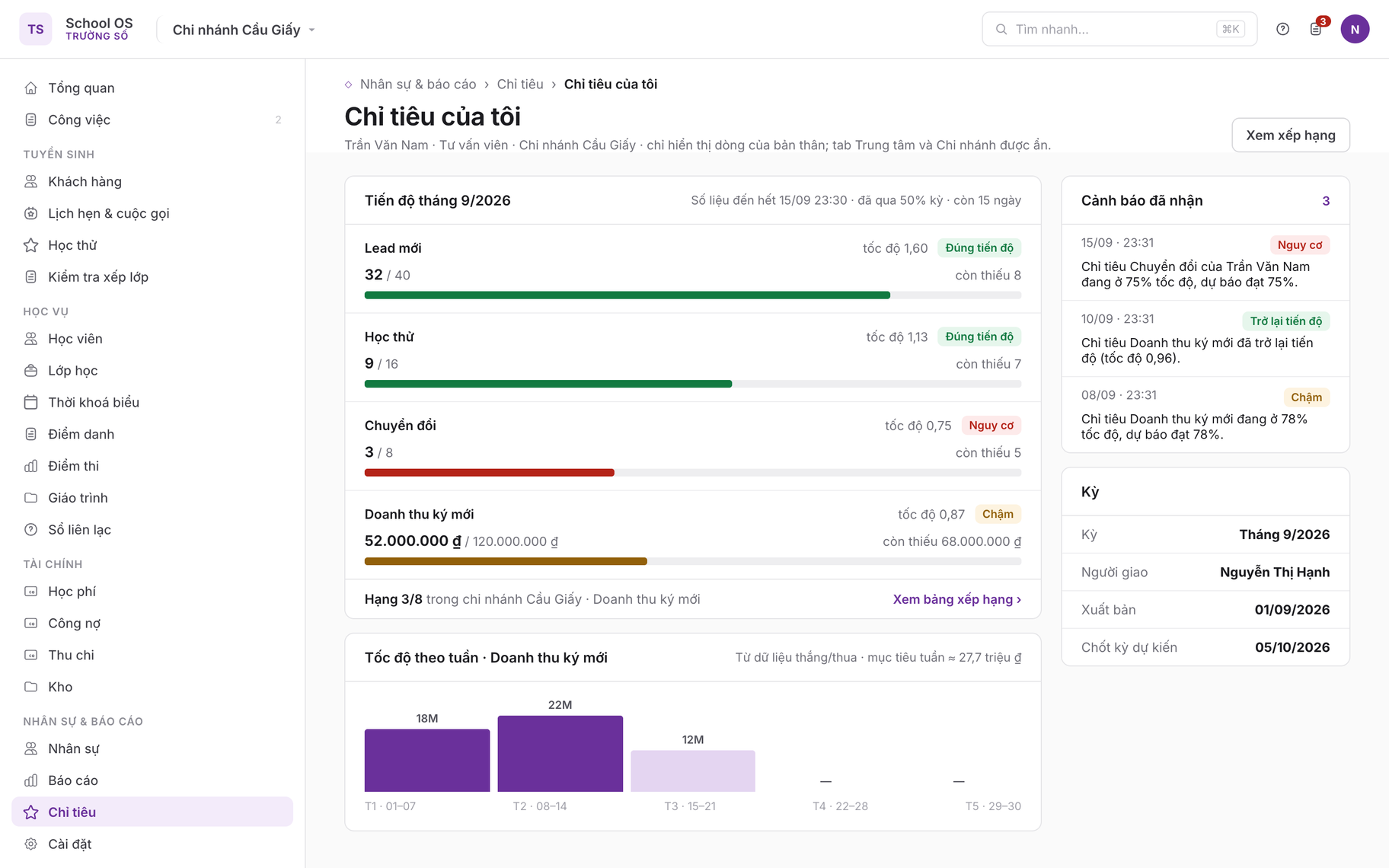
7 · My targets · consultant

/me/targets · desktop

My targets · consultant
Consultant Trần Văn Nam’s page: each metric has a progress bar, actual / goal, "N remaining", pace and a status chip; the footer reads "Rank 3/8 in branch". Below it the weekly pace from won/lost data; the rail lists received alerts, including the "back on track" notice (TGT-04). The Centre and Branch tabs are hidden for this role.

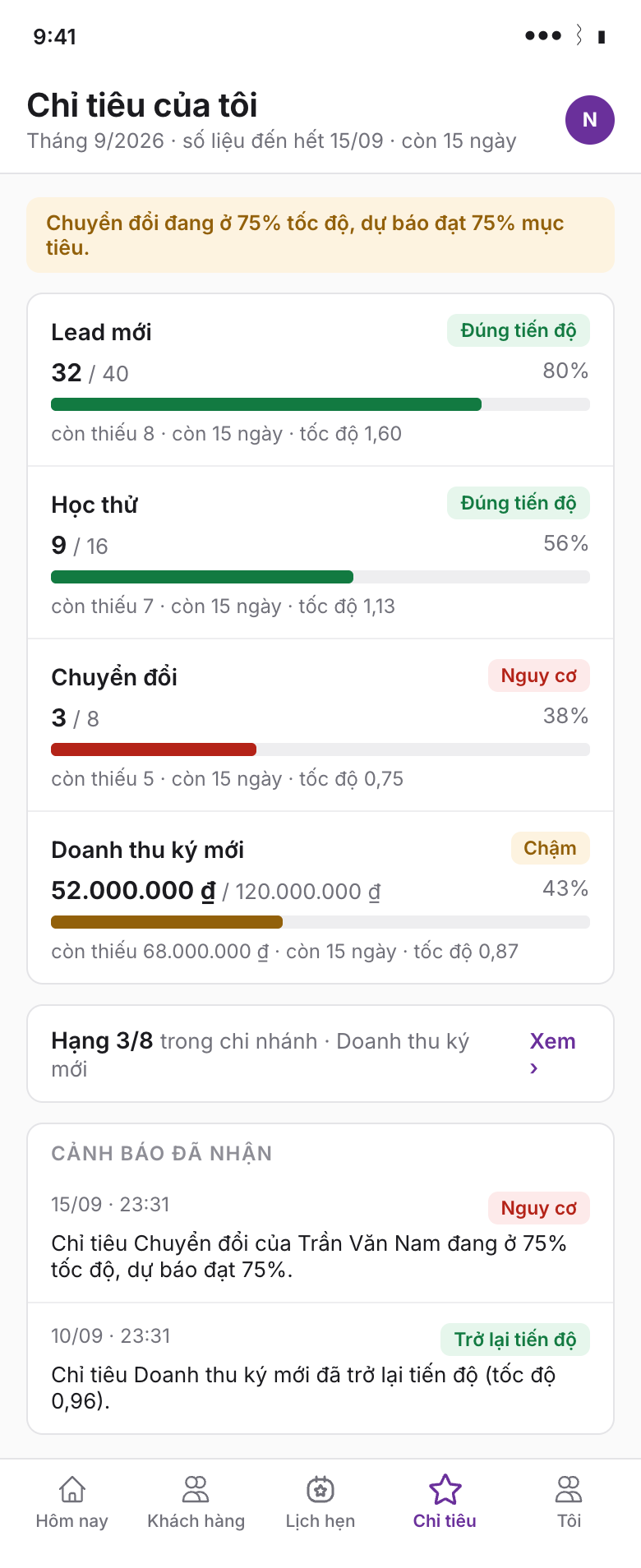
8 · My targets · mobile

/me/targets · mobile 390

My targets · mobile
The same data on the consultant’s phone: a pace alert banner on top, four progress cards with status chips and a "remaining · 15 days left · pace" line, a rank card linking to the ranking and the two latest alerts; the Targets tab sits in the bottom navigation.

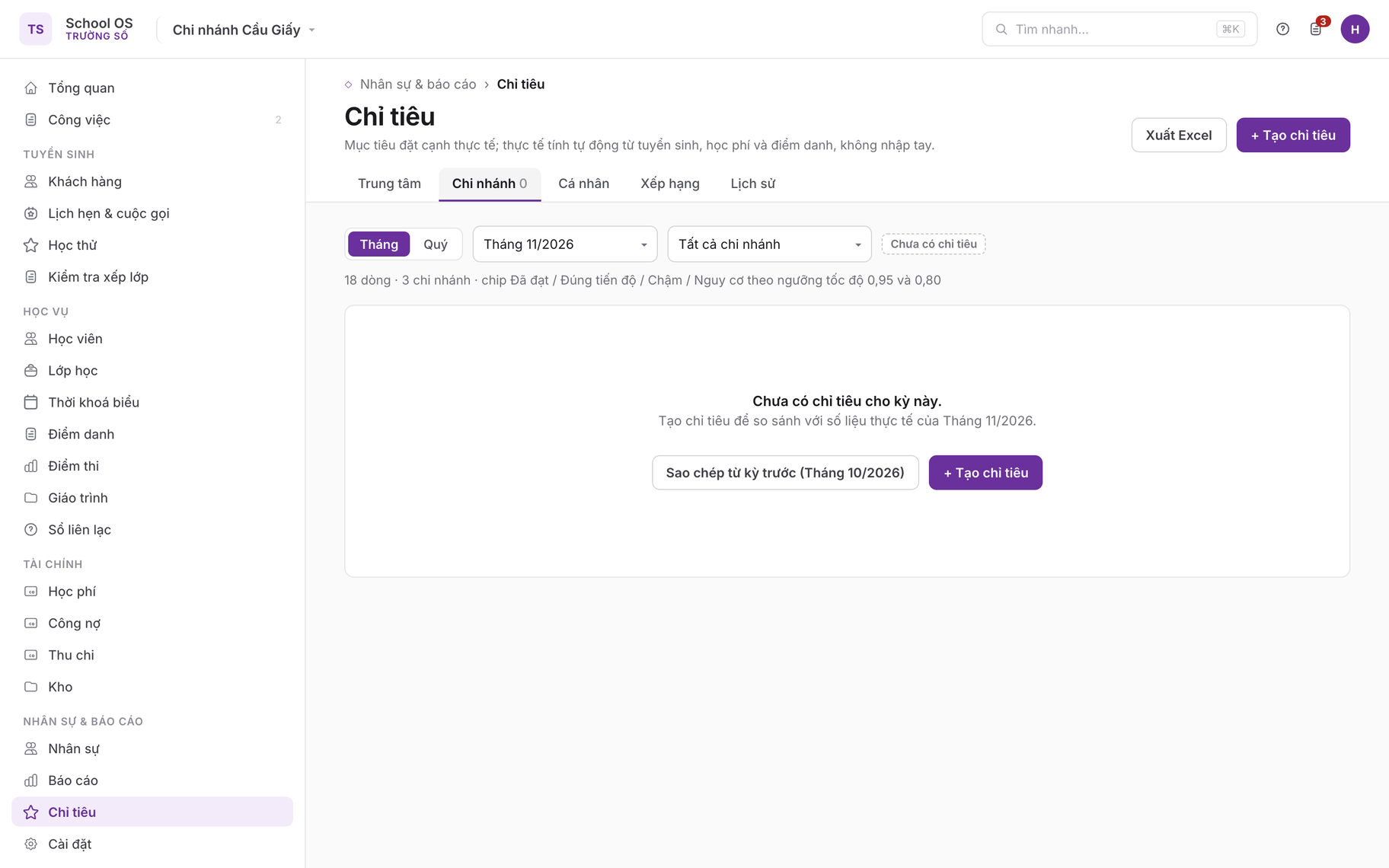
9 · Target board · empty state

/targets · desktop

Target board · empty state
A period with no target set: the message "No targets for this period yet. Create targets to compare against actuals." with the two buttons Create targets and Copy from previous period, as section 4 specifies.

1Purpose

A center owner runs the business on a handful of numbers: how many new students this month, how much revenue, which branch is behind, which consultant leads. Today those numbers live in Excel, while the application dashboard shows actuals with no goal to compare against. This module puts targets next to actuals on one screen: targets cascade from the center to branches and individuals, actuals are computed from records that already exist, and every change leaves a trace with a reason. Core principle: there is no manual field for an actual value and every value can be traced to its source records; a number that cannot be computed from data is not admitted to the metric catalogue.

In scope

Out of scope

2Today

No notion of a target exists in center-crm-frontend or the /v3 API; the existing dashboard endpoints return actuals per period and are the sources for this module, aggregated by a background job into daily snapshots.

Existing capabilityEndpointKeep?
Manager cards: won and lost count and value, conversion rateGET /v3/crm/dashboard/manager-summary existingyes; source for conversions and signed revenue (center, branch)
Funnel by stage; won/lost trend; won count and value per consultant/funnel, /won-lost-trend, /top-sales existingyes; source for new leads, the weekly pace line and individual consultant targets
Tuition figures: issued, paid, unpaid, overdue countGET /v3/teacher/school-finance/tuitions/stats existingyes; source for collected revenue and overdue collection
Consultant list; accessible branches/v3/crm/sale-profiles, /lightweight, /v3/crm/me/accessible-schools existingyes; used for allocation and filters
Target, target line, snapshot, revision history, bonus rulenonenew under /v3/crm/targets
Attendance rate, renewal, withdrawals, sessions taught, parent ratingnew entities of PRD 02, 04, 05, 06, 07sources for the P2 group, available once the source module ships

3User stories and acceptance criteria

TGT-01Set monthly targets for the center
The center owner creates a target set for one month.
  • Given targets.manage with scope all
  • When Chỉ tiêu → + Tạo chỉ tiêu, period Tháng 10/2026, metrics picked from the catalogue (new leads 300, trials 120, conversions 60, signed revenue 900,000,000, collected 850,000,000), Lưu nháp
  • Then A target in status draft is created with one center-scope line per metric; beside each input the actuals of the previous period and of the same period last year are shown; the draft is visible only to users who can manage targets.
TGT-02Allocate to branches and individuals
The owner splits targets across branches; the branch manager splits further across consultants.
  • Given A center draft with conversions 60
  • When The Phân bổ step is opened and "Chia theo tỷ trọng kỳ trước" is chosen or each branch is typed in
  • Then Every branch in accessible-schools gets a child line; the sum of children is compared to the parent in real time; on a mismatch the Xuất bản button is disabled and the gap is shown ("Thiếu 4"); "Ghi đè tổng" requires a reason. The branch manager repeats the step for consultants (list from sale-profiles/lightweight); a consultant sees only their own target, and only after publishing.
TGT-03Read the board and the forecast
The branch manager follows progress during the period.
  • Given 18/10/2026, October targets published, the daily snapshot has run
  • When Chỉ tiêu → Chi nhánh tab
  • Then Each line shows goal, actual to the end of the previous day, percentage achieved, pace, end-of-period forecast and a chip Đã đạt / Đúng tiến độ / Chậm / Nguy cơ per the thresholds in section 5; the time of the latest snapshot is shown above the table.
TGT-04Pace alert
The line owner and their manager hear early when a target is unlikely to finish.
  • Given Mid-period has passed (day 15 of a month, day 45 of a quarter) and a line has pace below 0.80
  • When The daily snapshot completes
  • Then An in-app notification "Chỉ tiêu [tên] của [phạm vi] đang ở 62% tốc độ, dự báo đạt 71%" goes to the line owner and their direct manager; at most one alert per line per 7 days; when pace returns to 0.80 or above, a "back on track" notification is sent.
TGT-05Revise a target mid-period with a reason
The owner adjusts a target when circumstances change.
  • Given A published target
  • When A branch's conversions goal is lowered from 25 to 18 because the branch closes for two weeks of renovation, with a reason
  • Then A target_revision stores the old and new value, actor, time and reason; child lines that no longer sum are flagged for reallocation; everyone who can see the line is notified; earlier snapshots keep the goal as it was when captured.
TGT-06Close the period
The accountant and the owner need one final number that no longer moves, for bonus purposes.
  • Given The period has ended and the reconciliation grace has elapsed (default 5 days)
  • When The background job runs the final snapshot
  • Then The target moves to closed and the final snapshot is flagged is_final; late records do not change the closed figures; only the owner can "Mở lại kỳ" with a reason, which produces a new final snapshot and a revision entry.
TGT-07Academic and teacher targets (P2)
Academic staff track attendance and renewal; teachers see sessions taught and parent rating.
  • Given PRD 04 and 07 have shipped; the quarterly target has attendance rate 92%, renewal rate 75%, withdrawals at most 12
  • When The board is opened on the Chi nhánh tab
  • Then Rate lines show goal and actual as percentages with no linear forecast; the "withdrawals at most" line is lower-is-better and turns Nguy cơ when the actual exceeds 80% of the cap before mid-period; a teacher sees only their own line on the teacher home.
TGT-08Formula-based bonus rule (P2)
The owner defines how bonus follows targets; the accountant takes the estimate into the timesheet.
  • Given targets.bonus_rules
  • When A rule is created at /settings/targets/bonus-rules: role consultant, metric signed revenue, tiers [100% to below 120%: 2% of signed revenue; from 120%: 3%], effective from January 2027
  • Then Tiers must be contiguous and non-overlapping; from the final snapshot every individual line gets a bonus_estimate; PRD 06 reads it to create the timesheet adjustment line "Thưởng chỉ tiêu tháng MM/YYYY"; approval and payout stay in PRD 06.

4Screens

Target board /targets

Period picker (month, quarter; defaults to the current period), branch filter, tabs: Trung tâm · Chi nhánh · Cá nhân · Xếp hạng · Lịch sử. A line "Số liệu đến hết 17/10/2026 23:30" and a "Tính lại ngay" button for users who can manage. Actions: + Tạo chỉ tiêu, Xuất Excel.

Columns: metric, scope (center, branch, or individual with avatar), goal, actual (from the latest snapshot, with a drill-down link to the PRD 09 source report), % achieved (progress bar), pace, forecast (blank for rate metrics), status (chip Đã đạt / Đúng tiến độ / Chậm / Nguy cơ / Chưa đủ dữ liệu), actions (Sửa mục tiêu, Phân bổ, Xem lịch sử).

Selecting a line opens the detail page /targets/:id: the line tree (center → branch → individual), a cumulative daily actual chart against the linear goal line, a Lịch sử tab (time, actor, old value, new value, reason) and a Thưởng tab (P2). Empty state: "Chưa có chỉ tiêu cho kỳ này. Tạo chỉ tiêu để so sánh với số liệu thực tế." with Tạo chỉ tiêu and "Sao chép từ kỳ trước". For consultants and teachers the Trung tâm and Chi nhánh tabs are hidden.

Create and allocate (three steps) /targets/new · /targets/:id/allocate

Step 1 Period and metrics: choose period type and period, tick metrics by group; each metric has a center goal input and two reference columns (previous period, same period last year). Step 2 Branches: metric × branch grid; "Chia đều" and "Chia theo tỷ trọng kỳ trước" buttons; a totals row with the gap coloured by status token. Step 3 Individuals (optional, the branch manager can do it later): metric × person grid per branch. Lưu nháp and Xuất bản; publishing is blocked while an un-overridden sum mismatch remains.

Consultant ranking /targets/ranking

Period, branch (or whole center) and ranking metric pickers (default signed revenue). Columns: rank, change since last week, consultant, branch, goal, actual, % achieved, pace; ordered by percentage achieved, not by absolute value. A consultant sees the whole branch table when ranking_visibility = branch (default) or only their own rank when self. Top three rows get a light background; the viewer's own row is pinned while scrolling. Empty state: "Chưa có chỉ tiêu cá nhân nào được xuất bản cho kỳ này."

My targets /me/targets · tile on the admissions home and the teacher home

Home tile: up to five progress bars with label, actual / goal, percentage, "còn thiếu N", days left; a last line "Hạng 3/8 trong chi nhánh" when ranking is visible. Full page: the same data with a weekly pace line (from won/lost data) and the list of alerts received. Empty state: "Chưa có chỉ tiêu được giao cho kỳ này."

5Business rules

metric_keyLabel (group)KindScope (C center, B branch)Actual value and sourcePhase
leads_newLead mới (admissions)countC, B, individualleads created in the period, duplicates excluded; source funnelP1
trials_attendedHọc thử (admissions)countC, B, individualtrial_booking in status attended within the period (PRD 01), attributed to the consultant who booked itP1
conversionsChuyển đổi (admissions)countC, B, individualleads moved to won in the period; source manager-summary, top-salesP1
revenue_signedDoanh thu ký mới (revenue)moneyC, B, individualsum of expected amount of leads won in the period; source manager-summary, top-salesP1
revenue_collectedDoanh thu thực thu (revenue)moneyC, Bsum of valid payments recorded in the period; source tuitions/statsP1
overdue_collectedThu công nợ quá hạn (revenue)moneyC, B, individual (accountant)payments in the period on invoices already overdue at period start; source tuitions/stats (extended)P1
attendance_rateTỷ lệ chuyên cần (academic)rateC, B(present + late) / marked over sessions in the period (PRD 04)P2
renewal_rateTỷ lệ tái ghi danh (academic)rateC, Bstudents whose package ended in the period and who bought a new one within 30 days / students whose package ended in the period (PRD 02, 05)P2
withdrawals_maxHọc viên nghỉ học tối đa (academic)count, lower is betterC, Bstudents moved to Đã nghỉ in the period (PRD 02)P2
sessions_taughtSố buổi dạy (teacher)countindividual (teacher)held sessions as main or substitute teacher (PRD 04, 06)P2
parent_ratingĐánh giá của phụ huynh (teacher)score 1–5individual (teacher), Baverage of parent ratings submitted in the period (PRD 07); minimum 5 ratingsP2
  1. The metric catalogue is fixed at product level; a tenant chooses which metrics to use but cannot define formulas; metrics whose source module has not shipped are hidden.
  2. A target is unique per (center_id, period_type, period_key); months are written 2026-10, quarters 2026-Q4. Quarterly and monthly targets are independent.
  3. Sum validation applies to count and money metrics: children must equal the parent with zero tolerance. Rate and score metrics are not summed; the parent uses the aggregated actual. Overriding a sum requires targets.override and a reason of at least 10 characters; the parent line carries sum_overridden.
  4. Elapsed fraction = days elapsed / days in the period (Asia/Ho_Chi_Minh); a tenant may enable "working days" to exclude Sundays and the PRD 03 holidays. Pace = (actual / goal) / elapsed fraction; forecast = actual / elapsed fraction; both computed from day 3 of the period, before that the line shows Chưa đủ dữ liệu.
  5. Status thresholds: Đã đạt when actual is at or above goal; Đúng tiến độ when pace is 0.95 or more; Chậm from 0.80 to below 0.95; Nguy cơ below 0.80. For lower-is-better metrics, Nguy cơ when actual / goal exceeds the elapsed fraction plus 0.20. Rate metrics compare directly and show Chưa đủ dữ liệu when the denominator is below 10.
  6. Pace alerts are sent only from mid-period, at most once per 7 days per line; never for lines already achieved or edited in the last 24 hours.
  7. Snapshots run daily at 23:30 for every open period; a manual run (manage permission) is limited to 6 per hour; a snapshot stores the goal at capture time, so editing a goal does not rewrite history.
  8. A period closes automatically after the reconciliation grace (default 5 days, configurable 0–15). After close the figures do not change; reopening requires targets.reopen. Editing a goal after publishing always requires a reason; deletion is allowed only in draft.
  9. Individuals are attributed by profile (sale_profile_id, staff_id), not by login account; an individual's actual follows the primary assignee at the time of the event and is not recomputed on reassignment.
  10. Ranking is always by percentage achieved, ties broken by absolute value. Bonus rules (P2) only produce bonus_estimate on the final snapshot; one person and one metric get at most one rule per period, the most recently effective rule wins.

6Data model

EntityFieldsNotes
targetid uuid; center_id; period_type enum(month, quarter); period_key text; status enum(draft, published, closed, archived); working_days bool; grace_days int; ranking_visibility enum(branch, self, all); created_by; published_at; closed_at; version intnew; unique (center_id, period_type, period_key)
target_lineid uuid; target_id; center_id; school_id null; scope enum(center, branch, individual); parent_line_id null; metric_key; owner_type enum(none, sale_profile, staff); owner_id null; goal numeric; direction enum(higher, lower); sum_overridden bool; override_reason null; inactive_owner bool; updated_by; updated_atnew; unique (target_id, metric_key, scope, school_id, owner_id)
target_snapshotid uuid; line_id; center_id; school_id null; snapshot_date; goal_at_snapshot; actual; denominator null; pct; elapsed_pct; pace null; forecast null; status enum(achieved, on_track, behind, at_risk, no_data); is_final bool; computed_atnew; unique (line_id, snapshot_date); denominator for rate metrics
target_revisionid uuid; target_id; line_id null; action enum(created, published, goal_changed, allocated, overridden, closed, reopened); field; old_value; new_value; reason; actor_id; created_atnew; audit detail, Lịch sử tab
bonus_rule (P2)id uuid; center_id; name; role enum(admissions, teacher, accountant); metric_key; bonus_type enum(pct_of_actual, fixed); tiers [{from_pct, to_pct null, value}]; effective_from period_key; active bool; created_bynew; a formula, not a payment
bonus_estimate (P2)id uuid; line_id; snapshot_id (is_final); rule_id; achieved_pct; tier_index; amount; exported_to_timesheet_at nullnew; read by PRD 06 to create the timesheet adjustment line

The metric catalogue (metric_key, vi/en label, group, kind, scopes, direction, source, minimum denominator, phase) is fixed in code. Every table carries center_id (tenant) and school_id (branch) when the line belongs to a branch; branch-scoped roles are always filtered by accessible-schools; center-scope lines are visible only to roles with scope all.

7API contract

MethodPathPurposeStatus
GET/v3/crm/dashboard/manager-summaryperiod → conversions, revenue_signed (center, branch)existing
GET/v3/crm/dashboard/top-salesperiod → conversions, revenue_signed per consultantexisting
GET/v3/crm/dashboard/funnelperiod → leads_new; add school_id, assignee_idextend
GET/v3/crm/dashboard/won-lost-trend · /sale-summaryweekly pace line; existing cards next to the My targets tileexisting
GET/v3/teacher/school-finance/tuitions/statsrevenue_collected; add overdue_collected_amount and from, to, school_id parametersextend
GET/v3/crm/sale-profiles/lightweight · /v3/crm/me/accessible-schoolspeople and branches for allocationexisting
GET · POST/v3/crm/targetsGET period_type, period_key, status → Target[]; POST {period_type, period_key, working_days?, grace_days?, lines: [{metric_key, goal}]} → Target (draft); 409 PERIOD_EXISTSnew
GET/v3/crm/targets/{id}→ Target with line tree and latest snapshots; as_of to view a past datenew
PATCH/v3/crm/targets/{id}{working_days?, grace_days?, ranking_visibility?, version}; 409 STALE_VERSIONnew
PUT/v3/crm/targets/{id}/lines{lines: [{id?, metric_key, scope, school_id?, owner_type?, owner_id?, goal, parent_line_id?}], override?: {reason}, reason?} → saved lines; 422 SUM_MISMATCH with the gap per parent; reason required after publishingnew
POST/v3/crm/targets/{id}/allocate{line_id, method: even | last_period_share, children: [{school_id | owner_id}]} → proposed allocation, not savednew
POST/v3/crm/targets/{id}/publish · /close · /reopenreopen requires {reason}; publish returns 422 SUM_MISMATCH while an un-overridden gap remainsnew
GET · POST/v3/crm/targets/{id}/snapshots · /revisions · /snapshot→ TargetSnapshot[] (line_id, from, to); TargetRevision[]; POST /snapshot runs a manual snapshot, 429 above 6 per hournew
GET/v3/crm/targets/boardperiod_type, period_key, scope, school_id?, metric_key? → lines with latest snapshot, filtered by permission; format=xlsxnew
GET/v3/crm/targets/rankingperiod_type, period_key, metric_key, school_id? → [{rank, rank_delta, owner, school, goal, actual, pct, pace}]new
GET/v3/crm/targets/me→ the current user's individual lines with ranknew
GET/POST/PATCH/v3/crm/targets/bonus-rules · /{id}{name, role, metric_key, bonus_type, tiers, effective_from, active}; 422 TIER_OVERLAP; GET /targets/{id}/bonus-estimates → BonusEstimate[] after close, read by PRD 06new
GET/PUT/v3/school/digest-settingsadd a targets: {enabled, metrics[]} block for the weekly digest (PRD 09)extend

8Permissions

Permissionownerbranch_manageradmissionsacademic_adminaccountantteacher
targets.viewallbranchownbranch (academic group)branch (revenue group)own
targets.manage (create, edit, publish)yesindividual lines in branchnononono
targets.override, targets.reopenyesnonononono
targets.ranking.viewallbranchbranch or own (per setting)nonono
targets.exportallbranchnonobranchno
targets.bonus_rules (P2)yesnononoview onlyno
targets.bonus_estimates.view (P2)allbranchownnoallown

Parents have no permission in this module. The "own" scope returns only lines whose owner_id matches the user's profile plus the branch parent line read-only.

9Analytics events

EventProperties
target_createdperiod_type, metrics_count, copied_from_previous
target_allocatedlevel (branch|individual), method (manual|even|last_period_share), children_count, overridden
target_publishedperiod_type, branch_lines, individual_lines, days_before_period_start
target_goal_changedmetric_key, scope, old, new, days_into_period, by_role
target_board_viewedrole, scope_tab, snapshot_age_hours
target_pace_alert_sentmetric_key, scope, pace, forecast_pct, kind (at_risk|recovered)
target_closed / target_reopenedgrace_days, late_records_after_close
bonus_rule_saved / bonus_estimate_exportedrole, metric_key, tiers_count / lines, total_amount

10Edge cases

11Open questions

Trường Số (truongso.net) · FLYER internal